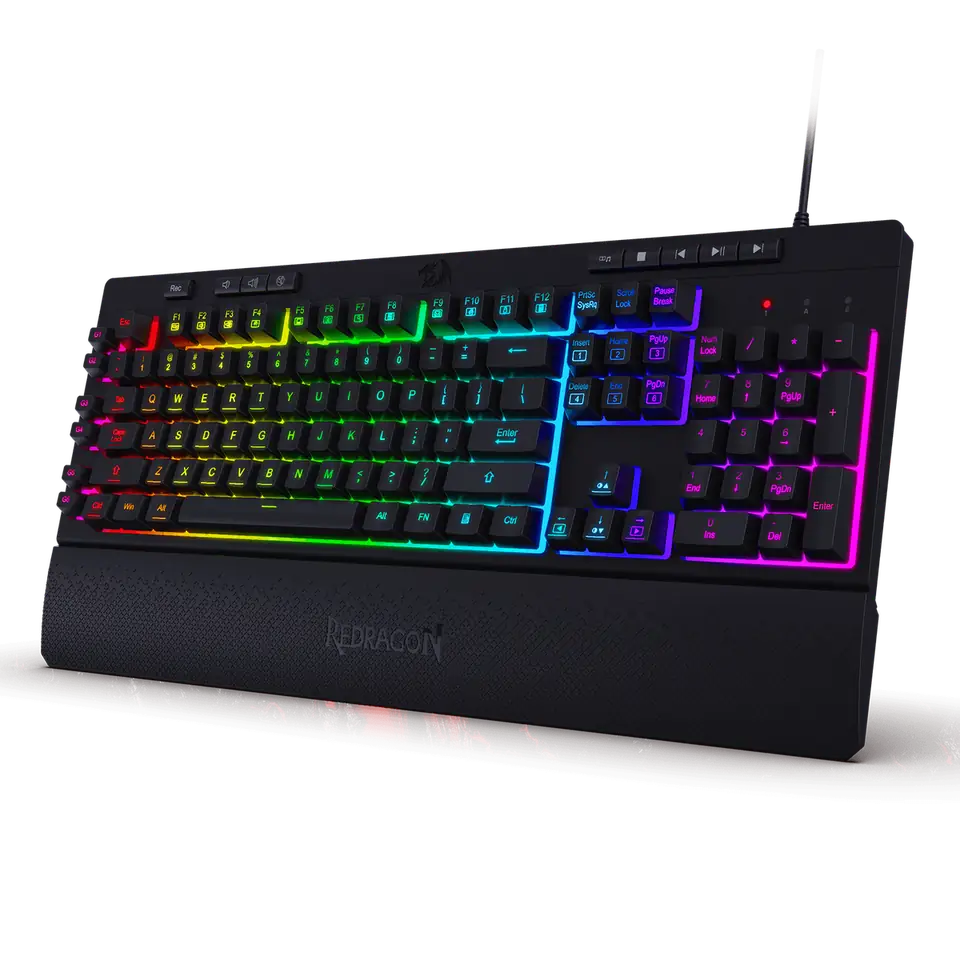
Redragon SHIVA K512 Membrane Gaming Keyboard
品牌 Redragon · 机械键盘 · 家居与办公 · 更多 Redragon 商品
- 模型: Redragon SHIVA K512 (K512)
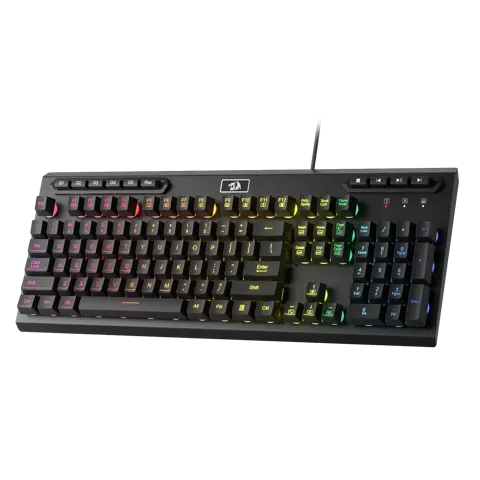
- 类型: 带有"机械手感"设计的薄膜键盘
- 布局: 全尺寸,104个按键
- 额外宏按键: 6个 (G1–G6)
- 防幻影: 同时按下26个按键
未标价
- Redragon前往 Redragon
- Walmart前往 Walmart
- eBay前往 eBay
- eBay (used) eBay: used, open-box, refurbished前往 eBay (used)
商店按固定顺序排列,绝不按价格或佣金排序。 价格仅为快照,请以商店当前价格为准。
摘要
一款预算全尺寸有线薄膜游戏键盘,配备RGB背光、6个宏按键和可拆卸腕托,由Redragon售卖,黑色$36.99或白色$39.99。购买前请注意手感:这是一款声称具有"机械手感"的薄膜键盘,而非真正的机械轴,且Redragon自家软件可能会使其变砖。
优点
- 薄膜手感舒适,性价比高,评论员觉得按起来有响应。
- 明亮且可自定义的RGB,7种预设和6种自定义模式。
- 6个宏按键用于快捷键和命令。
- 可拆卸磁性腕托,适合长时间使用。
- 专用媒体控制在游戏过程中非常方便。
- thanks to removable keycaps, easy to clean.
缺点
- 薄膜开关缺乏机械开关的触觉反馈。
- 塑料构造让一些评论员觉得便宜。
- 键帽可能比机械键帽穿着更快。
- 媒体键、空格键和退格键未完全灯光照亮。
- 通过软件分配宏存在报告的限制。
- 软件或固件更新可能会使键盘变砖。
已核实规格
| 模型 | Redragon SHIVA K512 (K512)。 |
|---|---|
| 类型 | 带有"机械手感"设计的薄膜键盘。 |
| 布局 | 全尺寸,104个按键。 |
| 额外宏按键 | 6个 (G1–G6)。 |
| 防幻影 | 同时按下26个按键。 |
| 背光 | 全动态RGB;7种预设灯效模式加上6个可自定义槽位;4个亮度等级。 |
| 预设图案 | 7彩波浪,频谱/霓虹,单色静态,呼吸,点击触发,7彩呼吸,闪烁。 |
| 专用媒体控制 | 播放/暂停,跳过,音量。 |
| 可拆卸腕托 | 磁性。 |
| 键帽 | 双色注塑成型。 |
| 宏录制 | G1–G6,每个宏最多64字节或30秒;亦可通过软件编程。 |
| WIN键锁 | FN + Win。 |
| 系统支持(根据手册) | Windows XP/Vista/7/8/10。 |
| 连接方式 | 有线USB;无需驱动或软件安装即可使用。 |
| 上壳材料 | 塑料。 |
| 软件 | Redragon RGB曲调和宏的软件;Redragon发布了一份因软件"变砖"的键盘修复指南。 |
| 声称耐久度 | 1000万次按键。 |
| 尺寸 | 18.3 × 8.4 × 2.8英寸(包装);键盘占地面积18.3 × 8.4英寸。 |
| 重量 | 0.95千克(Redragon的对比表列出同一K512型号的重量为0.93千克)。 |
| 包装内容 | 1 × Redragon K512键盘,1 ×使用手册。 |
| 保修 | 在Redragonshop.com购买的新品保修2年。 |
完整研究笔记与来源
Which model this is
This page covers the Redragon SHIVA K512, a full-size wired membrane board sold in black and white. Redragon also sells separate SHIVA K515, SHIVA 98 and SHIVA PRO 98 models with different key counts and feature sets; those are not covered here. The K512 is listed as model K512 and sometimes as MCK512 by retailers, and retailer SKUs vary.
Feel, build and lighting
The K512 uses membrane switches that Redragon describes as “mechanical feeling” rather than true mechanical switches. Reviews describe comfortable, responsive typing without mechanical tactile feedback, with decent key travel, but plastic construction that feels cheap to some, and keycaps that may wear faster than mechanical keycaps. The RGB is bright and customizable across seven preset patterns and six custom slots at four brightness levels; media keys, the spacebar and backspace are not fully lit.
Macros and software
Six G keys (G1–G6) record macros on the keyboard itself, up to 64 bytes or 30 seconds per key, and can also be programmed through Redragon’s software. At least one owner reports being unable to assign macros to the G keys from software and resorting to the on-board Rec button. Redragon also publishes a guide for fixing keyboards bricked by its own software, which signals a real update risk. Deeper macro customization is limited without the software.
Reliability, warranty and repairs
Redragon’s warranty page covers new products for 2 years. The manual describes warranty terms—electrical-circuit failures covered, consumables, foot stickers and spare parts excluded, retailer stamp required on the warranty card—but does not state a length. No replacement-parts or repair program for the K512 was found. For unresponsive keys or RGB issues, the manual suggests checking the USB connection and port, updating drivers, cycling lighting modes, reprogramming macros, cleaning keycaps and using compressed air before contacting Redragon support.
Is it worth it?
At $36.99 to $39.99, the K512 is a reasonable value for a beginner or budget full-size RGB membrane board with macro keys and a wrist rest, provided you accept membrane feel and plastic construction. It is not a substitute for a mechanical keyboard for enthusiasts or competitive play, where reviewers note more responsive options exist. At prices materially above about $45 to $50, the value case weakens because mechanical entry boards, including Redragon’s own, become close in price. There are no consumables or subscription costs: the software is free and macro recording is on-board.
来源
Manufacturer:
- Redragon SHIVA K512 user manual (ManualsLib)
- Redragon SHIVA K512 user manual overview (wupiano)
- Redragon SHIVA K512 product page
- Redragon limited warranty
- Redragon: fixing software that bricks a keyboard
Independent reviews:
Owner reports:
- Problem with SHIVA K512 RGB (r/MechanicalKeyboards)
- Redragon K512 Shiva keys not working (r/keyboards)
- Redragon Shiva K512 LCtrl-LShift-P under Linux (r/linuxquestions)
Retailers: