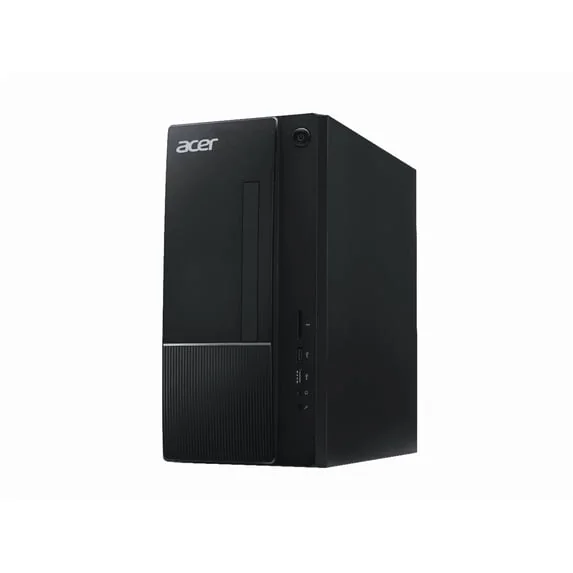
Acer Aspire Tower Desktop Computer
品牌 Acer · 台式电脑 · 手机与电脑 · 更多 Acer 商品
- 操作系统: Windows 11 Home,附带有线USB键盘和鼠标
- CPU: 英特尔酷睿i5-14400(第14代),10核(6性能核+4效率核),16线程,基础频率2.5 GHz,睿频最高4.7 GHz,20 MB L3缓存+9.5 MB L2缓存
- 芯片组: 英特尔H610
- 内存: 16GB DDR5-4800,由2×8GB UDIMM组成,两个插槽均已占用
- 存储: 512GB PCIe 4.0 M.2 NVMe SSD
未标价
- Acer前往 Acer
- eBay前往 eBay
- Amazon前往 Amazon (付费链接)
- eBay (used) eBay: used, open-box, refurbished前往 eBay (used)
商店按固定顺序排列,绝不按价格或佣金排序。 价格仅为快照,请以商店当前价格为准。
摘要
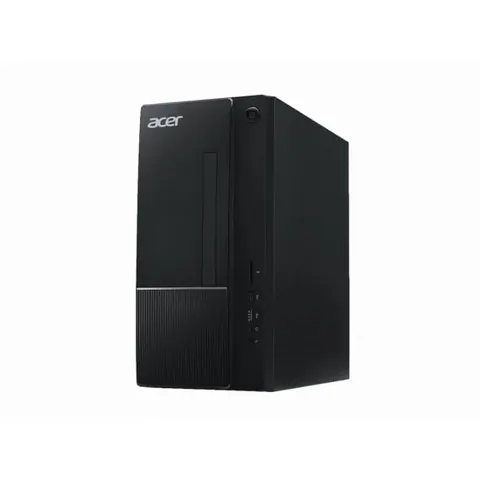
一款预算塔式台式机,适用于日常办公和学习工作。搭载英特尔酷睿i5-14400处理器,配备16GB DDR5内存和512GB PCIe 4 SSD,集显为英特尔UHD 730,附带300W专用电源。acer商店官方定价为749.99美元,但目前缺货,因此购买前请确认准确的零件号和库存情况。
优点
- i5-14400的六个性能核能够轻松处理日常多任务、Office办公和网页浏览;对同级TC-1775-UR11型号的独立测试显示,在持续负载下未出现CPU降频。
- 16GB DDR5-4800是实用的起步配置,且用户可通过更换两个8GB模块将内存升级至32GB。
- 前置USB-C、SD卡读卡器、双HDMI接口和Wi-Fi 6E满足大多数家用办公需求,无需额外适配器。
- 内存和3.5寸SATA硬盘槽便于升级,与焊接在板子上的小型电脑不同。
- 购买授权新机的用户可享受一年的保修服务,包含零件和人工费,支持通过序列号查询。
缺点
- 英特尔UHD 730为集显,无独立显存;现代3D游戏和GPU加速任务无法胜任。
- 300W电源为专用非模组设计,主板为OEM定制,因此添加独立显卡并非现实的直接升级方案。
- 仅有512GB SSD存储,且M.2 SSD放置在空的光驱支架下,升级时不太方便。
- 七个USB接口中仅有三个支持5 Gbps速度;其余四个为USB 2.0,没有USB4或Thunderbolt接口。
- 预装的是Windows 11 Home而非专业版,且不包含显示器、摄像头或扬声器。
- 在Acer的749.99美元建议零价及B&H的669.99美元(均缺货)的情况下,其性价比不如其他有库存的替代产品,如联想IdeaCentre Tower 14IRR9(679.99美元)。
已核实规格
| 型号 | Acer Aspire TC-1775-UR12,零件号 DT.BLRAA.002,UPC 195133251365;黑色塔式机箱。 |
|---|---|
| 操作系统 | Windows 11 Home,附带有线USB键盘和鼠标。不包含显示器、摄像头和扬声器。 |
| CPU | 英特尔酷睿i5-14400(第14代),10核(6性能核+4效率核),16线程,基础频率2.5 GHz,睿频最高4.7 GHz,20 MB L3缓存+9.5 MB L2缓存。 |
| 芯片组 | 英特尔H610。 |
| 内存 | 16GB DDR5-4800,由2×8GB UDIMM组成,两个插槽均已占用;如需扩容至32GB,请更换两个8GB模块。 |
| 存储 | 512GB PCIe 4.0 M.2 NVMe SSD。具备3.5寸SATA硬盘槽,但第二个M.2接口用于Wi-Fi,因此不保证有备用NVMe插槽。 |
| 图形 | 英特尔UHD Graphics 730(集显,共享系统内存,24个执行单元),无独立显卡。 |
| 接口 | 两个HDMI输出(一个1.4b,一个2.0);七个USB端口(三个5 Gbps USB 3.2 Gen 1,包括一个USB-C;四个USB 2.0);SD/SDHC/SDXC读卡器;千兆以太网。 |
| 无线 | 英特尔Wi-Fi 6E AX211和蓝牙5.3(部分地区规格表显示为5.2)。 |
| 扩展 | 一个PCIe x16插槽和一个PCIe x1插槽。 |
| 电源 | 300W内部专用尺寸电源。 |
| 尺寸 | 13.4 × 6.42 × 13.8英寸(约340 × 163 × 350毫米);重量约17.19磅(7.8公斤)。 |
| 保修 | 有限保修一年,包含零件和人工费。 |
| CPU功耗 | 基础65W,睿频最高148W(仅CPU本身,不代表整机功耗)。 |
完整研究笔记与来源
Which model this is
本页面介绍 Acer Aspire TC-1775-UR12 工厂预装机,零件号 DT.BLRAA.002,黑色塔式机箱,搭载Windows 11 Home、英特尔酷睿i5-14400、16GB DDR5-4800内存和512GB PCIe 4 SSD。该型号并非8GB的TC-1775-UR11、更旧的TC-1780或更新的TC-1785, also not a third-party “customized” listing that happens to share the same processor and memory. Retailer model numbers and seller-modified configurations can differ, so match on the part number and UPC 195133251365, not just the headline specs. The Amazon listing for this family carries ASIN B0HLL4BF8Z; verify it against the live listing before purchase.
Everyday performance
i5-14400的十个核(六个性能核,四个效率核)对于家用办公、学习、浏览器多标签页、视频通话(配合外置摄像头)和轻量级图像处理完全足够。对同处理器的同级TC-1775-UR11型号进行的独立测试显示,Office办公和网页浏览表现流畅,压力测试时未出现CPU热降频,CPU峰值温度约85°C,降温后约65°C,满载时的风扇噪音约47分贝。这些数据来源于2024年测试的另一台8GB内存的同系列机器,而非本台确切的16GB机型,因此仅供参考,不作为性能承诺。存储也是日常使用的另一个瓶颈:512GB容量在安装Windows、应用程序和媒体文件后很快就会用满,且扩容存储需要绕过SSD支架。
Upgrades and expansion
内存是最值得升级的部分:两个DDR5插槽已塞满8GB模块,因此要升级到32GB需要更换为2×16GB套装。目前corsair US上出售的 Vengeance DDR5-4800 32GB套装(2×16GB)促销价为399.99美元,另有524.99美元的爬虫报价。3.5寸SATA硬盘槽可用于安装2.5寸SSD,如WD Blue SA510 1TB SSD(Best Buy市场上报价229.99美元), or a 2 TB Seagate BarraCuda at $159.99 on a Best Buy marketplace listing, though the SATA power and data harness should be checked on the actual unit first. The PCIe x16 slot is present but does not make a gaming-GPU upgrade realistic, because the 300 W proprietary supply, physical clearance and OEM firmware all stand in the way. If you need a discrete GPU, buy a tower built for it.
Power, cooling and noise
300W的额定功率是电源的最大输出功率,而非整机空闲时的功耗。英特尔提供的65W基础功耗和148W睿频功耗仅适用于CPU本身。研究中提供了一个计算示例:若该机器在工作日每天8小时从墙上平均耗电60W, remaining sixteen hours in standby at 2 W, annual consumption would be about 186.88 kWh, or roughly $37.38 at $0.20 per kWh, excluding monitor and peripherals. The sibling UR11 sample’s stock cooler reached about 47 dBA under full load and otherwise stayed quiet, with no throttling. Actual wattage and noise for this exact unit are unverified, so a wall meter is the only way to know your own cost.
Value and availability
Observed October 2026 US pricing shows Acer’s store at $749.99 (out of stock), B&H at $669.99 (not available), a Micro Center regional page at $550.79 (reduced from $679.99, in-store only), and Best Buy at $755.99 (sold out). A Lenovo IdeaCentre Tower 14IRR9 with the same processor, memory and storage was listed at $679.99 with stock at a Micro Center Tustin branch. On the editorial thresholds in the research, this Acer tower is strong value at or below $500, reasonable up to about $650, and weak above that unless the Acer chassis or support matters to you. Paying more than about $650 for an older tower with integrated graphics is hard to justify against available alternatives.
Support and warranty
New authorized US units carry a one-year limited warranty, parts and labor, with serial-based lookup and receipt correction through Acer’s support site. Acer publishes an estimated 5 to 10 business days for repair after receipt, which is a manufacturer estimate, not an independently confirmed turnaround. Support access is through the SNID on the rear sticker, the Drivers and Manuals page, and chat. One owner raised a Secure Boot certificate question on a TC-1775-UR12 running BIOS v1.08; that is a single community report, not a confirmed defect, and any firmware work should use Acer’s serial-specific package rather than files for other TC variants. Intel’s unaffected list excludes non-K 14th-generation Core i5 processors from the 2024 Vmin stability issue, so this i5-14400 is not among the affected chips.
来源
Manufacturer:
- Acer US Store: Aspire TC Desktop TC-1775-UR12
- Acer Aspire TC product page and specifications (DT.BLRAA.002)
- Acer USA consumer desktop one-year limited warranty
- Acer USA drivers and manuals (SNID lookup)
- Acer USA warranty status and receipt correction
- Acer USA technical support contact
- Acer USA repair-case tracker
- Intel Core i5-14400 specifications
- Intel 13th/14th-gen Vmin stability update
Independent reviews:
- Lenovo IdeaCentre Tower 14IRR9 (comparison)
- Lenovo IdeaCentre Tower Gen 9 8L 90XS0022US (comparison)
- Dell Inspiron 3030 / Dell Slim ECS1250 (comparison)
Owner reports:
- Acer Community: TC-1775-UR12 Secure Boot certificate concern with BIOS v1.08
- David Yin: new TC-1775-UR12 setup after returning a bad refurbished desktop (Jan 18, 2025)
Parts and stores:
- B&H Photo Video: TC-1775-UR12 specification and $669.99 listing
- Micro Center: factory DT.BLRAA.002 / UPC 195133251365, regional $550.79
- Best Buy: TC-1775-UR12 listing (sold out)
- Newegg: customized Acer TC family listing
- Best Buy: WD Blue SA510 1TB SSD $229.99
- Best Buy: Seagate BarraCuda 2TB HDD $159.99
- Corsair US: Vengeance 32GB DDR5-4800 kit
- Memory Express regional TC-1775-UR12 sheet