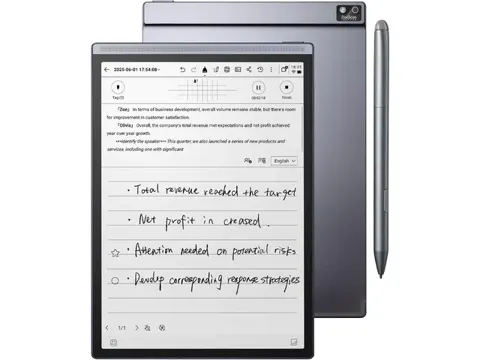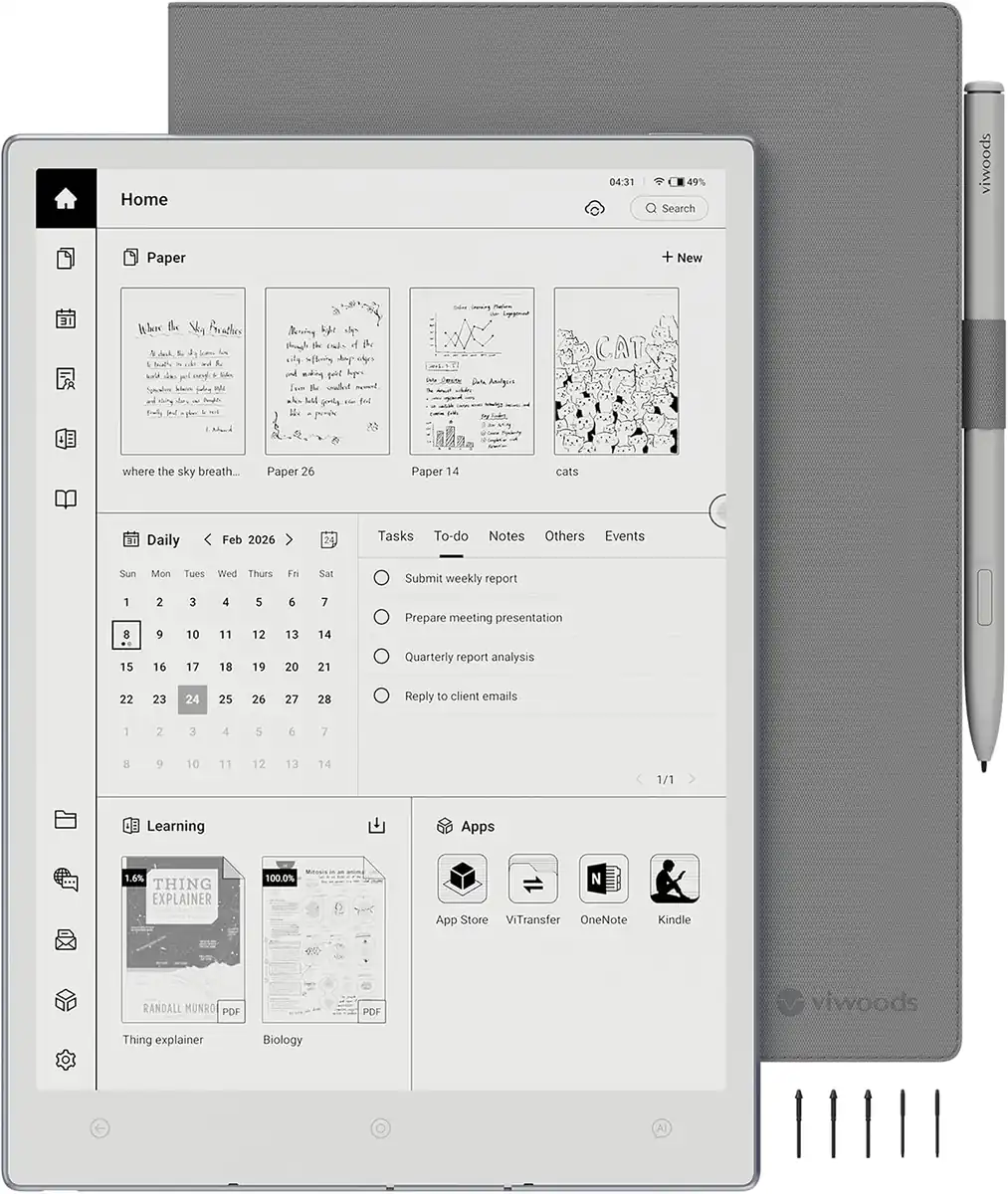
VIWOODS AiPaper 10.65" AI E Ink Tablet
By VIWOODS · E Readers · Desk & Streaming Setup
Compare all E Readers side by side →
- 10.65-inch Carta 1300 Mobius E Ink display
- 2660×1920 resolution at 300 PPI
- 256-level grayscale
- 4.5 mm thickness, 370 g weight
- Android 13 with 4 GB RAM and 128 GB ROM
Lowest price seen
$399.00
from $399.00 at VIWOODS · Checked Nov 6, 2026
- eBay (used) eBay: used, open-box, refurbishedView at eBay (used)
Stores with a price are sorted lowest first; commission never changes the order. Prices are snapshots. Check the current price with the store.
Summary
A 10.65-inch Android 13 writing tablet with a 300 PPI Carta 1300 Mobius display, the thinnest (4.5 mm) and lightest (370 g) in its class. Best if you want an open Android note tablet and can live without a front light, a rattling stylus and inconsistent cloud AI handwriting conversion.
Strengths
- Exceptionally thin (4.5 mm) and light (370 g) for a 10.65-inch E Ink device.
- Paper-like writing feel on the flexible Mobius panel with low parallax.
- Excellent folio included: magnetic attachment, pen loop, tip compartment — unusual value at this price.
- System-wide AI button (ChatGPT-4o, DeepSeek) for handwriting conversion, summarization, translation, voice input.
- Good battery life: up to two weeks at light use, up to four weeks standby, ~4.2 days typical mixed use.
Weaknesses
- No front light; evening/bedtime reading requires external light.
- W2 Stylus Pro rattles (spring-loaded nib, eraser, side button) and feels cheap; side button can trigger eraser accidentally.
- Mild ghosting across all apps; refresh modes trade ghosting for speed.
- AI handwriting conversion is inconsistent — misreads legible handwriting, works better on messy scribbles.
- Software learning curve: nested menus, some functions hidden, calendar/notes linking limited, no multi-device sync, no handwriting search.
- USB file transfer fails on macOS (Android File Transfer and Wi-Fi transfer); Windows and cloud sync work.
Verified specifications
| Display | 10.65-inch E Ink Carta 1300 Mobius, 2660 × 1920, 300 PPI, 256-level grayscale, no front light |
|---|---|
| Processor | Octa-core MediaTek MT8183, up to 2.0 GHz |
| RAM | 4 GB LPDDR4X |
| Storage | 128 GB eMMC, no microSD slot |
| OS | Android 13 (custom Viwoods UI), Google Play Store available |
| Connectivity | Wi-Fi 5 (802.11 a/b/g/n/ac), Bluetooth 5.0, USB-C (data/charging) |
| Battery | 4100 mAh, 3.8 V, USB-C charging |
| Stylus | W2 Stylus Pro (Wacom EMR, battery-free), 4096 pressure levels, up to 60° tilt, magnetic attachment, two nib types (soft and hard) included; C1 ceramic tip sold separately |
| Dimensions | 247 × 178 × 4.5 mm (H × W × D) |
| Weight | 370 g tablet only, ~510 g with folio |
| Sensors | Fingerprint reader in power button, microphone for voice AI; no G-sensor, no speakers, no cameras |
| Included | Tablet, W2 Stylus Pro, magnetic folio case (with pen loop and tip compartment), spare nib set (soft + hard), USB-C cable, quick guide |
| Warranty | 14 months from purchase date; covers defects in materials/workmanship under normal use for AiPaper / Mini / Reader / refurbished devices; excludes stylus, folio, tips, cosmetic damage, accidental damage, water damage, unauthorized repairs. Out-of-warranty paid repair or discounted replacement offered |
Full research notes and sources
Display and writing
The 10.65-inch Carta 1300 Mobius panel delivers 2660 × 1920 at 300 PPI, a sharp resolution that rivals or exceeds many 10.3-inch devices. The flexible plastic backplane makes the unit just 4.5 mm thick and 370 g, one of the lightest 10.65-inch E Ink tablets available. Writing feels like paper: Wacom EMR with 4096 pressure levels and up to 60° tilt gives precise control, and parallax stays under 750 µm. The panel supports 256 grayscale levels, but without a front light low ambient light limits practical use.
Ghosting is present but mild; the device offers Best, Fast and Ultra-Fast refresh modes that trade ghosting for speed. Reading contrast is lower than the Kindle Scribe, and the ebook library lives in the Learning app, which can be buried. Sideloading EPUBs sometimes fails past the cover, requiring a workaround. If you need a lit screen, the smaller AiPaper Mini includes a front light.
Software and AI
The Paper app supports layers, templates, tags, lasso selection, voice input and handwriting-to-text. The Learning app is where you import planner PDFs, but the template format and required page size are not documented.
A dedicated AI button opens ChatGPT-4o or DeepSeek for handwriting conversion, summarization and translation. This is a cloud LLM wrapper, not on-device AI, and conversion quality is inconsistent — it often misreads clean handwriting while struggling with messy scribbles. Viwoods does not publish data-retention or privacy details for these calls.
The Play Store is available, but the review unit shipped without Play Protect certification. Viwoods provides a registration guide, but some buyers may hit this hurdle. Third-party apps (Kindle, Kobo, OneNote, Libby, Chrome) run, but E Ink limitations mean no animations, slow scrolling and occasional ghosting. macOS file transfer does not work (Android File Transfer and Wi-Fi transfer both failed); Windows and cloud sync (Google Drive, Dropbox, OneDrive) are reliable.
Battery life and charging
The 4100 mAh, 3.8 V battery supports up to two weeks at light use (about 1 hour per day) and up to four weeks standby. Charging 9→100% takes under two hours via USB-C. No user-replaceable battery or service manual exists.
Stylus and accessories
The W2 Stylus Pro is a battery-free Wacom EMR pen with 4096 pressure levels, up to 60° tilt and magnetic attachment over the screen. It comes with two nib types (soft and hard) in the box. The pen rattles — the spring-loaded nib, eraser and side button all shift when tapped — and the plastic body feels cheap. The side button can accidentally trigger the eraser. Viwoods sells a C1 ceramic-tip stylus for $99, and third-party Wacom EMR pens are supported.
The included folio is a standout: it adds about 140 g (total ~510 g), uses magnetic attachment, includes a secure pen loop and a tip compartment. Viwoods also sells a genuine leather folio ($89, sale $59) and W2 Stylus Pro tip sets ($19). Accessories are excluded from the warranty.
Connectivity and sensors
Wi-Fi 5 (802.11 a/b/g/n/ac) and Bluetooth 5.0 handle local transfers and audio. The USB-C port supports charging and data, but macOS file transfer does not work. No microSD slot, no G-sensor, no speakers, no cameras. The fingerprint reader in the power button occasionally fails when the folio edge presses against it, requiring a workaround.
Warranty, support and repairability
Viwoods offers a 14-month warranty from the purchase date, covering defects in materials and workmanship under normal use for AiPaper, AiPaper Mini, AiPaper Reader and refurbished devices. The warranty excludes the stylus, folio, tips, cosmetic damage, accidental damage, water damage and unauthorized repairs. Out-of-warranty repair or discounted replacement is available, but buyer pays inbound shipping for warranty claims; Viwoods covers return shipping. International duties may apply.
The 60-day return policy is hassle-free for the tablet bundle; accessories require buyer-paid return shipping. Viwoods provides responsive email support, and firmware 3.14 (June 2026) is current. No published service manual or internal spare parts (screen, mainboard, battery) exist; iFixit has not published a teardown, and the flexible Mobius panel likely complicates screen replacement. Long-term update cadence and Android version upgrade path are unclear.
Viwoods direct lists the tablet at $549, including the stylus, folio and spare nibs. The former list price was $799 / £610 / AU$1,199; seasonal discounts often bring it to $539–$549. TechRadar reviewed it at $549 sale, and techreviewer.de measured €554 (~$585) in Germany.
At $549 the AiPaper is the best-value open Android writing tablet if you can live without a front light and accept a young brand’s software quirks. At $500–$549 it is good value — hardware leads the class. At $550–$649 it is fair; compare to reMarkable Paper Pure ($399, 226 PPI, closed OS), Paper Pro ($629, color, front light, closed OS), Boox Go 10.3 ($379, 4.6 mm, 375 g, Android 12), and Supernote Manta (~$500, 10.3", 300 PPI, superb software, no Play Store). Above $650–$799 (the old list price) value weakens because superior alternatives exist with longer track records.
Which model this is
This page covers the VIWOODS AiPaper 10.65" (single SKU on viwoods.com), hardware model with 2660×1920 300 PPI Carta 1300 Mobius display, Android 13, 4 GB/128 GB, 4100 mAh battery. Do not confuse it with the smaller AiPaper Mini (8.2", Carta 1000, front light, $429) or the phone-sized Readers.
Sources
Manufacturer:
- VIWOODS AiPaper product page
- Refund policy – 60-Day Hassle-Free Return and 14 Months Warranty Policy
- System Update 3.15
Independent reviews:
- TechRadar: ViWoods AiPaper review
- techreviewer.de: Viwoods AiPaper Test
- eWritable: Viwoods AI Paper Review
Owner reports: