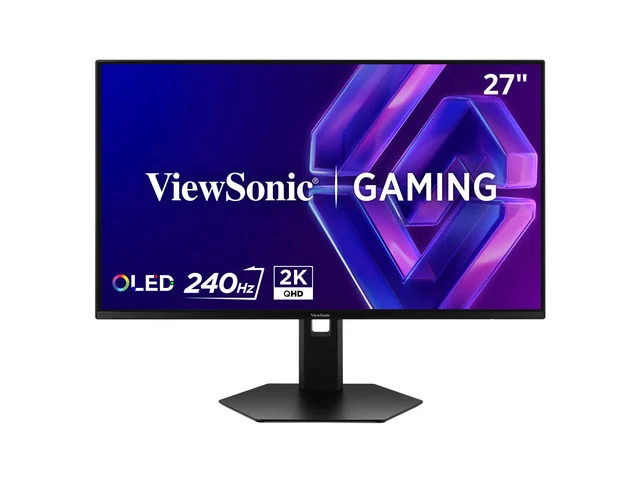
ViewSonic VX2738-2K-OLED 27" 1440p 240Hz OLED Gaming Monitor
By ViewSonic · Gaming Monitors · Audio & Electronics · More from ViewSonic
Compare all Gaming Monitors side by side →
- 27" QD-OLED 2560x1440
- 240Hz refresh rate
- 0.03ms GtG response time
- HDR10 10-bit color (1.07B colors)
- HDMI 2.1 x2, DisplayPort x2
Lowest price seen
$449.99
from $449.99 at ViewSonic · Checked Nov 6, 2026
- ViewSonic $449.99View at ViewSonic
- eBay $518.49View at eBay
- NeweggView at Newegg
- Targetfree shipping $35+ · store policyView at Target
- Best Buy15-day returns · store policyView at Best Buy
- Walmartfree shipping $35+ · store policyView at Walmart
- B&H Photo30-day returns · store policyView at B&H Photo
- CdwView at Cdw
- eBay (used) eBay: used, open-box, refurbishedView at eBay (used)
Stores with a price are sorted lowest first; commission never changes the order. Prices are snapshots. Check the current price with the store.
Summary
Check your room before you buy: glare is obvious in bright rooms and SDR brightness is modest at about 200 nits.
Size in context

61.1 cm · 24.1 in (W) × 25.0 cm · 9.8 in (D) × 53.1 cm · 20.9 in (H) · Drawn to scale from the maker's stated dimensions, next to everyday objects.
Strengths
- 240 Hz with motion resolution perfect above 180 fps and 15.7 ms measured input lag.
- Deep blacks and high color volume: 108.86% DCI-P3 and 161.41% sRGB measured.
- Two HDMI 2.1 and two DisplayPort 1.4 inputs, so modern GPUs have room to grow.
- Three-year US warranty covering parts, labor and backlight.
- Burn-in defenses including PXL Orbit pixel movement, static screen detection dimming and OLED APL.
- Stand gives 130 mm of height lift plus swivel and pivot, and VESA 100×100 mounting works.
Weaknesses
- Out-of-box color accuracy is poor, so a calibration is needed for reference-level results.
- No true sRGB mode; the sRGB color-temperature option does not clamp the gamut.
- Triangular RGB subpixels can fringe text, and the 2 W speakers are weak.
- No USB ports of any kind, and the stand wobbles slightly when you nudge the desk.
- Burn-in damage is explicitly outside warranty coverage.
Verified specifications
| Panel | QD-OLED (OLED type, Color a-Si TFT Active Matrix), triangular RGB subpixel layout. |
|---|---|
| Screen size | 27" (68.58 cm real diagonal); viewable area 26.7". |
| Resolution | 2560 × 1440 (WQHD), 16:9. |
| Refresh rate | 240 Hz; 60, 75, 100, 120, 144, 165, 180 and 240 Hz supported at 2560×1440. |
| Response time | 0.03 ms GtG (manufacturer); 0.20 ms measured panel response. |
| Input lag | 15.7 ms measured at 240 Hz. |
| Colors | 1.07 billion, 10-bit true color depth. |
| Viewing angles | 178° horizontal, 178° vertical. |
| Surface | anti-glare with a 2H hard coating; user guide rates haze at 25%. |
| Brightness | 200 cd/m² typical (manufacturer); 200 nits full-field SDR and 381 nits from a 25% window measured by Tom’s Hardware; Digit.in measured about 378 nits at 1% and 2% windows and 188 nits full-screen white. |
| Contrast | 150,000:1 stated (manufacturer); Tom’s Hardware found black levels unmeasurably low. |
| Color gamut measured | 108.86% DCI-P3 volume and 161.41% sRGB volume (Tom’s Hardware); 71.5% Rec.2020 coverage (Digit.in). |
| HDR | HDR10, VESA DisplayHDR 400; Tom’s Hardware measured a 419 nit peak in a 25% window. |
| Adaptive sync | NVIDIA G-Sync Compatible and AMD FreeSync Premium. |
| Inputs | HDMI 2.1 ×2, DisplayPort 1.4 with DSC ×2, 3.5 mm audio out ×1. No USB hub, no USB-C, no KVM. |
| Speakers | 2 W ×2 built in. |
| Stand | height adjust 130 mm (5.1"), swivel ±45°, pivot 90°/90°, tilt 5° forward and 20° back per the manufacturer page; the user guide states -7° to 20°. |
| VESA mount | 100 × 100 mm. |
| Dimensions | 611.1 × 531.1 × 250 mm (24.1" × 20.9" × 9.8") with stand; 611.1 × 354.1 × 53.59 mm (24.06" × 13.94" × 2.11") without it. |
| Weight | 5.4 kg (11.9 lb) with stand; 2.9 kg (6.5 lb) without it. |
| Power consumption | 61 W typical without audio, 62 W typical with audio at 100% volume, 62 W typical and 63 W max per the manufacturer page, standby 0.3 W; Tom’s Hardware measured 23.6 W at 200 nits. |
| In the box | monitor, power cable, AC/DC adapter, DisplayPort cable, quick start guide. |
| Warranty | three-year limited warranty on parts, labor and backlight in the US; burn-in damage from static images is excluded. |
| On-screen display | Input Select, Audio Adjust, ViewMode, Color Adjust, Manual Image Adjust and Setup Menu, in 21 languages. |
Full research notes and sources
Picture quality and calibration
Out of the box this is not a color-accurate panel. Tom’s Hardware measured grayscale error of 5.01 dE before calibration, dropping below 1 dE afterwards with OLED APL on and RGB-slider adjustment, and color error improving from 4.49 dE to 1.44 dE. Digit.in ran Calman and got average Delta E 2000 of 12.67 on ColorChecker, 11.59 on grayscale and 26.45 on saturation sweeps. Gamma runs dark out of the box, and there is no sRGB mode to rein the color in, so budget for a colorimeter if color accuracy matters to you.
Screen uniformity started at 13.55% and improved to 2.55% after a pixel-refresh cycle. Viewing angles are excellent, with no red tint seen at 45°. Tom’s Hardware judged the image processing strong and the HDR grayscale only slightly warm above 50%.
Brightness, HDR and the room it lives in
Peak brightness is not published by ViewSonic; only a 200 cd/m² typical figure appears on the product page and in the user guide. Tom’s Hardware measured 200 nits full-field and a 419 nit HDR peak in a 25% window, while Digit.in saw about 378 nits at 1% and 2% windows but only 188 nits full-screen white. That gap between small-window and full-field numbers is what you feel in a bright office: the anti-glare coating picks up room light and the screen cannot push past it. GameDaily and GamingShogun both point to the same weakness and recommend a dark room. The panel has no backlight, so it delivers perfect blacks in the dark and washed-out blacks in the sun.
Burn-in, upkeep and running costs
The monitor ships with a solid set of burn-in countermeasures: PXL Orbit pixel movement, static screen detection that dims the image, OLED screen movement, OLED image cleaning, OLED APL and static icon detection. Reviewers single out the advanced burn-in prevention as a real strength. The panel is still an OLED, though, and the user guide excludes damage from static images displayed for lengthy periods from the warranty.
For cleaning, turn the monitor off and unplug it, wipe the screen with a soft lint-free cloth, use a non-ammonia, non-alcohol glass cleaner if you need one, and clean the case with a soft dry cloth. ViewSonic disclaims liability for damage from ammonia- or alcohol-based cleaners. There are no consumables. Electricity is the only running cost: about 23.6 W measured at 200 nits, against 61 to 63 W typical and max per the manufacturer. VESA mounting hardware is not included.
Is it worth it?
ViewSonic sells it direct for $449.99. Against that, Tom’s Hardware calls it a terrific value and hard to fault, GameDaily scores it 9.5 out of 10 and recommends it under $500 for a dark room, GamingShogun rates it four stars while flagging SDR brightness and text fringing, and Digit.in frames it as a good OLED upgrade with color-accuracy and HDR-brightness trade-offs. The on-paper feature set — 240 Hz, 0.03 ms, HDR10, two HDMI 2.1, two DisplayPort, a pivoting stand and an esports mode — is competitive at this money. The catch is that the panel needs calibration to look its best and the screen is only about 200 nits in SDR. One owner review on the manufacturer’s own widget praises the color depth and says it does exactly what you’d expect a monitor to do for gaming, and reports no backlight trouble after researching QD-OLED panels.
Which model this is
This page covers the ViewSonic VX2738-2K-OLED, a 27-inch QD-OLED gaming monitor sold in the US. Manufacturer part number VX2738-2K-OLED, model number VS21072. No color or finish variants and no hardware revisions are documented on the product page or in the user guide; a single SKU is listed. Don’t confuse it with other ViewSonic OLED panels such as the XG272-2K-OLED, or with non-OLED VX-series monitors. Tom’s Hardware’s conclusion misspells the model as VX2783-2K OLED, which is a typo in the text rather than a second product.
Sources
Manufacturer:
Independent reviews:
Owner reports: