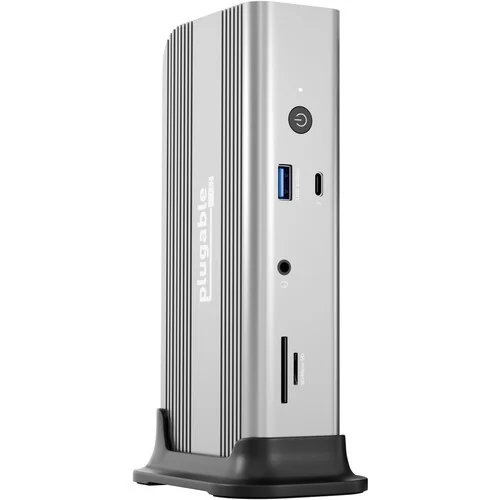
Plugable Thunderbolt 5 Dock (TBT-UDT3)
By Plugable · Docking Stations · Desk & Streaming Setup
- Up to 140W (28V 5A) host charging over USB Power Delivery 3.1
- Displays: up to 2x 8K 120Hz or 2x 4K 144Hz on Windows
- Each downstream Thunderbolt 5 port delivers up to 15W charging
Price not listed
- PlugableView at Plugable
- eBayView at eBay
- AmazonView at Amazon (paid link)
- eBay (used) eBay: used, open-box, refurbishedView at eBay (used)
Stores are listed in a fixed order, never by price or commission. Prices are snapshots. Check the current price with the store.
Summary
A Thunderbolt 5 dock that gives a laptop one upstream port for data and up to 140W of charging, three downstream Thunderbolt 5 ports, 2.5GbE and UHS-II card readers. Check your monitors first: the dock has no HDMI or DisplayPort output, so HDMI and DisplayPort screens need USB-C adapters that are not in the box.
Strengths
- One upstream port carries 80Gbps and 140W, so a single cable handles display, data and charging.
- The UHS-II readers move cards at 312MB/s, faster than the 250MB/s SDXC slot in Apple’s MacBook Pro.
- Thunderbolt Share certification lets two PCs share one keyboard and mouse without each laptop needing its own certification.
- The included vertical stand slides onto the end of the dock, has anti-slip feet and is heavier and better made than expected.
- The 180W adapter is not nearly as large as the ones from previous generations.
- The aluminum chassis feels solid, and the front power button and rear host port sit in easy-to-reach places.
Weaknesses
- No HDMI or DisplayPort output, so HDMI and DisplayPort monitors need USB-C cables or adapters that are not included.
- Each downstream Thunderbolt 5 port is capped at 15W, under the 18W Apple suggests for iPhone fast charging, and there is no spare high-wattage USB-C port.
- Once the laptop takes the full 140W, under 40W is left for everything else, so downstream ports can run short of power.
- One downstream Thunderbolt 5 port sits on the front, which creates cable clutter or ties up a capable port as a plain USB-C socket.
- The plastic back and side faceplate scratches easily.
- Thunderbolt 3 computers are not supported, base M1 and M2 Macs drive one external display, and a base M3 needs clamshell mode for two.
Verified specifications
| Model | TBT-UDT3, Plugable’s first Thunderbolt 5 dock, built on Intel’s JHL9580 controller. |
|---|---|
| Host connection | one upstream Thunderbolt 5 port, 80Gbps bidirectional, 140W Power Delivery. |
| Downstream ports | three Thunderbolt 5 ports, 80Gbps, up to 15W each. |
| USB-A | two ports at 10Gbps / 4.5W, one port at 5Gbps / 7.5W. |
| Ethernet | 2.5GbE, backwards compatible with 1GbE networks. |
| Card readers | SD 4.0 UHS-II at 312MB/s and microSD UHS-II at 312MB/s. |
| Audio | 3.5mm combo jack on the front. |
| Power | 180W external AC adapter with a barrel plug; host charging up to 140W over USB PD 3.1, and 100W on PD 3.0 hosts. |
| Bandwidth Boost | up to 120Gbps downstream, asymmetric 120Gbps transmit / 40Gbps receive. |
| Display support (manufacturer-stated) | dual 8K@120Hz or dual 4K@144Hz on Thunderbolt 5 Windows hosts; up to 3x 6K@60Hz or 3x 4K@144Hz on supported Macs. |
| Thunderbolt Share | certified for PC-to-PC use, which removes the per-laptop certification requirement; Windows 11 and the latest Intel graphics driver are needed on both PCs. |
| Compatibility | Thunderbolt 4 and full-featured USB4 hosts; Thunderbolt 4 and USB4 40Gbps Windows hosts are limited to dual 4K@60Hz. Thunderbolt 3 hosts are not supported. |
| Dimensions | 6.9 × 3.1 × 1.6 in (17.6 × 7.8 × 4.2 cm); 1.5 lb (692 g). |
| Chassis | ribbed aluminum with a plastic faceplate around the back and sides and an aluminum panel around the front ports. |
| In the box | dock, vertical stand, 1.0m (3.2 ft) certified 80Gbps Thunderbolt 5 cable, 180W AC adapter with barrel charging plug and quick-start guide. |
| Kensington lock slots on the back, next to the barrel charging port. | |
| Power button with an LED status light on the front. | |
| Warranty | two years plus lifetime support, per a secondary spec site; Plugable’s own warranty wording was not readable. |
Full research notes and sources
Video output and adapters
The dock carries no HDMI and no DisplayPort jack. Every display runs through the three downstream Thunderbolt 5 ports, so a monitor with a USB-C input plugs in directly while HDMI and DisplayPort screens need a USB-C-to-HDMI or USB-C-to-DisplayPort cable or adapter. None of those adapters ship with the dock, and they are the one running cost to budget for. Macworld also pointed out that putting one of the three downstream Thunderbolt 5 ports on the front means cable clutter on the desk, or a fast port tied up as a plain USB-C socket.
Power and charging
Host charging is 140W over USB Power Delivery 3.1, and hosts that only do PD 3.0 are capped at 100W. That comes from the 180W external adapter with a barrel plug, and the 180W supply is not nearly as large as the ones from earlier generations.
The squeeze shows up on the other ports. Each downstream Thunderbolt 5 port is limited to 15W, below the 18W Apple suggests for iPhone fast charging, there is no spare high-wattage USB-C port, and once the laptop takes the full 140W under 40W is left for everything else. A desk that also charges a phone can run its downstream devices short of power.
Host compatibility and Thunderbolt Share
Full display output needs a Thunderbolt 5 host: dual 8K@120Hz or dual 4K@144Hz on Thunderbolt 5 Windows machines, and up to 3x 6K@60Hz or 3x 4K@144Hz on Macs that support it. Mac limits are chip-dependent, with base M1 and M2 Macs driving one external display and a base M3 needing clamshell mode for two.
Thunderbolt 4 and full-featured USB4 hosts still work, but 40Gbps Windows machines are capped at dual 4K@60Hz, and Thunderbolt 3 computers are not supported at all.
Thunderbolt Share is the feature for people who move between two PCs. The dock carries the certification, so you do not need a certified laptop, though Windows 11 and the latest Intel graphics driver are required on both machines. Normal docking needs no drivers, and Windows users can optionally add the Intel Thunderbolt Share and Ethernet drivers for better 2.5GbE performance.
Is it worth it?
Macworld called it the value pick among the Thunderbolt 5 docks it had tested and gave it an Editors’ Choice. docking-stations.info scored it 8.4/10 and put it first in its recommendations while calling the port layout more future-facing than convenient. The Windows Central piece is a hands-on preview of a review sample rather than a finished lab test, and Plugable had no input on it.
The MSRP is $299.95 (Plugable, 2025). Macworld’s price table when it reviewed the dock (July 2025) listed it at $299.95 at B&H, $299.95 at Best Buy, $299.95 at Walmart and $419.99 at Lenovo USA. Against the same set, Macworld priced the OWC Thunderbolt 5 Dock at $329.99, the CalDigit TS5 at $369, the TS5 Plus at $499 and the Sonnet Echo 13 from $439 (Macworld, July 2025).
Two gaps to weigh before you order. Nobody has published an instrumented test of this exact dock, so there is no measured throughput, power draw or heat data to lean on, and no owner thread or retailer Q&A was found for it. Long-term reliability is simply not characterized. The two-year warranty with lifetime support comes from a secondary spec site rather than Plugable’s own page, so treat it as unconfirmed until you see the manufacturer’s wording.
Which model this is
This page covers the Plugable Thunderbolt 5 Dock, model TBT-UDT3, released in June 2025 and built on Intel’s JHL9580 Thunderbolt 5 controller. The port count is not fixed: Plugable’s store calls it 11-in-1, docking-stations.info counts nine plus excluding the upstream host connection, and Macworld lists one upstream plus three downstream Thunderbolt 5 ports, three USB-A ports, Ethernet, two card readers, an audio jack and the power input. The Amazon listing for this dock is ASIN B0F96ZVSKM. Do not confuse it with Plugable’s Thunderbolt 4 and USB4 docks such as the TBT4-UDX1 or UD-7400PD, which handle charging and display limits differently.
Sources
Manufacturer:
Independent reviews:
Owner reports:
- No owner reports, forum threads or retailer Q&A for this exact model were found.