Plugable Dual DisplayPort & HDMI Docking Station
By Plugable · Docking Stations · Desk & Streaming Setup · More from Plugable
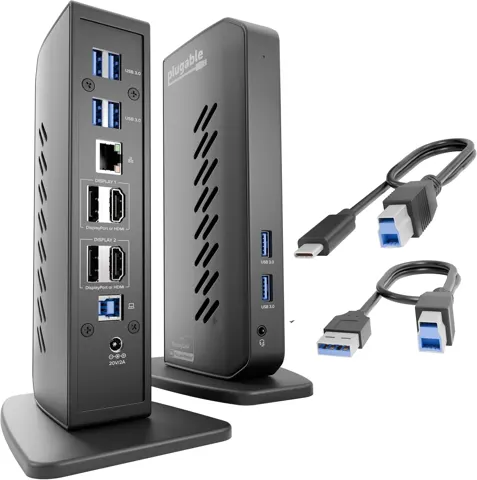
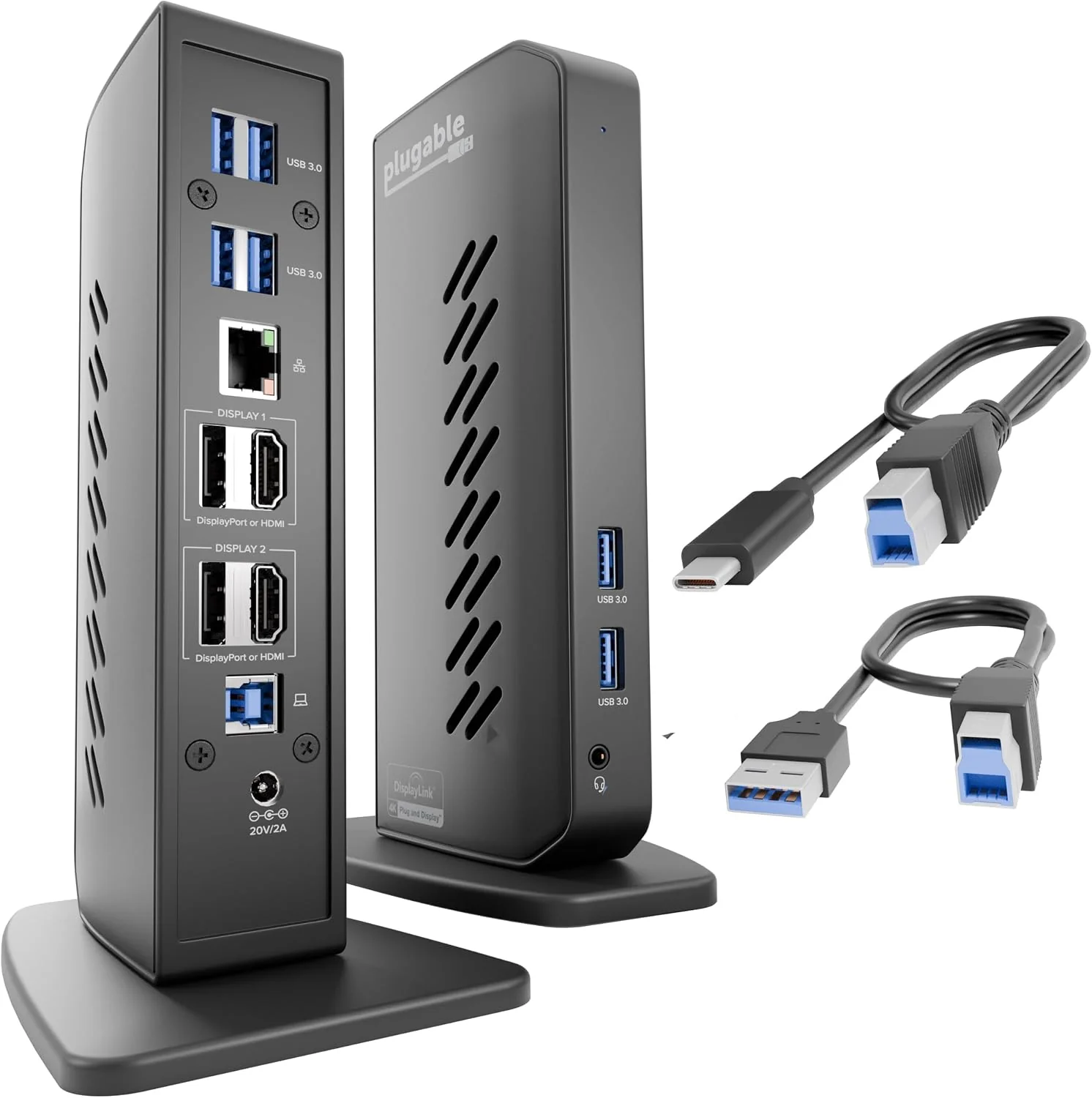
- 2x HDMI 2.0, 2x DisplayPort 1.2
- 6x USB 3.0 ports
- Gigabit Ethernet
- 40W power supply
- DisplayLink DL-6950 chipset
Price not listed
- eBay (used) eBay: used, open-box, refurbishedView at eBay (used)
Stores with a price are sorted lowest first; commission never changes the order. Prices are snapshots. Check the current price with the store.
Summary
A DisplayLink universal dock that drives two 4K@60Hz monitors from a single USB-C or USB-A connection and adds six USB-A ports, Gigabit Ethernet and headset audio. Check before you buy: it does not charge your laptop and it does not support HDCP, so protected streaming will not play through it.
Strengths
- Works with both USB-A and USB-C hosts, and both cables ship in the box.
- Drives two 4K@60Hz displays from one USB-C connection.
- Six 5Gbps USB-A ports, two of them front-facing for a drive or a dongle.
- Gigabit Ethernet jack, useful when the laptop has no Ethernet port.
- Small vertical footprint for a dual-4K dock.
- Two-year limited warranty and lifetime technical support.
Weaknesses
- It does not charge the host, so a one-cable desk setup is not possible with this model.
- HDCP is unsupported, so Netflix, Hulu, Prime Video, Blu-ray and iTunes will not play through the outputs.
- DisplayLink compresses the video in software, which adds latency and eats CPU and GPU cycles.
- Only two display groups: you cannot run two HDMI and two DisplayPort at once.
- macOS needs the DisplayLink Manager app, and Windows and macOS both need drivers installed.
- The included USB-C host cable has been traced to USB throughput and charging problems on at least one machine.
Verified specifications
| Model | UD-6950Z, using the Synaptics DisplayLink DL-6950 chipset. |
|---|---|
| Video outputs | 2x HDMI 2.0 and 2x DisplayPort 1.2, arranged in two groups where each group takes either HDMI or DisplayPort, not both. |
| Maximum resolution | two displays at 3840x2160 @ 60Hz; a single 5K display at 5120x2880 @ 60Hz needs two DisplayPort cables at once. |
| Refresh limits | HDMI 2.0 and DisplayPort 1.2 monitors run up to 4K 60Hz; DisplayPort 1.1 and HDMI 1.4 monitors cap at 4K 30Hz. |
| Host connection | one USB 3.0 port at 5Gbps, usable with USB-A or USB-C; both cables are included. |
| USB | 6x USB-A 3.0 at 5Gbps, two front and four rear, each rated 5V / 900mA / 4.5W. |
| Network | 1x Gigabit Ethernet (1000BASE-T) over DisplayLink. |
| Audio | 1x front 3.5mm TRRS combo headset jack, plus 2-channel digital audio over HDMI and DisplayPort. |
| Host charging | none. The laptop still needs its own charger. |
| HDCP | not supported. |
| Power supply | 20.0V / 2.0A / 40.0W external adapter with direct AC plug. |
| Recommended host | 6th-gen Intel Core i3/i7, AMD A10 @ 2.0GHz or better, Intel HD 520 / Radeon HD 8650 / GeForce 7xxM or better GPU, 8GB RAM or more. |
| Dimensions | 7.5 × 2.8 × 5.3 in (19 × 7 × 13.5 cm); 350 g (12.3 oz). It stands vertically on the desk. |
| In the box | dock, quick start guide, 0.9m (2.95 ft) USB-A to USB-B 3.0 cable, 0.9m (2.95 ft) USB-C to USB-B 3.0 cable, power adapter. |
| Warranty | two-year limited warranty on new units, 90 days on B-stock, plus a 30-day money-back guarantee. |
Full research notes and sources
Video outputs and the shared group layout
The dock has four video sockets, but they form two groups. Each group accepts either an HDMI 2.0 or a DisplayPort 1.2 connection, so the working setups are HDMI plus HDMI, DisplayPort plus DisplayPort, or one of each. Plugable does not state whether any other arrangement works, and it was not tested.
Resolution depends on the cable you use to the host and on the monitor. HDMI 2.0 and DisplayPort 1.2 panels handle 4K 60Hz, while DisplayPort 1.1 and HDMI 1.4 panels fall back to 4K 30Hz. A single 5K panel at 60Hz reportedly needs both DisplayPort cables plugged into one monitor, and nobody has verified that claim independently.
Plugable’s spec sheet lists USB-A and USB-C host connections without spelling out the difference. Treat USB-C as the requirement for two 4K screens.
No charging, no HDCP
These two limits come straight from the manufacturer’s product page, and they decide who should buy this dock.
Without host charging, you run two cables to the laptop: one for data, one for power. Plugable points buyers who need charging to the UD-6950PDH, which adds 100W Power Delivery and a USB-C-only host connection, listed at $199.99 direct against $159.99 for the UD-6950Z. If your laptop has Thunderbolt or USB4 with native dual-display support, a native dock avoids the driver and compression trade-offs entirely.
Without HDCP, protected streaming stays dark. That rules out Netflix, Hulu, Prime Video, Blu-ray and iTunes on the dock’s outputs. Plugable positions the model for productivity work and explicitly warns against gaming, and DisplayLink’s software compression is the reason.
What owners report
Plugable’s own support forum for this model is the strongest owner evidence available, and it contains dozens of threads on this exact dock. A company running four Dell Latitude 5420 laptops with four UD-6950Z docks over HDMI reported screen flickering on every machine, and Plugable treated it as unexpected behavior. Another owner had an HDMI monitor drop several times a day, with windows reverting to the laptop screen during a presentation. Other recurring thread titles cover an external display repeatedly losing connection with a black screen, all displays switching on and off while keyboard, mouse and headset lock up, speakers not playing, inconsistent output from the 3.5mm jack, no audio over HDMI from an M1 MacBook, monitors not waking properly, dual monitors failing when logged out of Windows, and a DisplayLink driver crash.
None of this establishes a failure rate. The forum is the issue log of a mature, widely used product, and no owner-reported defect rate for the UD-6950Z has been published.
USB power, cables and running costs
The 40W adapter leaves little headroom. Each USB-A port is limited to the USB 3.0 allowance of 900mA, which Plugable support confirmed to an owner complaining about slow phone charging.
One MSI GE76 owner reported USB speeds far below expectation, internet throughput dropping from about 300 Mbps to 50 Mbps, and phone charging taking three to five hours. Plugable explained the 900mA per-port limit and later traced the root cause to the supplied USB-C host cable. The included USB-A cable served as a workaround while a replacement USB-C cable was sent. Keep both supplied cables, and treat a sudden throughput collapse as a cable problem before a hardware problem.
Your other ownership cost is the laptop charger, since the dock will not carry power. A replacement USB-C cable is the only other part likely to be needed.
Is it worth it?
Plugable direct lists the UD-6950Z at $159.99 (November 2026). A specialist review puts MSRP at $149 and describes the dock as affordable at around $135, which is below most Thunderbolt docks. Against those figures, this is fair pricing for a DisplayLink dock that needs drivers, gives no charging and supports no HDCP.
The case for it is narrow: a USB-C laptop without Thunderbolt, a need for a second high-resolution display, no need for host charging, and no need for protected streaming. Plugable’s own UD-3900Z at $99.99 covers the simpler dual-HDMI 1080p-class case. If you want one cable for power and data, or you have a Thunderbolt laptop, look at a native dock.
Support is a real strength: two-year limited warranty on new units, 90 days on B-stock, a 30-day money-back guarantee, lifetime technical support, and current DisplayLink software dated September 2026.
Troubleshooting and upkeep
Maintenance here is software-side. Keep the DisplayLink driver or DisplayLink Manager app current, and use the documented clean-install procedure with the DisplayLink Installation Cleaner and a host reboot when output misbehaves. On macOS, grant Screen Recording permission, keep the DisplayLink Manager app running, and allow the accessory to connect on Apple silicon.
Current releases include Windows DisplayLink Software 12.3 M0 dated September 4, 2026 and DisplayLink Manager App 17.0 dated September 18, 2026. Plugable’s support article lists Windows 11/10 and macOS 14 or later as supported with current DisplayLink software.
Which model this is
This page covers the Plugable UD-6950Z, launched in July 2020 alongside the lower-end UD-3900Z and built on the Synaptics DisplayLink DL-6950 chipset. The Amazon listing for this model is ASIN B08B6CZ29Q. Do not confuse it with the UD-6950PDH, which adds 100W Power Delivery and is USB-C only, or with the UD-6950H, UD-3900Z, UD-3900H and UD-6950PDZ. The B-stock page covers the same UD-6950Z hardware, not new stock.
Sources
Manufacturer:
- Plugable Universal Docking Station for Dual 4K Monitors (UD-6950Z)
- Return, Exchange, Billing, and Refund Policy / Warranty (Plugable)
Independent reviews:
Owner reports: