Logitech Brio 101
By Logitech · Webcams · Desk & Streaming Setup · More from Logitech
- 1080p/30fps lens
- Built-in microphone
- Privacy shutter
- USB-A connector with 7 ft (2 m) attached cable
- Universal mounting clip
Price not listed
- eBay (used) eBay: used, open-box, refurbishedView at eBay (used)
Stores are listed in a fixed order, never by price or commission. Prices are snapshots. Check the current price with the store.
Summary
The Logitech Brio 101 is an entry-level 1080p/30 fps webcam with a built-in microphone, a physical privacy shutter and a 7 ft (2 m) USB-A cable, aimed at video calls, classes and casual streaming. Check your ports before buying: it connects by USB-A only, with no USB-C plug in the box.
Strengths
- A clear step up from typical laptop cameras at 1080p/30 fps.
- RightLight auto-brightness handles dim and backlit rooms.
- The built-in mic is usable for most video calls.
- A genuine physical privacy shutter covers the lens.
- Compact universal clip mounts to laptops, monitors and tripods.
- UVC plug-and-play across Windows, macOS, ChromeOS and Linux.
Weaknesses
- USB-A only; USB-C-only hosts need an adapter or dock.
- Fixed focus with no autofocus; close-up objects may be soft.
- No 4K or 60 fps for sharper or smoother video.
- The single omnidirectional mic picks up desk keyboard noise.
- Logitech lists no downloads, FAQs, spare parts or videos for this model.
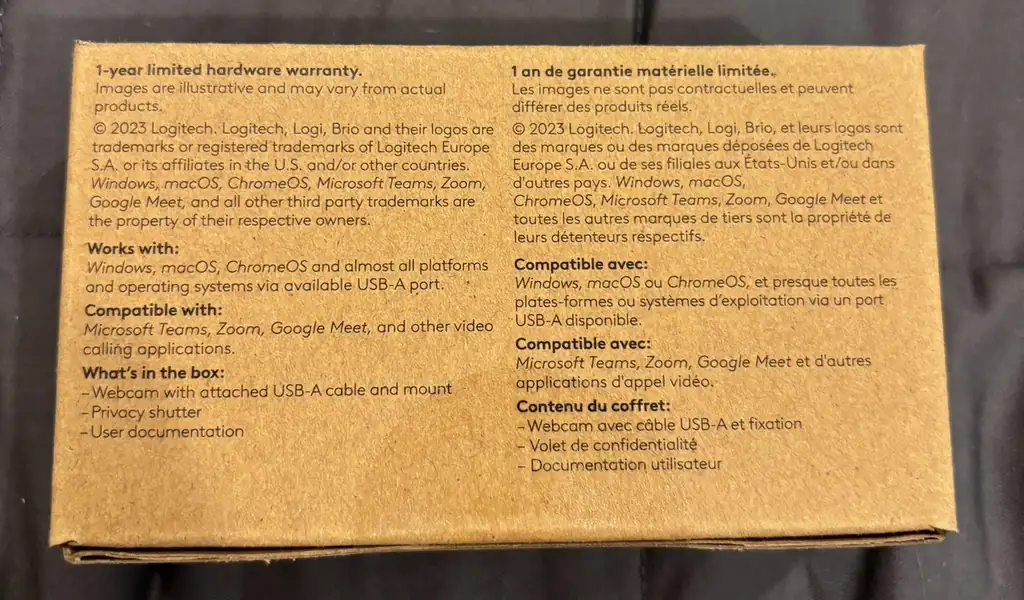
- Warranty duration is not stated in any retrieved source.
Verified specifications
| Model | BRIO 101 (Logitech). |
|---|---|
| Resolution/frame rate | 1080p (1920 × 1080) at 30 fps. |
| Lens | fixed focus; no autofocus. |
| Microphone | built-in single omnidirectional mic; usable for calls; picks up desk keyboard noise. |
| Privacy shutter | physical slide-over cover over the lens. |
| Connectivity | USB-A, UVC plug-and-play; no drivers required for basic use. |
| Optional software | Logi Tune / G HUB for image adjustment and RightLight override on Windows/macOS. |
| Compatibility | Zoom, Microsoft Teams, Google Meet, OBS, Nintendo Switch 2 GameChat. |
| Cable length | 7 ft (2 m), attached. |
| Mounting | universal mounting clip; manual tilt up/down. |
| Dimensions | 1.26 × 2.87 × 2.62 in (31.91 × 72.91 × 66.64 mm); weight 2.65 oz (75 g). |
| In the box | webcam with attached 7 ft (2 m) USB-A cable and user documentation. |
| Warranty | duration not stated in the retrieved sources; Logitech describes RMA replacement (new or refurbished at Logitech’s discretion), proof-of-purchase requirements, non-transferable coverage valid only in the country of purchase, and a replacement warranted for the remainder of the original period or 30 days, whichever is longer. |
Full research notes and sources
Which model this is
This page covers the consumer Logitech Brio 101 Full HD 1080p webcam, model BRIO 101. Do not confuse it with the Brio 100, Brio 105 (business), Brio 300, Brio 500 or MX Brio. Search results show two Amazon ASINs labeled Brio 101, B0GLDFSDS8 and B0BXGFFSL1, with no documented hardware difference between them. The retrieved quick-start guide is dated 2023. The Amazon listing is ASIN B0GLDFSDS8.
Image quality and focus
The camera records 1080p at 30 fps with fixed focus and no autofocus. Fixed focus means close-up objects may be soft. No field of view, sensor size, minimum focus distance or low-light rating was published in the retrieved documents, and no independent instrumented test data was retrieved.
Microphone, privacy and mounting
The built-in single omnidirectional mic is usable for most calls but is not noise-canceling and picks up desk keyboard noise; the Brio 300 adds dual noise-canceling mics. A physical slide-over shutter covers the lens. The universal clip mounts to laptops, external monitors and tripods, with manual tilt up and down. The attached cable is 7 ft (2 m) and USB-A only, so USB-C-only hosts need an adapter or dock.
Software and support
Basic use is UVC plug-and-play with no drivers; Logi Tune or G HUB on Windows and macOS adds image adjustment and RightLight override. Compatibility includes Zoom, Microsoft Teams, Google Meet, OBS and Nintendo Switch 2 GameChat. Logitech’s support page lists no downloads, FAQs, spare parts or videos for this model, and no spare parts are sold for it. Warranty duration was not stated in the retrieved quick-start guide, support page or warranty FAQ; Logitech’s Americas warranty process describes RMA replacement (new or refurbished at Logitech’s discretion), proof-of-purchase requirements, non-transferable coverage valid only in the country of purchase, and a replacement warranted for the remainder of the original period or 30 days, whichever is longer.
Is it worth it?
Buyers needing USB-C, autofocus or 60 fps should consider a higher tier. Power consumption and supply voltage are not published, and the device is USB-powered with no external power supply and no recurring consumables. No price was retrieved for the Logitech direct store page.
Sources
Manufacturer:
- Logitech BRIO 101 Quick Start Guide (PDF)
- Logitech BRIO 101 - Full HD 1080p Webcam Manual (ManualsLib)
- Getting Started - Brio 101 (Logitech Support)
- Warranty FAQ - Americas and Asia (Logitech Support)
Independent reviews:
Owner reports:
- No owner threads were retrieved in this research.