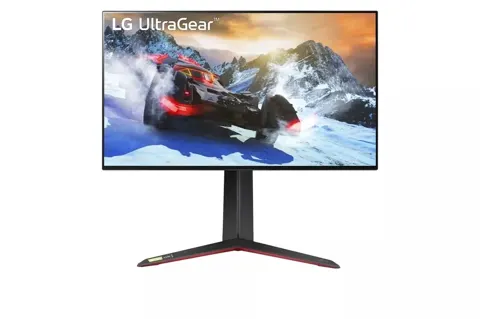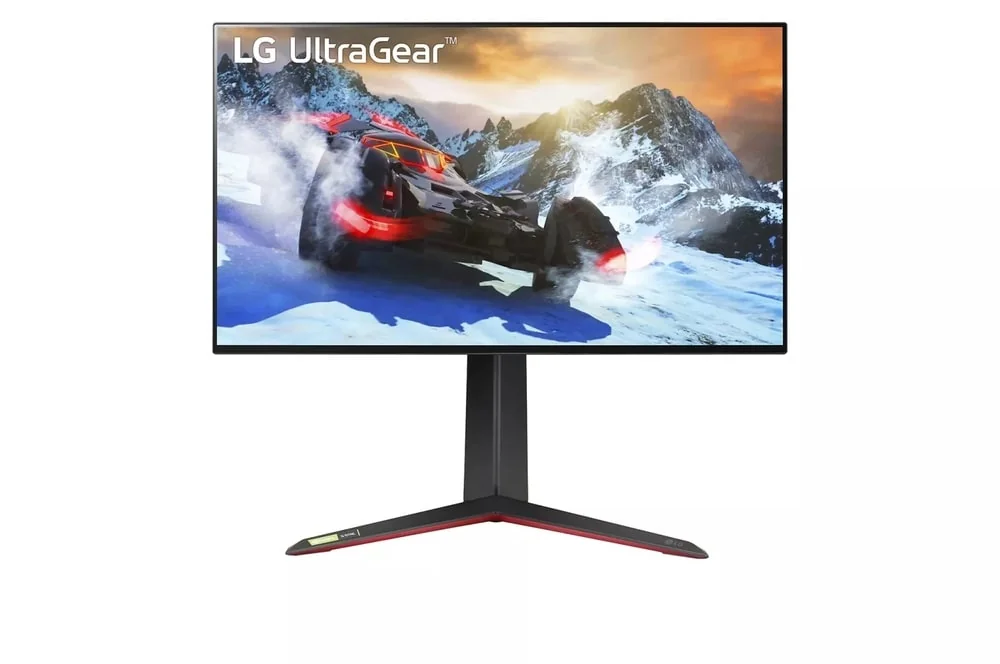
LG Ultragear 4K UHD 144Hz
By LG · Computer Monitors · Desk & Streaming Setup · More from LG
- 31.5 in screen size
- 4K UHD (3840 x 2160)
- 144Hz refresh rate
- 1ms (GtG) response time
- 400 cd/m2 brightness
Price not listed
- LGView at LG
- Best BuyView at Best Buy
- NeweggView at Newegg
- TargetView at Target
- AmazonView at Amazon (paid link)
More on eBay (1)
- eBayView at eBay
- eBay (used) eBay: used, open-box, refurbishedView at eBay (used)
Stores are listed in a fixed order, never by price or commission. Prices are snapshots. Check the current price with the store.
Summary
A 32-inch-class 4K IPS gaming monitor with up to 144Hz, HDMI 2.1, a USB hub and a height-and-pivot stand, aimed at PC players who want sharp text and accurate sRGB alongside gaming. Check availability and screen condition before buying: major US stores list it as no longer available new, and owners repeatedly report horizontal screen lines within months.
Strengths
- RTINGS tested this exact model and found low input lag with sharp motion at 144, 120 and 60Hz.
- 4K at about 140ppi gives sharp text and room for multitasking on a 31.5-inch panel.
- sRGB mode is accurate out of the box, so it works for image editing and office use as well as gaming.
- HDMI 2.1 handles 4K120 on PS5 and Xbox Series X|S with VRR where the console supports it.
- The stand gives 110mm of height adjustment and a 90° pivot, which most budget gaming screens skip.
- The on-screen menu covers black stabilizer, crosshair, FPS counter, joystick control, response-time settings and VRR controls.
Weaknesses
- One RTINGS test unit and several owners report horizontal lines or a loss of picture, from about 8 months to a little over two years in.
- No local dimming and low static contrast make the HDR10 badge mostly cosmetic.
- No USB-C, no KVM and no laptop charging; the USB hub needs a USB-B upstream cable.
- The stand has no swivel, so turning the screen toward someone means shifting the heavy base.
- RTINGS found disappointing reflections and darkened panel edges.
- 4K at 120 to 144 fps needs a capable GPU, and a lower-bandwidth chain may only manage 4K120 or 4K60.
Verified specifications
| Panel | 31.5-inch viewable (marketed as 32-inch) IPS LCD with LED backlight, native 3840×2160, 16:9, up to 144Hz, about 139.9 ppi. |
|---|---|
| Response time | LG advertises 1ms GtG; RTINGS measures fast, generally consistent motion response with some blur and overshoot. |
| Color | 95% typical DCI-P3 advertised, with an accurate out-of-the-box sRGB mode; VESA DisplayHDR 400. |
| HDR | HDR10 signal accepted, no local dimming, and RTINGS finds low static contrast and weak highlight separation. |
| Video ports | two HDMI 2.1, one DisplayPort 1.4 with DSC, and a four-pole 3.5mm headphone jack with DTS Headphone:X support. |
| USB hub | one USB 3.0 Type-B upstream and two USB 3.0 Type-A downstream; a USB-A-to-B cable is needed to expose them. |
| Stand | 110mm height adjustment, -5° to +15° tilt, 90° clockwise pivot, no swivel. |
| VESA | 100×100mm mount with four M4×10mm screws; LG bracket LSW149 listed as optional. |
| Dimensions | 713.9×611.2×278mm with the stand at full height, 713.9×428.2×54mm without it; 8.3kg (18.3lb) assembled, 6.0kg (13.2lb) panel only. |
| Power | 19V DC, 5.0A input, with a 110W external supply (ADS-120QL-19A-3, 19V DC/5.79A, LG part EAY63032212). |
| Power draw | 65W typical under LG’s full-white test condition, ≤0.5W in deep-sleep standby, ≤0.3W off. |
| Cables in the box | 1.8m DisplayPort cable EAD65185308, 1.8m HDMI 2.1 cable EAD65912803, 1.8m USB-A-to-B cable EAD65573101, power cord EAD62348835. |
| Audio | no integrated stereo speakers documented in the owner’s manual. |
| Warranty | one year parts and one year labor in the US. |
Full research notes and sources
Which model this is
This page covers the LG UltraGear 32GR93U-B, a flat 31.5-inch-class IPS gaming monitor with native 3840×2160 at up to 144Hz, HDMI 2.1, DisplayPort 1.4 with DSC, G-SYNC compatibility, FreeSync Premium, a USB 3.0 hub and a stand that adjusts height and pivots to portrait. It is not the 27GR93U-B, the 32GQ950-B or the older 32GQ750-B.
The factory timing table in the owner’s manual lists 3840×2160 at about 144.05Hz over HDMI in 2.1(PC) mode and over DisplayPort, so 4K144 from a compatible PC is real. Older retailer copy calling the set “4K HDMI120” describes the console format rather than a limit of the HDMI port.
Screen-line reports
This model carries an unusually well-grounded signal for screen lines. RTINGS bought a unit manufactured in June 2023, completed its tests, then saw lines on screen and intermittent failure to show a picture in April 2024. That is one actual device failure, not a measured failure rate, and no confirmed affected production batches or recall have surfaced.
Owners describe similar faults. In an r/Monitors thread from September 2024, a poster reported horizontal lines across the bottom two-thirds of the panel below 120Hz, and LG reportedly judged the unit not repairable. An r/LGUltraGearOfficial owner posted on May 2024 that horizontal artifacts appeared with only power connected and no video cable, while another participant in that thread reported a panel replacement on their own unit. An r/buildapc owner reported on August 2024 that repeated lower-panel lines showed up on a desktop PC, a PS5 and an HDMI TV box but not with a MacBook Pro; a service center found no defect after roughly 20 hours of testing, and the problem returned at home. That is a complex intermittent case, not proof that every such symptom is a dead LCD.
Best Buy owner accounts include a black line after about 1.5 years, a color-flicker failure at approximately 8 months, a screen failure just outside the one-year warranty, and new top horizontal lines after a little over two years. These are individual self-selected reports, so treat the risk as real and the rate as unknown.
If lines appear in the monitor’s own menu with every source disconnected, suspect the panel or logic board. If they only show at selected 60Hz, VRR or HDMI modes, test certified cables, drop the refresh rate, switch hosts and power-cycle before suspecting the panel. A lower refresh rate may change how the artifacts look without fixing anything. Do not open the panel or the mains supply.
HDR and dark-room contrast
VESA DisplayHDR 400 and HDR10 acceptance do not make this a high-end HDR panel. There is no local dimming, and RTINGS reports low static contrast, so dark scenes read as gray and bright specular highlights have little separation from the surroundings. This is not a mini-LED, FALD, quantum-dot or OLED screen.
Color is in better shape. LG rates the panel at 95% typical DCI-P3, and RTINGS found the sRGB mode unusually accurate without calibration, which makes the monitor usable for casual image editing and office work. Monitors Unboxed also bench-tested this exact monitor for response time, color, brightness and contrast.
Reflections are the other weak spot in RTINGS testing: the panel handles ambient light poorly and the edges darken. If the screen sits next to a strong window, or you want even black in a dark room, this is the wrong choice. The 4K sharpness does not compensate for washed-out blacks.
Ports, hub and ergonomics
Video connections are two HDMI 2.1 ports and one DisplayPort 1.4 port with DSC. Audio goes through a four-pole 3.5mm jack with DTS Headphone:X support; no built-in speakers are documented, so plan on external audio.
The USB hub is simple: one USB 3.0 Type-B upstream port and two USB 3.0 Type-A downstream ports, and the included USB-A-to-B 3.0 cable is required to reach the computer. There is no USB-C video input, no power delivery for a laptop, and no KVM that switches keyboard and mouse with the video source. Users running two computers would be better served by a monitor with KVM support.
The included stand adjusts height by 110mm, tilts -5° to +15° and pivots 90° clockwise into portrait. There is no swivel, so you move the base to turn the display toward someone. For mounting, the manual specifies a 100×100mm VESA pattern with four M4×10mm screws and lists LG bracket LSW149 as an option. Rotation has to be set inside Windows or macOS, since the monitor does not auto-pivot.
Running costs, parts and what it’s worth
There are no filters, batteries or mandatory subscriptions here, and LG’s software such as OnScreen Control and Calibration Studio carries no listed recurring fee. Electricity is the running cost: LG rates the monitor at 65W typical under its own full-white test, so 2,000 powered hours a year work out to 130kWh, or $26.00 a year at an assumed $0.20/kWh. Adding deep-sleep time of 6,760 hours at 0.5W brings the total to about $26.68 a year. That is a calculation from the manual’s figures, not a metered bill.
Parts are available but not cheap. LG Parts lists a genuine EAY63032212 power adapter at $151.95 (LG Parts, 2026); a third-party seller advertises an allegedly identical unit at $42.69, with authenticity unverified, so buy from LG or an authorized parts distributor. Reliable Parts lists the stand base assembly AAN30050801 at $90.85 on backorder, and the DisplayPort, HDMI, USB and power cord part codes without public prices. An installed LCD replacement has no verified price and is qualified-service work only.
Availability is the bigger problem. The LG US catalog still shows $599.99 for the model (LG US, 2026) but sends buyers to a store finder rather than an in-stock checkout. Best Buy shows a $119.99 clearance figure on its review page but marks it unavailable, and its product page says the monitor is no longer available new. B&H Photo, an authorized dealer, says no longer available. Newegg’s first-party listing is sold out, with third-party sellers asking from about $1,056.37 and one at $1,119.90 (Newegg, 2026). Those asking prices are not normal new market value.
For a confirmed authorized-new unit with full LG warranty, the thresholds are $250 or less as exceptional, $251–$349 as worthwhile given the panel risk, $350–$449 only for a buyer who specifically wants this panel’s response and sRGB accuracy, and $450–$599 as unattractive while 32-inch 4K alternatives sell for less. Anything over $600 is poor value. Used, a $150–$200 target with verified working 60Hz and 144Hz over both DisplayPort and HDMI plus a dependable return window is the conservative choice, and secondhand warranty terms rarely carry over. If you have the money and want a current alternative, the MSI MAG 321CUP 31.5-inch curved VA at 160Hz was listed at $399.97 (Micro Center, 2026) and the MAG 321UP 31.5-inch QD-OLED at 165Hz at $649.99 (Micro Center, 2026), while the Gigabyte M32U adds USB-C, a built-in KVM and swivel adjustment.
Sources
Manufacturer:
- LG UltraGear 32GR93U-B product page and specifications
- LG 32GR93U owner’s manual PDF, electrical requirements, 4K144 timings and USB hub
- LG USA support for 32GR93U-B.AUS, one-year parts and labor warranty
- MonitorsLib LG 32GR93U service sheet with adapter and cable part numbers
Independent reviews:
Owner reports:
- r/Monitors thread on horizontal lines after eight months
- r/LGUltraGearOfficial thread on lines with no video input connected
- r/buildapc thread on intermittent lines across PC and PS5
- r/LGUltraGearOfficial thread on lines across multiple devices
Parts and stores:
- LG Parts genuine EAY63032212 monitor power adapter
- Reliable Parts catalog for 32GR93U-B base assemblies and cables
- Best Buy product page showing the monitor as no longer available new
- B&H Photo listing for the 32GR93U-B, no longer available
- Newegg listing for the 32GR93U-B, first-party sold out
- Micro Center listing for the MSI MAG 321CUP 31.5-inch 4K 160Hz
- Micro Center listing for the MSI MAG 321UP 31.5-inch 4K 165Hz QD-OLED