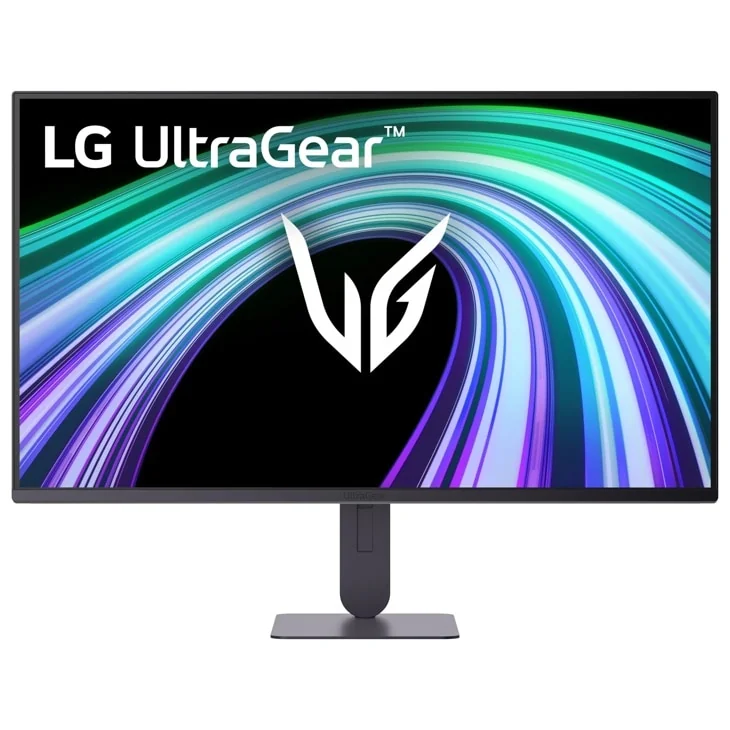
LG UltraGear 27G414B-B
By LG · Gaming Monitors · Audio & Electronics
- 27-inch FHD IPS panel
- 144Hz refresh rate
- 1ms response time
- G-Sync
Lowest price seen
$129.96
from $129.96 at Woodruffappliance · Checked Oct 3, 2026
- Woodruffappliance $129.96View at Woodruffappliance
- LGView at LG
- NeweggView at Newegg
- eBayView at eBay
- B&H PhotoView at B&H Photo
- NeutronUSAView at NeutronUSA
- eBay (used) eBay: used, open-box, refurbishedView at eBay (used)
- AmazonView at Amazon
Prices are snapshots. Check the current price with the store.
Summary
A 27-inch 1080p IPS gaming monitor with a native 144 Hz refresh, a height-adjustable stand and built-in speakers. The headline 1 ms is Motion Blur Reduction, not pixel response — LG rates that at 5 ms GtG — and 1080p across 27 inches is about 81.6 PPI, much softer than a QHD screen of the same size.
Strengths
- 144 Hz IPS with G-SYNC Compatible and FreeSync, a real step up from basic office panels.
- A height-adjustable stand with 80 mm of travel, which many budget gaming monitors leave out.
- Built-in 2 W speakers and VESA 100 × 100 mounting cover desk and monitor-arm setups.
- DisplayPort 1.4 and HDR10 input support handle modern PCs and consoles.
- LG US support publishes the owner manual, quick guide and a Windows driver for this model.
- The brand’s one-year US parts-and-labor warranty backs the panel.
Weaknesses
- The advertised 1 ms is Motion Blur Reduction; LG’s own pixel-response figure is 5 ms GtG at Faster.
- 1080p across 27 inches is about 81.6 PPI, visibly softer for text than a 27-inch QHD panel at about 108.8 PPI.
- HDR10 runs on a 250 cd/m² panel with no local dimming, so it is compatibility rather than impact.
- The stand only tilts and changes height; retailer tables that list pivot or swivel are wrong.
- One HDMI and one DisplayPort is thin for several PCs or consoles, and there is no USB hub.
- No independent lab test exists yet, and retailer review pools mix 24-inch and 27-inch variants.
Verified specifications
| Display | 27-inch flat IPS, anti-glare, 16:9. |
|---|---|
| Native resolution | 1920 × 1080 (FHD). |
| Pixel pitch | 0.3114 × 0.3114 mm; derived density about 81.6 PPI. |
| Refresh rate | 144 Hz native. |
| Motion response | 1 ms MBR (Motion Blur Reduction), not pixel response. |
| Pixel response | 5 ms GtG at the Faster overdrive setting. |
| Brightness | 250 cd/m² typical, 200 cd/m² minimum. |
| Contrast | 1500:1 typical, 1050:1 minimum. |
| Color | sRGB 99% typical, 95% minimum; 16.7 million colors. |
| HDR | HDR10 input support; no local dimming documented. |
| Adaptive sync | NVIDIA G-SYNC Compatible and AMD FreeSync with VRR. |
| Gaming features | Dynamic Action Sync, Black Stabilizer, Crosshair, FPS Counter and Motion Blur Reduction. |
| Ports | one HDMI, one DisplayPort 1.4 and one audio-out jack; no USB hub or USB-C video. |
| Audio | two 2 W built-in speakers. |
| Stand adjustment | 80 mm height travel and −5° to +15° tilt; no pivot and no swivel. |
| Mount | VESA 100 × 100 mm. |
| Dimensions | 611.6 × 467.4 × 220 mm with stand; 611.6 × 357.7 × 42.5 mm without. |
| Weight | 4.3 kg (about 9.5 lb) with stand; 3.2 kg (about 7.1 lb) without; 5.7 kg (about 12.6 lb) shipped. |
| Power | external adapter, 100–240 V, about 20 W on, under 0.5 W in sleep and under 0.3 W off. |
| Warranty | 1 year parts and 1 year labor in the United States. |
| In the box | a 1.5 m HDMI cable, power adapter and cable, and documentation. |
Full research notes and sources
Pixel response and the 1 ms claim
LG’s exact-model specification does not say the panel has a 1 ms GtG response. It lists 1 ms MBR, or Motion Blur Reduction, and 5 ms GtG at the Faster setting. MBR can sharpen perceived motion under the right conditions, but it is a different measurement from pixel transition speed. Any listing that turns this into a blanket 1 ms response overstates the hardware.
Sharpness: 1080p at 27 inches
1920 × 1080 spread across 27 inches works out to about 81.6 pixels per inch. Games stay usable, especially from farther back, but desktop text and fine detail are clearly less crisp than a 27-inch QHD screen at about 108.8 PPI. That tradeoff used to be easy to accept when QHD gaming monitors cost much more; now the price gap is small enough that a buyer should compare before choosing.
HDR, ports and setup
The monitor accepts HDR10 and LG advertises sRGB 99%, but the panel is rated at only 250 cd/m² typical with no documented local dimming. That is signal compatibility, not convincing HDR. Connectivity is one HDMI, one DisplayPort 1.4 and one audio-out jack, so a second console or PC may need a switch. The physical HDMI version is inconsistent across sources — B&H labels the port HDMI 2.0 while an LG regional graphic says 2.1 — so until LG US publishes a clear port table, HDMI 2.1 should not be promised.
Stand and daily use
Height adjustment is real at 80 mm, and the panel tilts from −5° to +15°. There is no pivot and no swivel, even though several retailer spec tables list both. VESA 100 × 100 makes a monitor arm an easy upgrade if full positioning matters. Setup is light: the stand and cables are the only assembly, and there are no consumables to replace. LG Switch adds desktop layout controls, but it is software rather than a hardware KVM or USB-C dock.
Evidence and owner reports
This is a 2026 model with no credible instrumented test from a monitor lab yet, so the brightness, contrast, response and HDR figures remain manufacturer claims rather than measured results. Retail review pools are also contaminated by pooled variants: one retailer combines 24-inch and 27-inch choices and carries reviews that predate the launch, and a Walmart 27-inch page includes a review discussing a 24-inch screen. One 2026 B&H review of two 27-inch units describes a stable picture, quick refresh and good value for home-office use, which is encouraging but a single report. One hands-on article found the height adjustment useful and the speakers adequate, and also reported base wobble; treat that as a caution signal rather than a recurring defect. No exact-model Reddit or forum thread shows a repeatable pixel, VRR, power or backlight failure pattern, and the model is too new for multi-year reliability data.
Running costs
There are no scheduled consumables or subscriptions, so electricity is the only running cost. At LG’s roughly 20 W typical on-mode figure, four hours of use a day is about 29.2 kWh a year; at the U.S. July 2026 residential average of 18.31 cents/kWh that is about $5.35 a year for active use, plus roughly $0.67 a year if the other 20 hours sit at the 0.5 W sleep figure. A reasonable upper estimate is about $6 a year before local utility rates. No US replacement part numbers or prices surfaced for the external adapter, stand or panel, so those are service events rather than routine purchases.
Is it worth it?
LG’s US catalog listed it at $159.99, while B&H and Walmart marketplace listings sat at $129.99 and a Newegg marketplace listing at about $179.99 in September 2026; Micro Center was around $159.99. At $115 or less it is a strong buy for someone who wants 27 inches, height adjustment, speakers and 144 Hz from a mainstream brand. From about $116 to $135 it is fair, especially if 1080p is intentional for a console and PC. Above roughly $136 the resolution compromise gets hard to justify, because QHD alternatives approach the same price: Acer sells the Nitro KG271U N3 direct at $159.99 with a 27-inch 2560 × 1440 IPS panel up to 180 Hz, AOC’s Q27G41ZE is about $159.99, and LG’s own QHD 200 Hz 27G61ZB-B is $199.99. The 24-inch sibling, the 24G414B-B, was listed at $109.99 and is sharper at the same resolution.
Which model this is
This page covers the LG UltraGear G4 27G414B-B, US support suffix 27G414B-B.AUS, a 27-inch flat IPS monitor launched in 2026. Do not merge evidence from the 24G414B-B, 27G411B-B, 27G410A, 27G523B-B or 27G550B-B, and treat pooled retailer ratings that mix the 24-inch and 27-inch sizes as family data rather than this model’s record.
The listing is ASIN B0GX78512M.
Sources
Manufacturer:
- LG UltraGear 27G414B-B product page
- LG US support page for 27G414B-B.AUS, manuals, driver and warranty
- LG UK specifications for the 27G414B-B
- LG Canada specifications for the 27G414B-B
- LG Japan product page for the 27G414B-B
- LG Japan UltraGear launch release and specification table, May 2026 (PDF)
- LG Hong Kong product page for the 27G414B-B
Independent reviews:
Owner reports:
Parts and stores: