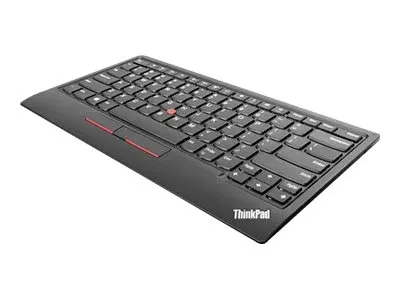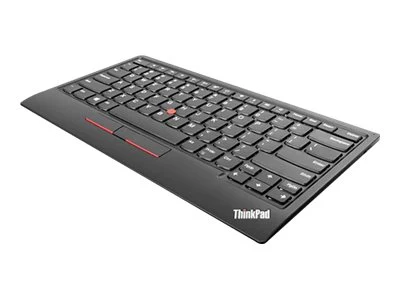
Lenovo ThinkPad TrackPoint Keyboard II
By Lenovo · Membrane Keyboards · Home & Workspace · More from Lenovo
Compare all Membrane Keyboards side by side →
- Scissor-switch membrane keys with 1.8 mm travel
- 84-key compact layout (no numpad)
- Bluetooth 5.0 and 2.4 GHz wireless (USB-A dongle)
- No backlighting
- Integrated TrackPoint pointing stick with three mouse buttons
Lowest price seen
$110.59
from $110.59 at Jtfcorp · Checked Nov 24, 2026
- Jtfcorp $110.59View at Jtfcorp
- Walmartfree shipping $35+ · store policyView at Walmart
- Office DepotView at Office Depot
- LenovoView at Lenovo
- AmazonView at Amazon (paid link)
- GovconnectionView at Govconnection
- CdwgView at Cdwg
More on eBay (1)
- eBayView at eBay
- eBay (used) eBay: used, open-box, refurbishedView at eBay (used)
Stores with a price are sorted lowest first; commission never changes the order. Prices are snapshots. Check the current price with the store.
Summary
The Lenovo ThinkPad TrackPoint Keyboard II is a compact 84-key wireless keyboard that brings the ThinkPad laptop typing layout, including the red TrackPoint and three buttons, to a stand-alone board. It suits buyers who want that exact feel and a built-in pointer in a small footprint; the trade-offs are no backlighting, membrane switches, and no official Mac or Linux support.
Size in context

1.4 cm · 0.5 in (W) × 30.5 cm · 12.0 in (D) × 16.5 cm · 6.5 in (H) · Drawn to scale from the maker's stated dimensions, next to everyday objects.
Strengths
- Familiar ThinkPad typing feel, including dish-shaped keycaps; PCMag found no meaningful difference versus a ThinkPad T470 keyboard.
- TrackPoint with three buttons works as a built-in pointer, useful without a mouse and in tight spaces.
- Dual-device wireless: Bluetooth plus a 2.4 GHz nano receiver, switched with the rear slider.
- Fast Windows setup via Swift Pair on Windows 10 1803 or later; Android 8+ supported.
- Compact footprint that is easy to carry and stow.
Weaknesses
- Membrane switches with no mechanical option; no dedicated media row or wrist rest.
- No official macOS or Linux support.
- Fn key cannot be swapped with Ctrl.
- Battery life is a manufacturer claim; no independent runtime test was published.
- Value weakens above roughly $100 against larger mechanical or ergonomic boards.
Verified specifications
| 84 keys; compact layout without a numeric keypad. | |
| Membrane (scissor-style) key switches; no key backlighting. | |
| Wireless over Bluetooth and 2.4 GHz via a USB Type-A nano receiver; up to two devices connected at once. | |
| TrackPoint pointing stick with three buttons (left click, right click, scroll) beneath the space bar. | |
| Layout | inverted-T arrow keys; dedicated Home, End, Insert, Page Up, Page Down keys. |
|---|---|
| ThinkPad-style function keys | brightness, volume, mute, mic-mute, Windows Project, Notifications, Settings, Bluetooth, on-screen keyboard; customizable bonus F12 key; Fn key at lower left, left of Ctrl. |
| Platforms | Windows (Swift Pair on Windows 10 version 1803 or later), Android 8 or newer; no official macOS or Linux support. |
| Rechargeable internal battery; USB-C charging with the included USB-C-to-USB-A cable (charge-only; all data connections are wireless). | |
| Lenovo claims up to one year of typical use per charge; no independent runtime test was published. | |
| Two tilting feet on the underside adjust the typing angle. | |
| Dimensions | 0.54 × 12 × 6.5 in (HWD). |
| One-year warranty. | |
| Optional Windows driver | pointer-speed control, remapping of the bonus F12 key, ThinkPad Preferred Scrolling. |
Full research notes and sources
Which model this is
This is the Lenovo ThinkPad TrackPoint Keyboard II, US English, part number 4Y40X49493, sold under Lenovo support accessory ID ACC500164. It is the stand-alone keyboard that carries the ThinkPad laptop layout and TrackPoint, not the original TrackPoint Keyboard and not a ThinkPad laptop keyboard. ASIN B08BWQXZYL.
Typing and pointing
The TrackPoint is a real pointing stick with three buttons under the space bar, so the board works without a mouse in tight spaces or on a couch. Media functions share the function keys, there is no dedicated media row, no wrist rest, and no numeric keypad. The Fn key sits left of Ctrl and cannot be swapped with it. Two tilting feet on the underside change the typing angle; the reviewer preferred them folded for a shallower, laptop-like posture.
Connectivity and setup
It ships with a USB Type-A nano receiver for 2.4 GHz wireless and also supports Bluetooth, holding two connections at once with a rear slider to switch. On Windows 10 version 1803 or later, Swift Pair makes Bluetooth setup quick. A rear OS selector switches some function keys to Android shortcuts, with Android 8 and newer supported. There is no official macOS or Linux support. The optional Windows driver adds pointer-speed control, remapping of the bonus F12 key, and ThinkPad Preferred Scrolling. The included USB-C-to-USB-A cable is charge-only; all data traffic is wireless.
Battery and charging
An internal rechargeable battery charges over USB-C. Lenovo claims up to one year of typical use per charge, but no independent runtime test was published, so treat that figure as a manufacturer claim. Whether the keyboard can be used while charging was not confirmed.
Is it worth it?
At the 2020 MSRP of $85.99, the board made sense for a buyer who already liked ThinkPad laptops and wanted that layout plus a TrackPoint in a stand-alone form. Above roughly $100, larger mechanical and ergonomic keyboards offer more travel, stability, and dedicated media keys. The strongest argument for paying up remains the TrackPoint plus the ThinkPad key feel and dual-device support.
Sources
Manufacturer:
- Lenovo US store — ThinkPad TrackPoint Keyboard II, US English (part number 4Y40X49493)
- Lenovo Support — ThinkPad TrackPoint Keyboard II, Overview and Service Parts (ACC500164)
- Wayback Machine archive of the Lenovo Support ACC500164 page (July 15, 2026)
Independent reviews:
Owner reports:
- No owner-report threads for this exact model were located.