Mechanical Keyboards
Keychron Q3 Max — research dossier
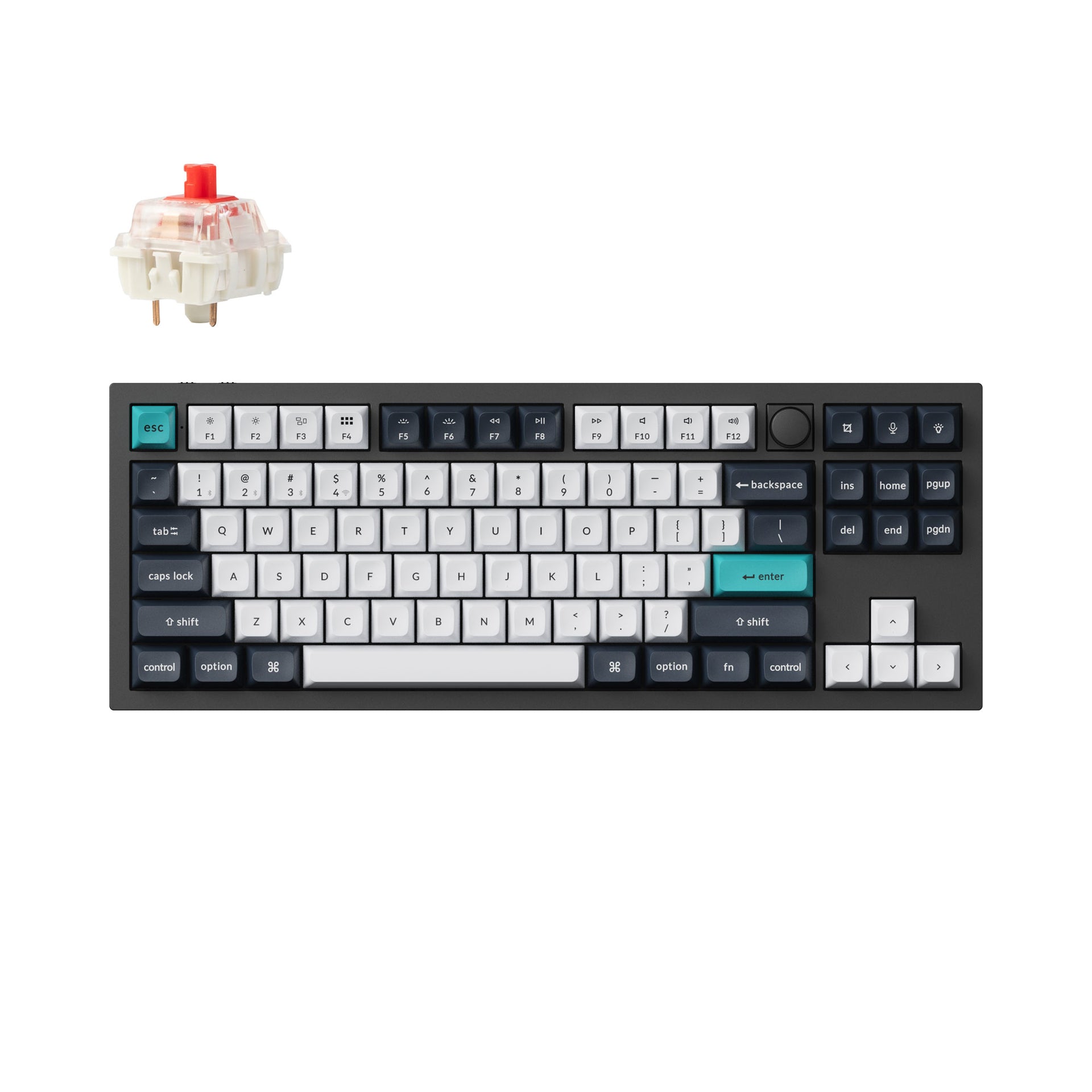
The Keychron Q3 Max is a premium 80% TKL mechanical keyboard built around a CNC-machined aluminum case, double-gasket mounting, hot-swappable MX-style sockets, QMK/Keychron Launcher programmability, and three connection paths: 2.4 GHz, Bluetooth, and USB-C. Its strongest case is the unusually complete combination of enthusiast-grade construction and customization with genuinely useful wireless connectivity.
Where to buy / check price
We don’t show live prices — open a store to check its current price and terms.
Full review
Keychron Q3 Max — research dossier
Checked: 2026-09-22 Seed ID: keychron-q3-max Category: mechanical keyboards Research version: 1
Summary
The Keychron Q3 Max is a premium 80% TKL mechanical keyboard built around a CNC-machined aluminum case, double-gasket mounting, hot-swappable MX-style sockets, QMK/Keychron Launcher programmability, and three connection paths: 2.4 GHz, Bluetooth, and USB-C. Its strongest case is the unusually complete combination of enthusiast-grade construction and customization with genuinely useful wireless connectivity.
The main reliability caution is more important than ordinary subjective keyboard complaints. Multiple Q3 Max owners across 2024–2026 report double-registering, missed keystrokes, or intermittent wireless/input problems. Keychron's firmware history added debounce controls and later raised ANSI debounce to 50, while wireless firmware releases fixed macOS low-power delay, occasional wireless key dropout, pairing/power-on faults and related issues. One Keychron-hosted owner review says switch swaps and firmware reflashing did not solve repeated/missed inputs, but a replacement PCB did. This does not establish a population failure rate, but it is a real recurring signal.
Verified specifications
- Layout: 80% / TKL, 87-key class with rotary knob on current Q3 Max configurations.
- Case: 6063 aluminum, CNC-machined and finished; full-metal construction.
- Mount: double-gasket design with silicone isolation between case halves plus plate gaskets.
- Plate: polycarbonate (PC).
- Acoustic stack: Keychron lists sound-absorbing foam, IXPE foam, PET film, latex bottom pad, bottom-case acoustic foam and bottom-case PET film for Q Max.
- Switches: Gateron Jupiter Red, Brown, or Banana on fully assembled versions; factory pre-lubed; Keychron claims up to 80 million keystrokes.
- Switch sockets: hot-swappable for most 3-pin and 5-pin MX-style switches.
- Stabilizers: PCB-mounted screw-in stabilizers.
- Keycaps: KSA double-shot PBT option with non-shine-through top legends; OSA side-printed double-shot PBT option is also sold.
- Backlight: south-facing RGB; 22 built-in lighting types plus further control through Launcher.
- MCU: ARM Cortex-M4 STM32F402 with 256 KB flash.- Connectivity: 2.4 GHz wireless, Bluetooth, and USB-C wired.
- Polling rate: 1000 Hz over 2.4 GHz and wired; 90 Hz over Bluetooth.
- Wireless pairing: three Bluetooth channels plus the 2.4 GHz receiver.
- Battery: 4000 mAh rechargeable Li-polymer.
- Official battery claim: up to 180 hours with backlight off; up to 100 hours with RGB at lowest brightness.
- Official charge time: around 5 hours.
- N-key rollover: listed as supported in wireless and wired modes.
- OS support: macOS, Windows, Linux.
- Firmware/customization: QMK family firmware plus Keychron Launcher/VIA-compatible keymap support. Keychron's web Launcher requires wired mode for configuration/firmware operations.
- Current ANSI keyboard firmware listed by Keychron: v1.1.1, updated 2025-04-23; it changed debounce time to 50. v1.1.0 added debounce configuration, LKP, per-key/mixed RGB, wireless backlight-off control, and Bluetooth sleep-timer adjustment.
- Current shared Max-series wireless module firmware listed by Keychron: v0.2.4, updated 2026-03-12. Earlier v0.2.1 fixed macOS Bluetooth compatibility and occasional low-power input delay; v0.2.0 fixed occasional wireless key dropout; v0.2.2 fixed pairing/power-on faults and states that Bluetooth was upgraded to 5.2.
Dimensions, weight, ergonomics and maintenance
- Current US/ANSI product page: 365 × 137 mm.
- Front case height: 19.7 mm without keycaps.
- Rear case height: 32.6 mm without keycaps.
- Feet height: 2.7 mm.
- Fixed typing angle: 5.2°.
- Current US/ANSI official weight: 1770 g ± 10 g for fully assembled.
- Important conflict: Keychron's ISO page states 2045 g ± 10 g, while PC Gamer reports 2.045 kg and Tom's Guide 4.5 lb. Do not publish one universal weight without variant qualification.
- There are no flip-out height feet for a second typing angle; Tom's Guide specifically flags lack of height adjustment.
- The board is high-profile. A wrist rest may help some users, but that is preference rather than a defect.
- Fully assembled configuration includes the case/PCB/PC plate, switches and keycaps including Mac and Windows caps. Keychron's box image also shows cable/adapter, receiver/accessories and service tools; future publication should use the current box image/manual rather than invent accessory counts.
- Keychron documents disassembly and plate replacement. The board is intentionally serviceable, but warranty treatment depends on cause of failure.
Strengths
- Exceptional chassis/build quality. PC Gamer, Tom's Guide, PCWorld and owner reports converge on unusually solid construction.
- Excellent stock acoustics for a mass-market board. Double-gasket construction plus multiple foam/film layers are repeatedly praised.
- Strong typing experience out of the box. Factory-lubed Jupiter switches, PBT keycaps and PC plate make it much closer to an enthusiast build than a normal gaming keyboard.4. Real low-latency wireless path.
- Broad customization: hot-swap sockets, QMK, Launcher/VIA keymaps, screw-in stabilizers and replaceable parts.
- Cross-platform and multi-device: macOS/Windows/Linux, three Bluetooth channels, 2.4 GHz and wired mode.
- Battery is respectable. PC Gamer used it roughly two weeks and charged once; Tom's Guide reported roughly three weeks. These are reviewer experiences, not standardized battery tests. 8.
Weaknesses / limitations
1. 2. Very heavy: depending on variant/source, roughly 1.77–2.05 kg. Excellent desk stability, poor portability. 3. Fixed typing angle / no height adjustment. 4. Tall keycap profile can be polarizing. Tom's Guide liked the feel but recorded lower-than-usual typing accuracy in its test and attributed part of that to the tall caps. 5. Bluetooth is not the performance mode: official polling is only 90 Hz versus 1000 Hz wired/2.4 GHz. 6. Small-sample QC/reliability concerns: repeated-input, missed-input, DOA-key and intermittent wireless reports recur across owner sources. The rate cannot be quantified. 7. Warranty is parts-oriented, not automatic whole-unit replacement. For Q Max manufacturing defects, Keychron says it may replace only the defective part. 8. Firmware ecosystem requires care. Keychron warns not to flash firmware if everything works because an incorrect update can damage the keyboard. 9. Stock stabilizers are not guaranteed perfect. PCWorld's Q Max sample had significant Backspace rattle while the other stabilized keys were better. 10. No dedicated gaming-profile ecosystem/rapid-trigger features; this is an enthusiast mechanical keyboard that also games well, not a Hall-effect esports board.
Recurring praise / user experience
- The most consistent praise is physical feel: heavy aluminum body, satisfying switch feel, stable desk presence and refined acoustics.
- Multiple users coming from mainstream gaming boards describe a large jump in typing quality.
- Gateron Jupiter Banana gets strong praise from users who like an early tactile bump; Red is the lighter option for gaming.
- Owners value that the board works without proprietary desktop software and remains deeply remappable.
- Positive 2.4 GHz reliability reports exist, including a 2024 owner who reported no wireless issues and tiny Best Buy verified samples. They do not cancel the negative reports.
Recurring complaints / caution signals
- Double-register / missed keystrokes: Q3 Max Reddit threads in March and May 2024 describe spacebar and other keys double-registering. A 2026 owner reported double characters after six months, and another returned the board for the same behavior.
- Firmware/input behavior changed over time: Q3 Max ANSI v1.1.1 changed debounce to 50. Other Max-series changelogs explicitly mention fixes for double presses caused by Snap Action; Q3 Max's own entry does not claim that every double-input case is fixed.- Bluetooth/low-power latency: a 2026 Q3 Max Mac owner described wake/reconnect delay and queued keystrokes. Keychron wireless firmware v0.2.1 specifically says it improved occasional low-power input delay on macOS.
- Wireless module history shows real fixes: v0.2.0 fixed occasional key dropout; v0.2.2 fixed flash-memory errors that could prevent power-on/pairing and repeated pairing failures on older macOS.
- Battery readout behavior is not perfectly intuitive; community users report Fn+B/charging-state confusion, and official wireless firmware has fixed battery-indicator behavior.
Reliability and maintenance
There is enough evidence to say the Q3 Max has a recurring input/QC caution signal, but not enough evidence to estimate a failure percentage. Positive professional reviews and many satisfied owners show that the model is not broadly unusable.
Practical troubleshooting order for an affected unit: test wired versus 2.4 GHz versus Bluetooth; test a known-good switch in the affected key; factory reset; check exact keyboard firmware, wireless-module firmware and receiver firmware against Keychron's model-specific instructions; only then treat the problem as hardware. Do not flash firmware casually—Keychron explicitly warns against updating a working board.
Warranty: Keychron states a 12-month global keyboard warranty. For Q Max manufacturing defects, the published policy says Keychron may replace defective parts rather than the entire keyboard. Damage caused by improper modification/installation is excluded from free service. This is a meaningful ownership consideration because service may involve replacing a PCB or other component yourself.
Checked 2026-09-22:
Editorial value bands:
Unless the buyer already owns preferred switches and keycaps, assembled is usually better value because the Jupiter switches and PBT caps are not throwaway parts.
Quality is genuinely premium; value is conditional. A buyer who simply needs a reliable wireless mechanical keyboard can get most practical benefit for much less.
Buy from a channel with an easy return window and thoroughly test all keys and all three connection modes early.## Source conflicts / discrepancies 1. Weight — major unresolved conflict. Current US/ANSI official page: 1770 g ± 10 g. Keychron ISO page: 2045 g ± 10 g. PC Gamer: 2.045 kg; Tom's Guide: 4.5 lb. This may be variant/revision/layout-specific. 2. Bluetooth version. Current product spec says Bluetooth 5.1. Preserve both. 3. Battery life. Keychron claims up to 180 h backlight-off / 100 h RGB at lowest brightness; professional real-use reports are expressed as roughly weeks, not standardized hours. 4. Double-input root cause. Some community replies blame switches; another owner swapped switches and reflashed firmware without success, then resolved the issue with a replacement PCB. Firmware changelogs also changed debounce. Evidence supports multiple possible causes. 5. Acoustic-layer count. Marketing/review wording varies (“four layers,” “seven layers,” or named foam/film layers). Use the named official materials rather than a single universal count.
Unanswered questions
- What exact hardware/revision difference explains the 1770 g versus 2045 g weight split?
- Does wireless firmware 0.2.2's “Bluetooth 5.2” wording change effective Bluetooth version for all original Q3 Max hardware?
- What percentage of Q3 Max units experience double/missed-input faults? Public sources provide no denominator.
- Is there a later Q3 Max ANSI firmware than v1.1.1 not yet reflected on Keychron's firmware index?
- How much battery runtime does the exact Q3 Max achieve under controlled 2.4 GHz + moderate/full RGB use?
- Are recent production batches using a revised PCB/switch/socket design that reduces the input complaints reported from 2024–2026?
Short-card summary
Keychron Q3 Max — premium TKL, excellent feel, but inspect reliability early. The board is exceptionally solid and widely praised for typing feel and sound. Main downsides: very heavy, no height adjustment, premium price, and a recurring owner signal around double/missed keystrokes and wireless input behavior.
The Q3 Max is easiest to understand as a custom-keyboard-style build that happens to ship finished and wireless. The case is CNC-machined 6063 aluminum, the plate is polycarbonate, the PCB accepts ordinary 3-pin and 5-pin MX-style switches, the stabilizers screw into the PCB, and the board is packed with foam/film isolation. That is why it feels and sounds much closer to a hobbyist build than to a normal plastic gaming keyboard.
The wireless side is unusually complete. Wired and 2.4 GHz both run at a stated 1000 Hz polling rate, while Bluetooth drops to 90 Hz. Bluetooth is better treated as the multi-device office/mobile mode: it can pair to three hosts, but it is not the performance path.
The stock typing experience is one of the biggest strengths. Gateron Jupiter switches are pre-lubed, the PC plate avoids the metallic hardness/ping that can come from a stiff metal plate, and the double-gasket/acoustic stack removes much of the hollow sound of older mainstream boards. Red switches are the lighter choice; Brown and Banana add progressively more tactile feedback. If none suit you, the board is hot-swappable.
The physical excess is also the downside. It is excellent if it lives permanently on a desk and poor for travel. Tall KSA caps can also take adjustment, although Keychron offers a side-printed OSA option.Battery life is good but should not be read from marketing without context. Keychron says up to 180 hours with lighting off and 100 hours with RGB at minimum brightness. PC Gamer went roughly two weeks and charged once; Tom's Guide reported around three weeks. RGB brightness, sleep settings and Bluetooth versus 2.4 GHz can change runtime substantially.
The important caveat is reliability. There are multiple Q3 Max reports of keys registering twice or failing to register, including threads in 2024 and owner comments in 2026. This is not enough to call the model broadly defective, and plenty of users report trouble-free operation, but the complaints are too repetitive to hide. One owner report hosted by Keychron says swapping switches and reflashing firmware did not help; Keychron eventually supplied a replacement PCB and the problem stopped. Keychron's own firmware history added debounce controls, changed ANSI debounce to 50, and released wireless fixes for low-power delay, key dropouts and pairing/power faults. Evidence points to more than one possible cause.
That makes purchase channel matter. Buy it somewhere with a straightforward return period, test every key repeatedly, test wired/2.4 GHz/Bluetooth, and update firmware only if you actually have a documented issue—Keychron itself warns against flashing a working board unnecessarily.
The honest verdict is not “best keyboard for everyone.” It is a very complete premium TKL with outstanding materials and typing feel, paired with a reliability signal that a detailed review should disclose.
Sources checked (2026-09-22)
- Keychron Q3 Max official US/ANSI page — https://www.keychron.com/products/keychron-q3-max-qmk-via-wireless-custom-mechanical-keyboard
- Keychron Q3 Max official ISO page — https://www.keychron.com/collections/tkl-keyboard/products/keychron-q3-max-qmk-via-wireless-custom-mechanical-keyboard-iso-layout-collection
- Keychron Q/Q Pro/Q Max firmware index — https://www.keychron.com/pages/firmware-and-json-files-of-the-keychron-qmk-keyboards
- Keychron Max-series Bluetooth/2.4 GHz firmware — https://www.keychron.com/pages/keychron-v-max-q-max-k-max-series-bluetooth-firmware
- Keychron Q3 Max user guide hub — https://www.keychron.com/pages/keychron-q3-max-user-guide
- Keychron warranty policy — https://www.keychron.com/pages/warranty
- Keychron help: 12-month global warranty — https://help-center.keychron.com/en-us/article/360021443594-how-long-is-the-keyboard-warranty-for 8. 9. 10. 11.
- Reddit r/Keychron double space press — https://www.reddit.com/r/Keychron/comments/1ba9vxy/
- Reddit r/Keychron double-registering keys — https://www.reddit.com/r/Keychron/comments/1cqqcr0/
- Reddit r/Keychron 2026 reliability discussion — https://www.reddit.com/r/Keychron/comments/1vhb0xq/
- Reddit r/Keychron Bluetooth/low-power delay — https://www.reddit.com/r/Keychron/comments/1q6w56x/
- Reddit r/MechanicalKeyboards owner long-form experience — https://www.reddit.com/r/MechanicalKeyboards/comments/1i23sgr/ 17. 18.
Note: Walmart review text is largely syndicated from Keychron, so it was not treated as an independent review pool.