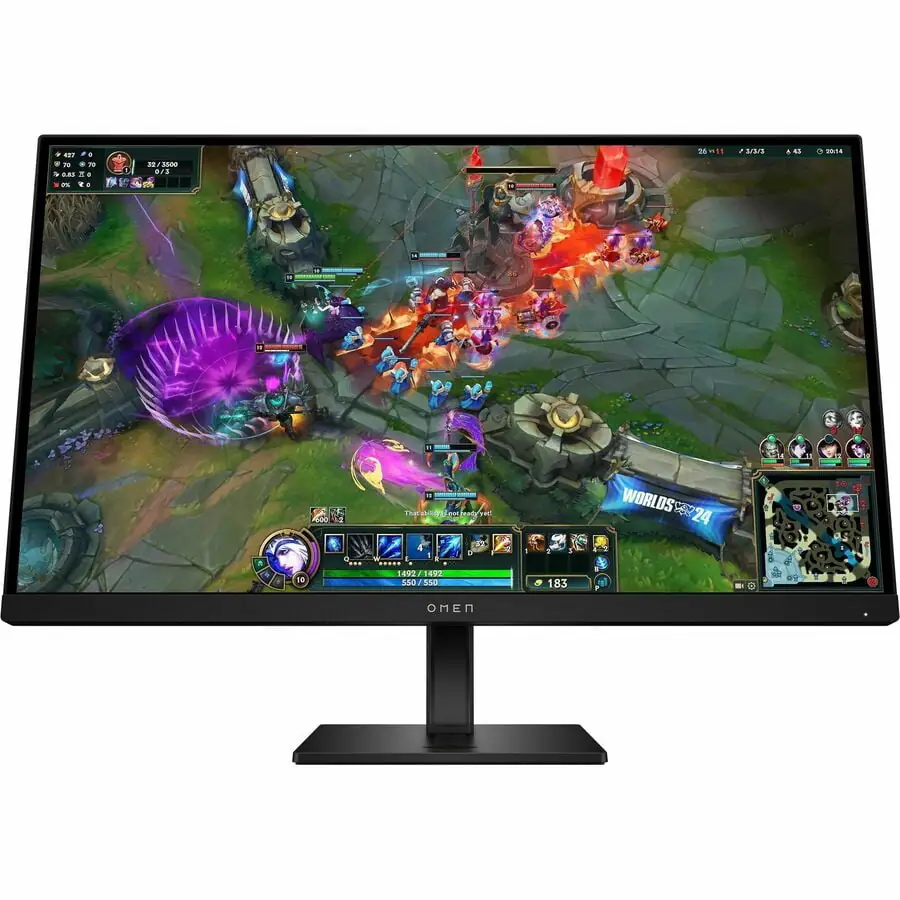
HP OMEN 27qs QHD Gaming Monitor
By HP · Gaming Monitors · Audio & Electronics · More from HP
Compare all Gaming Monitors side by side →
- 27-inch IPS panel, 2560 x 1440 (QHD), 16:9
- 240 Hz max refresh rate, 1ms GtG with Overdrive
- 400 nits typical brightness, 1000:1 static contrast ratio
- 1x DisplayPort 1.4, 2x HDMI 2.0, 2x USB-A 3.2 hub, dual 3W speakers
Price not listed
- HPView at HP
- eBayView at eBay
- Micro Centerprice match · store policyView at Micro Center
- AmazonView at Amazon (paid link)
- eBay (used) eBay: used, open-box, refurbishedView at eBay (used)
Stores with a price are sorted lowest first; commission never changes the order. Prices are snapshots. Check the current price with the store.
Summary
A 27-inch QHD gaming monitor built for competitive play: a 240 Hz IPS panel with 1 ms GtG response and very low input lag. Check your connections before you buy: HDMI 2.0 tops out at 144 Hz at 1440p, so you need DisplayPort for the full 240 Hz.
Strengths
- 240 Hz refresh with 1 ms GtG response gives crisp motion without heavy ghosting at middle overdrive levels.
- Measured input lag is very low, which suits fast competitive play.
- Out-of-the-box color accuracy is strong, with a dedicated sRGB clamp mode.
- SDR brightness around 376–400 nits is bright enough for most rooms.
- The stand adjusts height, tilt and pivot, and the panel takes a standard VESA mount.
- Build quality and the understated black design draw regular praise from owners.
Weaknesses
- Static contrast sits at the IPS norm around 1000:1, with noticeable glow in dark rooms.
- DisplayHDR 400 certification comes with low peak brightness and no local dimming, so HDR adds little over well-tuned SDR.
- The stand has no swivel, so turning the panel sideways means moving the whole unit.
- HDMI 2.0 caps out at 144 Hz at 1440p, so console and secondary-PC users need DisplayPort.
- The default Standard preset clamps to sRGB instead of using the full DCI-P3 gamut.
- Panel longevity and backlight failure rates over years of 240 Hz use are not published.
Verified specifications
| Panel | 27-inch diagonal IPS with anti-glare coating, about 25% haze. |
|---|---|
| Resolution | 2560 × 1440 (16:9), about 109 PPI. |
| Refresh rate | 240 Hz maximum over DisplayPort 1.4. |
| Response time | 1 ms GtG with Overdrive. |
| Brightness | 400 nits typical, with SDR measured around 376–400 nits. |
| Contrast ratio | 1000:1 typical. |
| Color gamut | about 95% to 97% DCI-P3, 100% sRGB with a dedicated sRGB clamp mode. |
| HDR | VESA DisplayHDR 400 certified. |
| Adaptive sync | AMD FreeSync Premium and NVIDIA G-SYNC Compatible. |
| Connectivity | 1× DisplayPort 1.4, 2× HDMI 2.0, 3.5 mm headphone jack, USB upstream port and 2× USB-A downstream ports. |
| Audio | two built-in 3 W speakers. |
| Ergonomics | height adjustment of 100 mm or 130 mm depending on revision, tilt -5° to +20°, pivot rotation 90°, and 100 × 100 mm VESA mounting. |
| Dimensions | 24.2 × 16.6–20.5 × 5.2 in (615 × 422–521 × 132 mm). |
| Weight | about 19.1 lbs (8.7 kg) with the stand. |
| Materials | plastic chassis, matte black with glossy accents. |
| Power consumption | about 33 W typical. |
| In the box | monitor panel, stand base and upright, power cable, DisplayPort cable, USB upstream cable and documentation. |
| Warranty | HP’s standard manufacturer warranty, one to three years depending on region and retailer terms. |
Full research notes and sources
Motion clarity and input lag
Instrumented tests from RTINGS, Tom’s Hardware, IGN and DisplayNinja all put the 27qs near the top of its class for motion handling. At 240 Hz with Overdrive on the recommended middle levels (Level 2 or Level 4), fast movement stays crisp without the smearing or inverse ghosting that aggressive overdrive causes. Input lag measured extremely low, which matters in competitive shooters where every frame of delay shows up in aiming.
Color, brightness and HDR
Color accuracy is good out of the box, and the gamut covers roughly 95% to 97% of DCI-P3 with full sRGB coverage. One quirk catches people out: the default Standard preset clamps to sRGB, so if you want wider color in SDR, switch to the Gaming preset or tune the color settings yourself.
SDR brightness is around 376–400 nits, which is solid for a desktop panel. HDR is the weak part. The DisplayHDR 400 badge means limited peak brightness and no local dimming, so HDR mode adds little over a good SDR picture, and dark scenes suffer the usual IPS contrast limits with visible glow.
Ports, consoles and the stand
The practical gotcha is HDMI bandwidth. HDMI 2.0 cannot carry 2560 × 1440 at 240 Hz, so any console or second PC limited to HDMI drops to 144 Hz. Use DisplayPort 1.4 for the full refresh rate.
The stand is the other irritant. It adjusts height, tilt and pivot, but there is no swivel, so aligning the panel to your seating angle means shifting the entire monitor on the desk. A 100 × 100 mm VESA mount gives you a better arm if the position matters to you.
Is it worth it?
Reviewers call the 27qs exceptional value at discounted sale prices below $300, and at its $429.99 launch MSRP they rate it as facing much stiffer competition from newer high-refresh IPS panels and entry-level OLEDs. If you play competitive games at 1440p and want a 240 Hz IPS without paying for OLED, this is the panel to look at first.
Which model this is
This page covers the OMEN by HP 27qs, manufacturer part 780J4AA, in the 27-inch QHD 240 Hz gaming configuration. It is not the 1080p OMEN models or HP’s office displays. The US retail listing is ASIN B0CSM28SFG.
Sources
Manufacturer:
Independent reviews: