

Dragon Touch 15.6" Digital Calendar & Chore Chart
By Dragon · Smart Displays · Phones & Computers
- 15.6 inch 1920x1080 FHD touchscreen
- 32 GB storage
- Dual-band WiFi 2.4G/5G
- Wall-mount or desk, auto-rotate landscape/portrait
- eCalendar app syncs Google, Apple, Outlook, Yahoo, Cozi
Price not listed
- DragonView at Dragon
- eBayView at eBay
- AmazonView at Amazon (paid link)
- eBay (used) eBay: used, open-box, refurbishedView at eBay (used)
Stores are listed in a fixed order, never by price or commission. Prices are snapshots. Check the current price with the store.
Summary
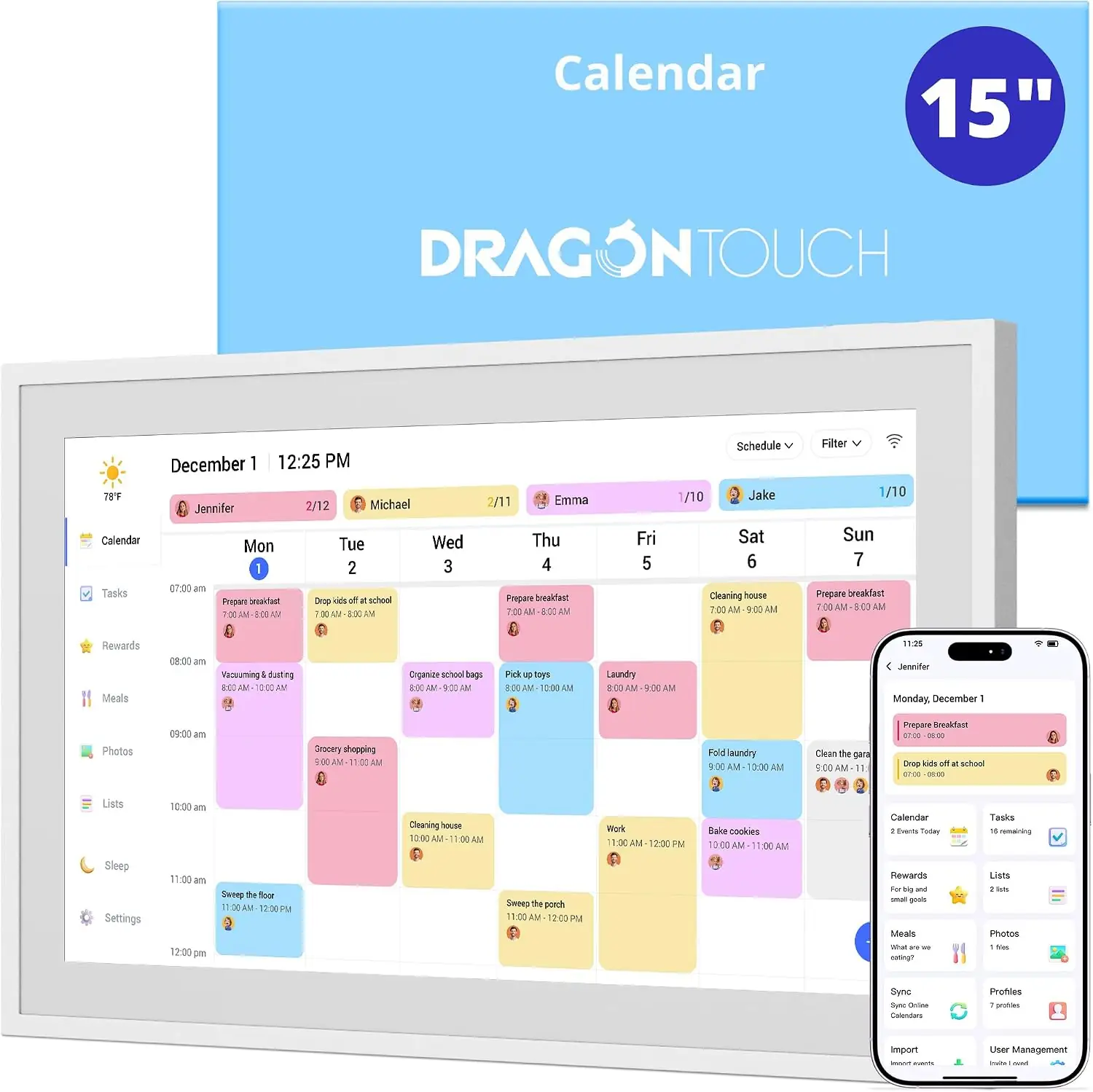
A 15.6-inch 1080p touchscreen family calendar that syncs Google, Apple, Outlook, Yahoo and Cozi calendars and adds a chore chart, dinner planner and lists. Check the app requirement before you buy: setup, activation and chore rewards all happen in the eCalendar phone app, not on the device.
Strengths
- The 1080p IPS screen is bright and readable from across the room.
- Setup through the eCalendar app is quick, and Google Calendar sync works.
- Two-way sync: events added on the device sync back to phones.
- The chore chart with star rewards is motivating for kids, and meals, lists and photos sit in one place.
- It wall-mounts or sits on a desk, in portrait or landscape, with auto-rotate.
- Calendar sync, the chore chart, the dinner planner and lists all work without a subscription.
Weaknesses
- It runs a locked-down Android 8.1: no Google Play, no third-party apps, no widgets and no voice assistant.
- Setup is impossible without a smartphone and the eCalendar app, and activation needs the app’s 6-digit code.
- The USB-C port appeared disabled on one unit, and with no SD slot there is no easy way to expand photo storage.
- Only calendar events sync; chores, tasks and reward star values are edited in the app, not on the device.
- eCalendar iOS app reviews describe wrong notification times and occasional glitches.
Verified specifications
| Model | Dragon Touch TM15, the 15.6-inch size in Dragon Touch’s digital calendar line. |
|---|---|
| Display | 15.6-inch IPS LCD, 1920 × 1080 (FHD), 16:9, touchscreen. |
| Storage | 32 GB internal, with no SD slot. |
| Memory | 2 GB RAM. |
| Connectivity | dual-band Wi-Fi, 2.4 GHz and 5 GHz. |
| OS | locked-down Android 8.1; no Google Play and no third-party app installs. |
| Power | AC/DC adaptor only; no built-in battery, so it must stay plugged in. |
| Ports | DC power input; the manual lists USB-C as available for US-region sales only. |
| Orientation | auto-rotate; wall-mounts with the rotate bracket or sits on the included desk stand, in landscape or portrait. |
| Calendar sync | Google, Apple (iCloud), Outlook, Yahoo and Cozi, plus most calendars through a public sharing link. |
| Sync scope | events only; tasks and chores do not sync to third-party calendars. |
| Sync latency | about 1 minute for Google and Outlook, 1–30 minutes for iCloud, Yahoo and Cozi. |
| Setup | needs an iOS or Android phone or tablet with the free eCalendar app; activation uses a 6-digit code from the app. |
| Features | events, chore chart with star rewards, dinner planner, grocery and to-do lists, photo screensaver, weather, sleep mode, reminders and a light sensor. |
| Dimensions | approximately 16 in tall by 10 in wide, weighing between three and four pounds (tester estimates; first-party dimensions were not published). |
| In the box | calendar, AC/DC adaptor, rotate bracket, desk stand, wall-hanging template, wall anchors, quick start guide and user manual. |
| Warranty | 12 months per the manual; the product page advertises 2-year protection, and a QR code in the device’s Help settings reportedly unlocks two years by registering the unit. |
Full research notes and sources
Setup and the eCalendar app
The calendar is managed entirely through the free eCalendar app for iOS or Android. You activate the unit with a 6-digit code from the app, and without Wi-Fi the calendar can only be previewed, not edited. Google Calendar sync initially required pasting the account’s “Secret address in iCal format” into the app, according to The Gadgeteer’s 2025 setup experience. Once linked, sync takes about a minute for Google and Outlook and 1–30 minutes for iCloud, Yahoo and Cozi. Only calendar events sync — tasks and chores stay on the device. Reward star values and reward setup can also be edited only in the app. A paid “Magic Import” upgrade sits on top of the free features; the App Store lists eCalendar Plus at $2.99 a month or $29.90 a year.
What testers and owners report
No major outlet — RTINGS, Wirecutter, CNET, Tom’s Guide, PCMag — has published an instrumented test. An owner-style review on Medium describes quick, painless setup and good readability from across the room. iOS app reviews for eCalendar describe wrong notification times and occasional glitches. Treat these as single-reviewer observations, not measurements: screen brightness, color accuracy and touch latency have not been measured anywhere.
Pricing, warranty and running costs
Prices vary widely by channel. Dragon Touch’s own site sells the 15.6-inch at $254.99, marked down from $299.99. TechEBlog reported $149.99 (was $160) in August 2026, and a Walmart listing showed $169.99, down from $175.99. The only recurring cost is optional: the Magic Import upgrade at $2.99 a month or $29.90 a year, while photos and videos consume the fixed 32 GB of storage. Warranty terms conflict: the manual says 12 months from purchase, the product page advertises 2-year protection, and The Gadgeteer found a QR code in the device’s Help settings that unlocks two years by registering — confirm the term with the retailer or manufacturer at purchase. The manual also states there are no user-serviceable parts inside and that tampering voids the warranty.
Is it worth it?
At $150 or less it is a reasonable buy for a household that wants a big shared family calendar with chore rewards and calendar sync, and where locked-down old Android is acceptable. Between $151 and $170, compare it against Skylight and Cozyla, which Dragon Touch’s own comparison page positions as subscription-based competitors. Above $200 — including the $254.99 direct price — the case is weak: full Android tablets and established calendar brands compete there, and no professional test coverage justifies the premium. The 15.6-inch segment is crowded; a comparable Tabwee chore-chart calendar was offered at $179.99 in October 2025, so shop across brands at this size.
Which model this is
This page covers the Dragon Touch TM15, the 15.6-inch model in a line that also includes 10.1, 21.5, 24, 27 and 32-inch sizes. The 21.5-inch sibling shares much of the software but is different hardware, and findings from it are flagged as such above.
The US Amazon listing for this variant is ASIN B0FPFRW9VV.
Sources
Manufacturer:
- Dragon Touch Digital Calendar product page
- Dragon Touch Digital Calendar info page
- Dragon Touch Digital Calendar support center
- eCalendar user manual (TM series)
Independent reviews:
Owner reports:
Retail: