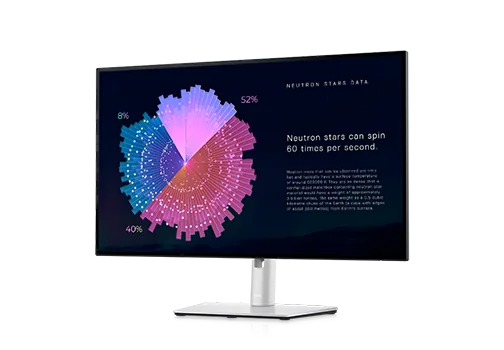
Dell U2722DE Monitor
By Dell · Computer Monitors · Desk & Streaming Setup · More from Dell
Compare all Computer Monitors side by side →
- 27-inch QHD 2560x1440 IPS
- 350 cd/m2 brightness
- 178° viewing angles
- 5ms response time
- 100% sRGB color coverage
Check today's price at the stores
- NeweggView at Newegg
- Walmartfree shipping $35+ · store policyView at Walmart
- AmazonView at Amazon (paid link)
- PCNationView at PCNation
More on eBay (1)
- eBayView at eBay
- eBay (used) eBay: used, open-box, refurbishedView at eBay (used)
Stores with a price are sorted lowest first; commission never changes the order. Prices are snapshots. Check the current price with the store.
Summary
The Dell U2722DE is a 27-inch QHD IPS productivity monitor built around a hub with 90W USB-C power delivery, four 10Gbps USB-A ports, DisplayPort daisy chaining, KVM switching, and RJ45 networking. Its main caveat is USB-C connection stability, particularly with unsuitable cables, wake/sleep transitions, and some Mac configurations.
Size in context

61.2 cm · 24.1 in (W) × 18.5 cm · 7.3 in (D) × 38.6 cm · 15.2 in (H) · Drawn to scale from the maker's stated dimensions, next to everyday objects.
Strengths
- Rich connectivity hub. 90W USB-C power delivery, four USB-A ports, KVM switching, and Ethernet reduce desk clutter for laptop users.
- Accurate colors. Factory-calibrated sRGB mode produces excellent color accuracy with average dE around 1.0.
- Wide port selection. Comprehensive hub functionality supports complex workstations with multiple devices.
- Ergonomic stand. Height, swivel, tilt, and pivot adjustments plus VESA mounting offer flexible positioning.
- Good color coverage. Measured 95-100% sRGB and 94-96.6% DCI-P3 coverage suitable for color work.
Weaknesses
- USB-C stability issues. Owners report repeated connect/disconnect sounds and “No USB C Signal” errors, sometimes requiring factory resets.
- Limited gaming suitability. 60Hz refresh rate and lack of variable refresh make it unsuitable for fast competitive games.
- Source switching limitations. Automatic detection can fail after sleep, and switching requires menu navigation rather than dedicated buttons.
- Audio output limitations. Wired earphone volume control does not work under macOS.
Verified specifications
| 27-inch IPS panel at 2560 × 1440 and 60Hz | |
| Rated brightness 350 cd/m², rated contrast 1000:1, and 178° horizontal/vertical viewing angles | |
| Dell specifies 5ms G2G in Fast mode; the normal setting is 8ms | |
| Rated coverage is 100% sRGB and 95% DCI-P3 | |
| Video inputs | HDMI with HDCP 1.4, DisplayPort 1.4 with HDCP 1.4, USB-C with DisplayPort 1.4 mode and up to 90W power delivery |
|---|---|
| Hub includes | two upstream USB-C 3.2 Gen 2 ports, one downstream USB-C 3.2 Gen 2 port (up to 15W), three downstream USB 3.2 Gen 2 ports, one USB-A 3.2 Gen 2 charging port |
| RJ45 supports 1000Mbps Ethernet, MAC address pass-through, PXE boot, and Wake-on-LAN | |
| Stand adjusts by height, pivot, swivel, and tilt; panel supports 100 × 100mm VESA mounting | |
| Dimensions 24.1 × 15.2 × 7.3 inches (HWD); weight 10.5 pounds | |
Full research notes and sources
USB-C performance and compatibility
The USB-C hub is the monitor’s centerpiece but has specific requirements. Dell ships a 1.0m cable because longer cables reduce bandwidth and cause problems. Owners report that unsuitable replacement cables can cause “No USB C Signal” errors, even when carrying audio and USB data.
One owner traced connection issues to longer replacement cables, while another experienced repeated Windows USB connect/disconnect sounds every 30 seconds. Factory reset sometimes resolved these issues, though not always. The monitor also sometimes fails to detect desktops waking from sleep, requiring manual intervention.
Power delivery works as specified - one owner confirmed 90W charging to a laptop while peripherals stayed connected to the monitor. However, compatibility varies by host system, with some Mac configurations showing different behavior than Windows.
Color and image quality
Color performance is strong for productivity work. Independent testing found the factory-calibrated sRGB mode produces excellent accuracy with average dE around 1.0. Coverage measurements include 95-100% sRGB and 94-96.6% DCI-P3, making it suitable for color-sensitive work.
Brightness is the main specification discrepancy. Dell rates the panel at 350 cd/m², but measurements vary: PCMag recorded 238 cd/m², TFTCentral measured 255 cd/m² at 75% brightness, Parka Blogs found 299 nits after calibration, and MonitorNerds recorded 316 cd/m². The wide-gamut default mode is less accurate than the sRGB preset and can oversaturate standard content.
The 60Hz refresh rate and lack of variable refresh limit gaming applications. TFTCentral measured 14.1ms total display lag with about 9ms attributed to signal processing, making it unsuitable for fast competitive gaming.
Ergonomics and connectivity
The stand offers comprehensive adjustment including height, swivel, tilt, and pivot, plus 100 × 100mm VESA compatibility. Reviewers consistently praise the ergonomics and build quality.
Connectivity extends beyond the USB-C hub to include HDMI, DisplayPort, and an integrated RJ45 port. The Picture-in-Picture feature can interfere with DisplayPort daisy chaining in some configurations. Power synchronization with closed-lid Dell laptops is limited to select Dell systems.
Which model this is
This is the Dell UltraSharp 27 USB-C Hub Monitor, model U2722DE. It should not be confused with the related U2722D model, which lacks the USB-C hub, KVM, and Ethernet features. The U2722DE uses manufacturer part 1V70H, Dell part 210-AYZG, and order code u2722desap.
Sources
Manufacturer:
Independent reviews:
Owner reports: