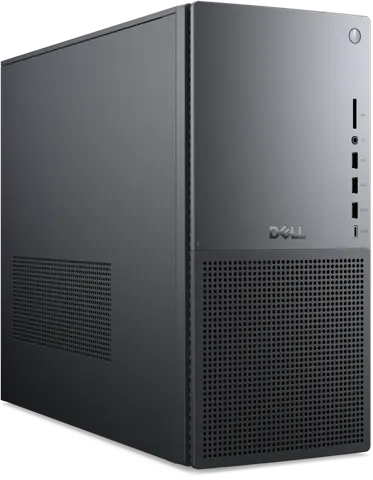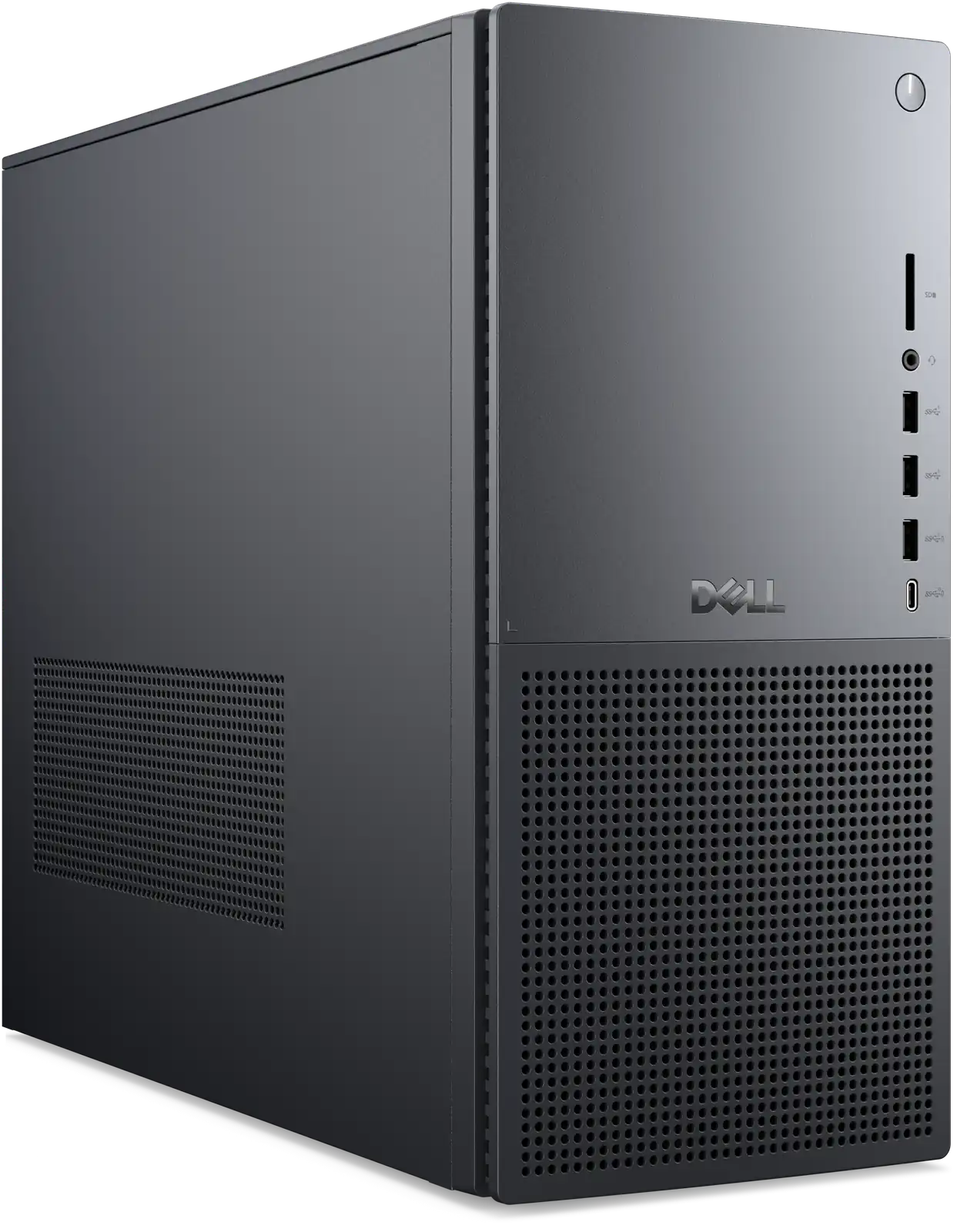
Dell Tower Plus Desktop (EBT2250)
By Dell · Desktop Computers · Phones & Computers · More from Dell
Compare all Desktop Computers side by side →
- 16GB DDR5 (2 x 8 GB, up to 5600 MT/s, non-ECC)
- Intel Wi-Fi 7 BE200 (2x2) 802.11be + Bluetooth 5.4
- 27.1L chassis, 14.68 x 6.81 x 16.80 in, 19.0-28.5 lb
Price not listed
- Dell30-day returns · store policyView at Dell
- eBayView at eBay
- Best Buy15-day returns · store policyView at Best Buy
- Micro Centerprice match · store policyView at Micro Center
- AmazonView at Amazon (paid link)
- eBay (used) eBay: used, open-box, refurbishedView at eBay (used)
Stores with a price are sorted lowest first; commission never changes the order. Prices are snapshots. Check the current price with the store.
Summary
A 27-liter metal mid-tower that Dell sells in fifteen prebuilt configurations and a full custom builder, ranging from a quiet Core Ultra 5 225 office machine to Core Ultra 9 285K and GeForce RTX 5080 creator rigs. Check the power supply before you buy: the base 460 W unit and the proprietary motherboard and power connectors limit which graphics card you can add later.
Size in context

37.3 cm · 14.7 in (W) × 17.3 cm · 6.8 in (D) × 42.7 cm · 16.8 in (H) · Drawn to scale from the maker's stated dimensions, next to everyday objects.
Strengths
- Fifteen prebuilt configurations plus a custom builder cover most budgets and use cases.
- Steel frame and metal side panels give it a solid, premium feel for a mainstream tower.
- Near-silent at idle, and reviewers call it barely noticeable under a desk.
- Front panel carries three USB-A ports, a USB-C port, a headset jack and a full-size SD card reader.
- Tool-less side panel, quick-release drive sleds, front fan duct and GPU bracket make routine work easy.
- Wi-Fi 7, 2.5 GbE and Thunderbolt 4 come standard across the range.
Weaknesses
- The motherboard and power supply are proprietary, so standard ATX parts cannot be dropped in.
- The 460 W power supply cannot feed an RTX 5080 or a future high-power card without a Dell upgrade.
- The CPU fan gets loud and high-pitched under sustained load with the standard cooler.
- There is no front dust filter, so the intake collects dust quickly.
- The included keyboard and mouse are described by reviewers as very basic and barely functional.
- Prebuilt configuration pricing is uneven, with some Ultra 9 pairings costing more than better-chosen Ultra 7 builds.
Verified specifications
| Model | Dell Tower Plus, model EBT2250, in Graphite or Platinum. |
|---|---|
| Processors | Intel Core Ultra 5 225 (10C/10T, 65 W base), Ultra 7 265 (20C/20T), Ultra 7 265K (unlocked) and Ultra 9 285K (24C/24T, 125 W base), all on LGA1851. |
| Motherboard | Dell proprietary X5WC5 with front I/O built into the main board. |
| Memory | two DDR5-5600 UDIMM slots, up to 64 GB; base configuration ships with 16 GB. |
| Storage | two M.2 2280/2230 slots and two 3.5-inch SATA bays with drive sleds; base configuration has a 512 GB PCIe Gen4 TLC SSD. |
| Graphics | Intel UHD Graphics on the base configuration, or GeForce RTX 3050, 4060 Ti, 5050, 5060, 5060 Ti, 5070, 5070 Ti or 5080. |
| Wireless | Intel Wi-Fi 7 BE200 802.11be 2x2 with Bluetooth 5.4 and internal antennas. |
| Front ports | three USB 3.2 Gen 1 Type-A, one USB 3.2 Gen 2 Type-C at 10 Gbps for data only, a 3.5 mm headset jack and a full-size UHS-I SD card reader. |
| Rear ports | four USB 2.0 Type-A, two USB 3.2 Gen 1 Type-A, one Thunderbolt 4 USB-C at 40 Gbps with 4K video, HDMI 2.0, 2.5 GbE, stereo line in and out, optical S/PDIF and a Kensington lock slot; a discrete card adds HDMI 2.1 and three DisplayPort 2.1. |
| Expansion | three PCIe slots, two M.2 slots, two 3.5-inch bays and two DIMM slots. |
| Power supply | 460 W proprietary unit as standard, with proprietary 750 W and 1000 W upgrades. |
| Cooling | one 120 mm ducted front intake, one 120 mm rear exhaust, and a standard passive tower CPU heatsink with a 120 mm fan; advanced air, 125 W Dell liquid and 240 W third-party liquid coolers are optional. |
| Dimensions | 14.68 × 6.81 × 16.80 in (372.9 × 173 × 426.9 mm), 27.1 L. |
| Weight | 19.0 lb (8.62 kg) to 28.5 lb (12.94 kg), depending on configuration. |
| Warranty | one year of base hardware service, onsite after remote diagnosis, with ProSupport and ProSupport Plus plans available for up to four years. |
Full research notes and sources
Configurations and value
Dell lists fifteen prebuilt towers plus the custom configurator. The entry point is a Core Ultra 5 225 with 16 GB of memory, a 512 GB SSD and integrated graphics, listed at $949.99 with Ubuntu Linux (Dell.com, November 2026), and the matching Windows 11 Home configuration lists at $1,249.99. A Core Ultra 7 265K with 32 GB, 1 TB and an RTX 5070 listed at $1,999.99, with a sale figure of $1,799.99, while the top Ultra 9 285K with 64 GB, 4 TB and an RTX 5080 listed at $3,679.99.
Discounts move the numbers a lot. Dell.com commonly takes 10–20% off prebuilts, PCMag saw an Ultra 7 with an RTX 3050 at $749 on a limited promotion, and RTX 5070 configurations landed between $1,050 and $1,150. Other stores listed the same class of machine at $1,879 (Newegg), $1,500 for an RTX 5060 build (Best Buy) and $3,599 for an RTX 5080 build (Walmart), in November 2026.
Some prebuilt pairings make poor sense, such as an Ultra 9 with an RTX 5060 Ti at $2,149 against an Ultra 7 with an RTX 5070 at $1,799. The custom configurator avoids those combinations but gives up the promotional discounts.
Ports, connectivity and access
The side panel comes off with a single rear thumbscrew, and inside, the drive sleds, GPU bracket and front fan duct all use quick-release latches. The CPU cooler is only reachable after the graphics card comes out, and the front fan takes one screw to remove.
Front connectivity is the strongest part: three USB-A 5 Gbps ports, one USB-C 10 Gbps port for data only, a headset jack and a full-size SD card reader. The rear adds Thunderbolt 4 with 4K video, HDMI 2.0, 2.5 GbE and optical audio. Video output on the front USB-C port does not exist, so displays plug into the back or into the graphics card.
The proprietary power supply and motherboard
This is the long-term limitation. The board is Dell’s own X5WC5 design with the front I/O integrated into the main PCB, and the power supply uses a 2-pin plus C14 connector rather than a standard 24-pin ATX. Neither a standard ATX motherboard nor a standard ATX power supply will fit.
The 460 W unit is validated for the factory graphics cards up to the RTX 5070. An RTX 5080 or anything hotter needs Dell’s 750 W or 1000 W proprietary upgrade, which adds $50 to $150 and keeps you locked into Dell parts. Motherboard replacement also requires a Dell part, and Dell sells a replacement 460 W power supply under part number 4H6F4, a Huntkey HU460EBS-00.
Thermals, noise and maintenance
Idle is quiet on every configuration reviewers measured. Under sustained CPU load the standard cooler turns shrill, and CNET described the sound as threatening madness and vacuum-like, while WIRED found it loud but not distracting in gaming. PCMag’s review unit carried the advanced air cooler and was never overly loud. CNET also saw a 10-minute Cinebench multicore score fall from 1944 to 1810 points, roughly a 7% throttle, and WIRED recorded a Core Ultra 7 265K averaging 83 °C with spikes to 96 °C.
There is no front dust filter, so plan on opening the case and cleaning the intake on a schedule. A Dell community member’s video-review series covered cooler, GPU, memory, power supply and noise testing on this tower.
One owner in the Dell community forum reported a Crucial CT2K32G56C46U5 memory kit freezing at POST, which cleared after a power cycle and a 15-second hold of the power button. That stayed a single report, with no pattern of failures behind it.
Is it worth it?
For general office work, a quiet desk and modern ports, the Ultra 5 225 base at $850 or less is good value once you accept integrated graphics. For 1440p gaming and creator work, the Ultra 7 265K with an RTX 5070 is worth buying on sale between $1,500 and $1,600. The Lenovo Legion Tower 5 Gen 10 is worth checking at the same budget, since it uses standard parts and cools better.
If you plan to swap graphics cards in two or three years, skip this tower. The proprietary power supply and motherboard block that path, and a standard ATX build costs less. For workstation-class expandability, the Dell Pro Max Tower T2 is the better fit.
Published benchmarks all come from Ultra 7 and Ultra 9 configurations with RTX 5060 through RTX 5080 cards, so treat them as context for the higher builds. On an RTX 5070 machine, Shadow of the Tomb Raider ran at 227 fps at 1080p High against 289 fps on a Lenovo Legion 5 Gen 10 with the same card, a sign the processor was the limit, and Cyberpunk 2077 at 4K Ultra with DLSS Balanced held about 74 fps. Productivity scores ranged from Geekbench 6 multi-core 1,810 on the Ultra 7 265K to 19,697 on the Ultra 9 285K.
Which model this is
This page covers the Dell Tower Plus Desktop, model EBT2250, the successor to the Dell XPS Desktop line, in Graphite or Platinum. The chassis and platform are shared across configurations, so the CPU, memory, graphics card and power supply you choose determine the price. The reference configuration is a Core Ultra 5 225 with 16 GB of memory, a 512 GB SSD, integrated graphics, a 460 W power supply and Wi-Fi 7. The listing identifier is ASIN B0F22T3S84. Do not confuse it with the Dell Pro Max Tower T2, the XPS Desktop 8950 and 8960, or the entry-level Dell Tower.
Sources
Manufacturer:
- Dell Tower Plus Desktop product page, specifications and configurations
- Dell Tower Plus EBT2250 owner’s manual and service manual
Independent reviews:
Owner reports: