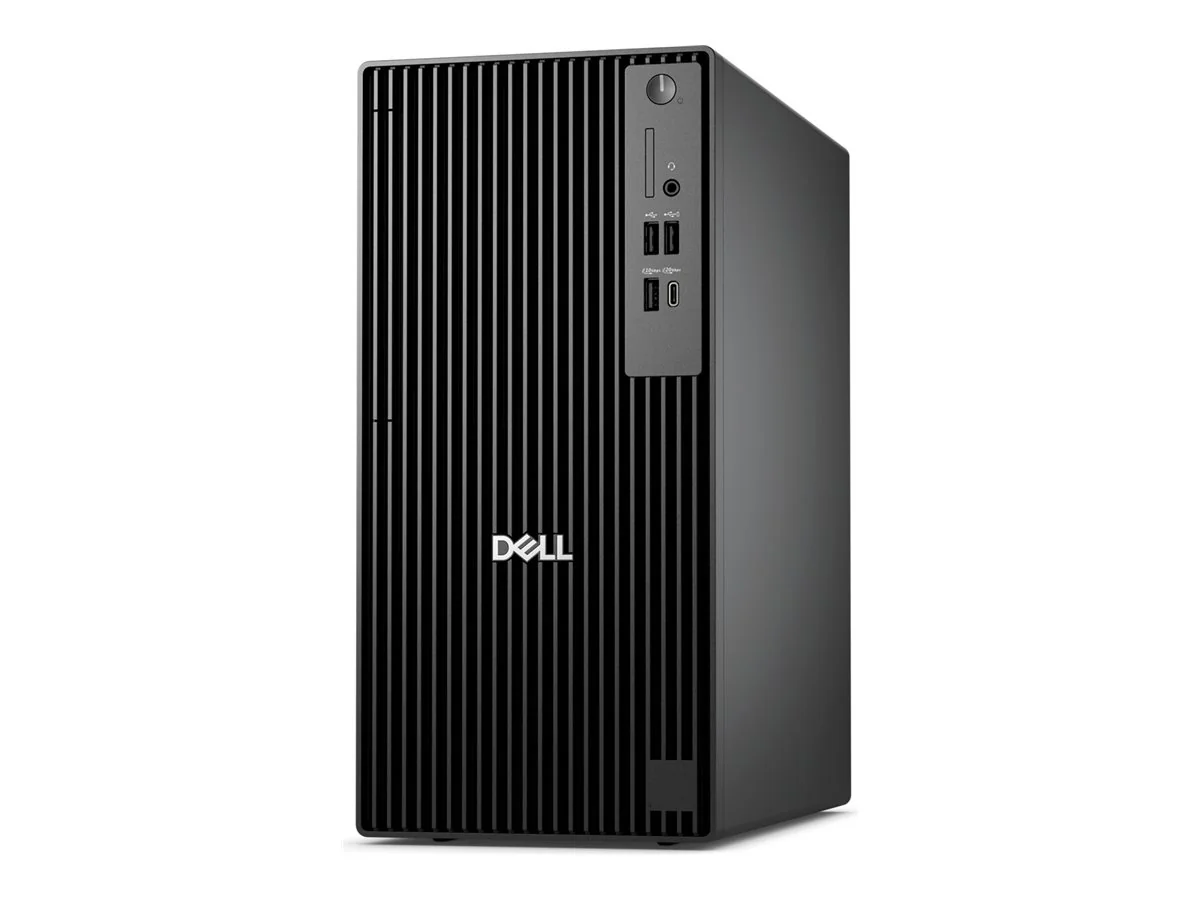
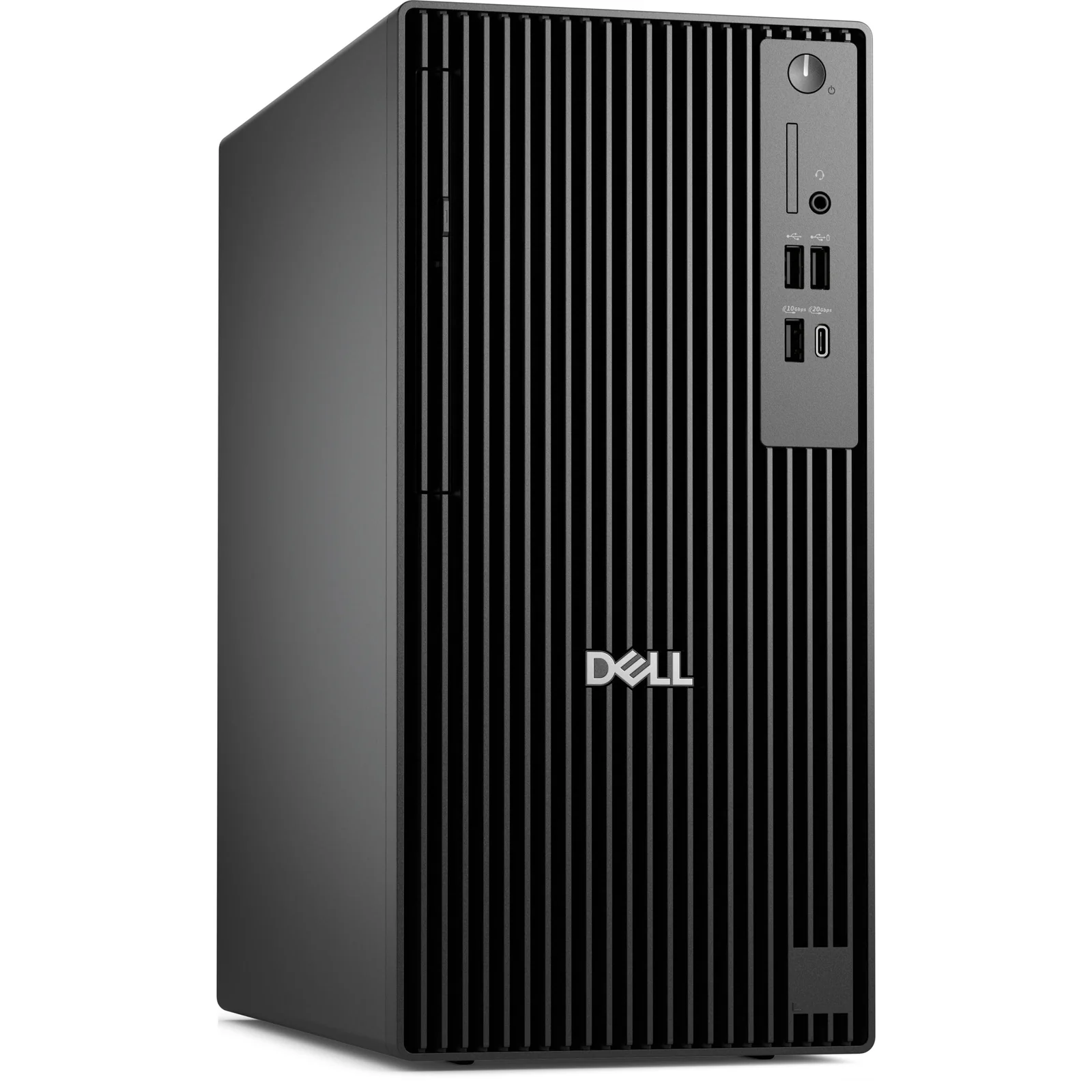
Dell Pro Tower Plus Business Desktop
By Dell · Desktop Computers · Phones & Computers · More from Dell
- Intel Core Ultra 5 235, 14 cores, up to 5.0 GHz
- 32GB DDR5-5600 RAM (up to 128GB)
- 1TB PCIe Gen4 SSD (3 M.2 slots)
- Windows 11 Pro
- 3x DisplayPort 1.4a + USB-C
Price not listed
- DellView at Dell
- eBayView at eBay
- AmazonView at Amazon (paid link)
- eBay (used) eBay: used, open-box, refurbishedView at eBay (used)
Stores are listed in a fixed order, never by price or commission. Prices are snapshots. Check the current price with the store.
Summary
A configurable Intel Core Ultra business tower with four DDR5 slots, three M.2 SSD positions and a full-height PCIe x16 slot, sold under the single name QBT1250 even though CPU, RAM, storage, graphics and support vary by build. Check the exact configuration and Service Tag before buying: the $1,789 base build has one 16GB DIMM, a 512GB QLC SSD, integrated graphics, no Wi-Fi and no HDMI.
Strengths
- Four RAM slots with a 128 GB documented maximum, three native M.2 sockets, a 3.5-inch HDD provision and a full-height PCIe x16 slot give more headroom than many small office PCs.
- Intel Core Ultra 5 235 brings 6 P-cores and 8 E-cores, hardware virtualization, Quick Sync video and optional vPro, making a plausible office, development or VM workstation.
- Dell publishes a service manual with diagrams for DIMM sockets, SSD slots, connectors, fans, the chassis intrusion switch and optional PCIe expansion, and lists memory, drives and graphics card as customer-replaceable parts.
- Three standard DisplayPorts plus front and rear USB-C cover many multi-monitor business desks without a dock.
- Dell’s verified-user review page describes fast Office and Photoshop work and relatively low noise in many setups.
- Business support is selectable by Service Tag, with official BIOS images and driver downloads for the exact machine.
Weaknesses
- The same model name covers very different builds, so the $1,789 base price buys one 16 GB DIMM, a 512 GB QLC SSD, integrated graphics, no Wi-Fi and no HDMI.
- Single-channel memory by default reduces memory bandwidth versus a two-DIMM layout.
- Wireless, Bluetooth and HDMI may be absent even though marketing highlights Wi-Fi 7 and Thunderbolt 4.
- The 260 W supply leaves limited headroom for a high-power graphics card or extra drives.
Verified specifications
| Platform | Dell Pro Tower Plus QBT1250; QBT1250 names the chassis family, not one fixed retail bundle. Do not confuse it with the Dell Pro Tower QCT1250, the Pro Slim Plus QBS1250, or the consumer Dell Tower Plus EBT2250. |
|---|---|
| Processors | Intel Core Ultra 5 225/235/245, Ultra 7 265 or Ultra 9 285, depending on configuration. The checked build uses the Core Ultra 5 235: 14 cores (6 P-cores plus 8 E-cores), 14 threads, up to 5.0 GHz boost, 65 W base power, 121 W maximum turbo, 24 MB Smart Cache, 13 TOPS NPU, integrated Intel Graphics. |
| vPro | the Ultra 5 235 is vPro Enterprise eligible, but eligibility is not enablement; the checked configuration lists Intel vPro Management Disabled. |
| Memory | four DDR5 UDIMM slots, 8 GB minimum, 128 GB maximum (4 × 32 GB). Validated speeds run up to 5600 MT/s with one or two 16/32/64 GB modules, up to 4800 MT/s with four 8/16 GB modules, and up to 4400 MT/s with four 32 GB modules. The checked build ships one 16 GB non-ECC DIMM in single channel. |
| Size | 12.77 × 6.06 × 11.54 in (324.3 × 154 × 293 mm); weight 12.63 to 15.81 lb across configurations. |
| Front ports | one USB-A 2.0 PowerShare, one USB-A 2.0, one USB-C 3.2 Gen 2×2 at 20 Gbps, one USB-A 3.2 Gen 2 at 10 Gbps, one universal headset jack. |
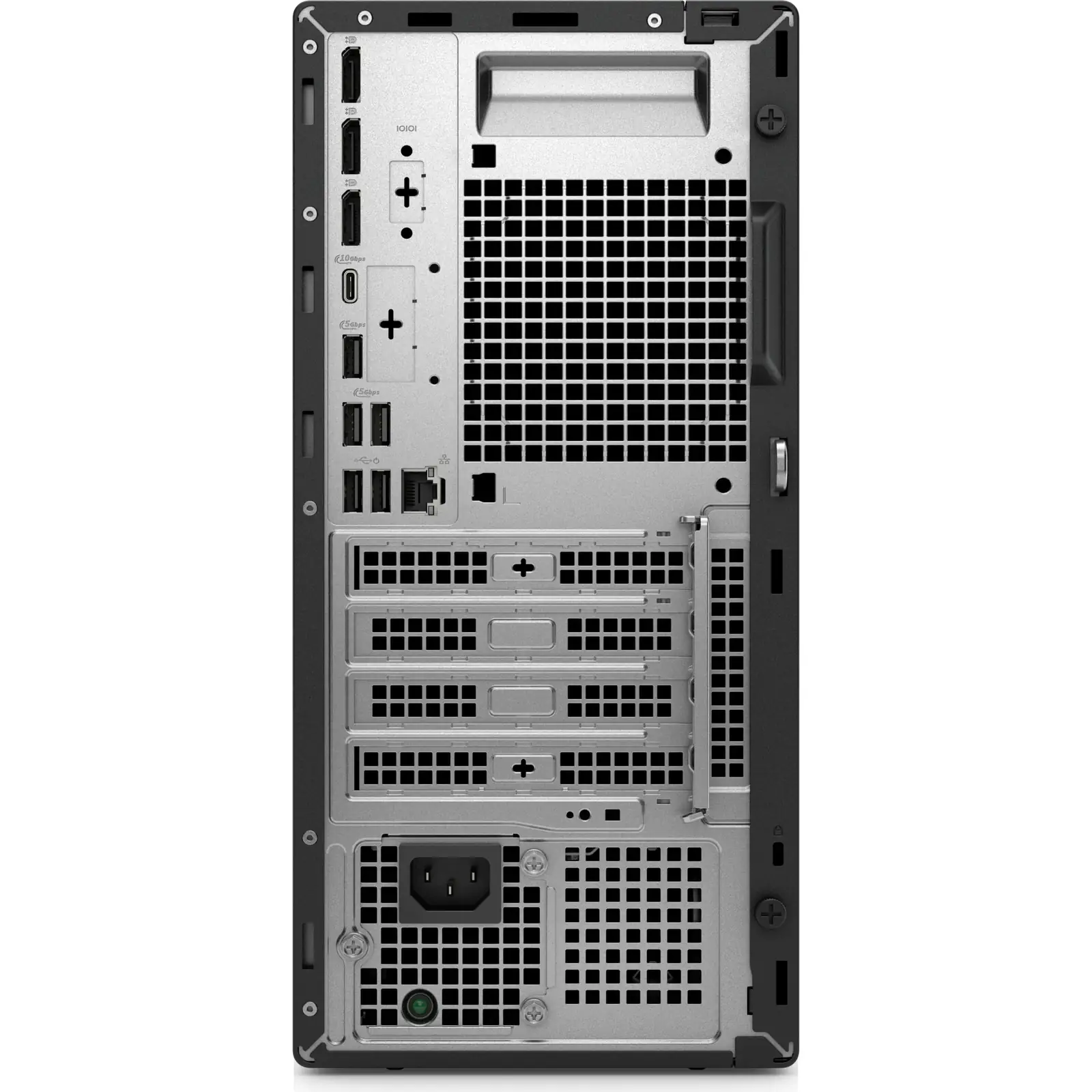
| Rear ports | three DisplayPort 1.4a, one 1 GbE RJ-45, three USB-A 3.2 Gen 1 at 5 Gbps, two USB-A 2.0 SmartPower On, one USB-C 3.2 Gen 2 at 10 Gbps. HDMI is optional, not standard. |
| Optional module bay | one mutually exclusive slot for HDMI 2.1, DisplayPort 2.1, VGA, 5 GbE RJ-45, 5 GbE fiber, USB-C with DisplayPort Alt Mode, Thunderbolt 4 or dual 10 Gbps USB-A. Pricing in the checked build ran about $20 for HDMI 2.1, $40 for 5 GbE copper, $50 for Thunderbolt 4 and $20 to $30 for a Wi-Fi 7 card. |
| Storage | three motherboard M.2 positions (up to three 2230 or up to two 2280), one 3.5-inch SATA bay up to 4 TB, optional 9.5 mm slimline DVD-RW. The checked build has a 512 GB Gen 4 ×4 QLC SSD. Dell lists a maximum of 2 TB per M.2 2280 self-encrypting drive. |
| Expansion | one full-height PCIe 4.0 x16, one full-height PCIe 3.0 x4 open-ended, one PCIe 3.0 x1, and an optional fourth PCIe 3.0 x4 expansion board; a separate Wi-Fi M.2 2230 socket. |
| Graphics | Intel integrated graphics on the checked build. Dell offers optional AMD Radeon RX 6300 2 GB and RX 7400 8 GB, with availability tied to power supply and configuration. |
| Power supply | 260 W Bronze or 360 W Platinum, 90 to 264 VAC, 47 to 63 Hz. The 360 W option added about $20. Rated watts are capacity, not idle draw. |
| Networking | onboard 1 GbE. Wi-Fi is optional: Intel AX211 Wi-Fi 6E or BE200 Wi-Fi 7. The checked build lists Wireless: None, so Wi-Fi and Bluetooth are not standard. |
| Service | Dell’s Owner’s Manual was updated August 24, 2026, with illustrated component replacement. Use the Service Tag to pull exact factory assembly and drivers. |
| Warranty and support | the checked build lists Basic Hardware Service with Onsite Support After Remote Diagnosis, with upgrades to ProSupport, accidental damage, keep-your-hard-drive and deployment support. Some configurator pages offer 3, 4 or 5 year terms. Onsite dispatch follows remote diagnosis. Read the actual contract for SLA and duration. |
Full research notes and sources
Configuration and upgrade limits
Memory speed depends on population: up to 5600 MT/s with one or two 16, 32 or 64 GB modules, up to 4800 MT/s with four 8 or 16 GB modules, and up to 4400 MT/s at the full 128 GB. The checked build’s single 16 GB DIMM leaves three slots free but runs single-channel. Dell’s configurator priced 32 GB single-stick at about $530 and 2 × 32 GB at about $1,530 above the base, which are factory surcharges, not retail DIMM prices.
The optional module bay cannot hold HDMI, Thunderbolt 4 and 5 GbE at the same time; pick one. The 260 W supply is a hard limit for graphics upgrades, and an x16 slot alone does not guarantee a given card fits or has the right power connectors. The PSU, mainboard and CPU are field-replaceable by technicians, not standard ATX drop-ins, so cheap generic replacements are not assured.
Storage is flexible but slot-specific: three M.2 positions accept up to three 2230 drives or up to two 2280 drives, plus one 3.5-inch bay up to 4 TB and an optional slimline DVD drive. Dell lists 2 TB maximum per M.2 2280 self-encrypting drive; larger aftermarket capacities were not vendor-validated in these sources. Brackets and cables may not ship with every low-end build.
Running costs
There is no required annual subscription to run the machine locally. Electricity is the main recurring cost, and the 260 W rating is capacity, not draw. Illustrative only: at an assumed 35 W average for 8 hours a day over 250 business days, consumption is 70 kWh a year, or $14 at an assumed $0.20 per kWh. At an assumed 75 W average the same schedule is 150 kWh a year, or $30. Running 24 hours a day at 35 W averages 306.6 kWh a year, or $61.32. Actual draw depends on CPU, graphics, storage, displays and workload; measure with a plug-in meter.
Acquisition spread over a hypothetical five years is $357.80 a year for the $1,789 base build, or $210 a year for the $1,049.99 CDW 32 GB system if it is genuinely comparable. Five years is not a tested expected lifetime. Microsoft 365 is a 30-day trial requiring a paid subscription afterward. Dell ProSupport, accidental damage, keep-your-hard-drive and deployment options are priced individually, not as one universal plan. External backup and downtime costs can exceed power spending for business use.
Is it worth it?
Dell’s configurator showed $1,789.00 on October 17, 2026 for the Core Ultra 5 235 / 16 GB / 512 GB / integrated graphics / 260 W build, though Add to Cart displayed a technical issue and checkout was not verified; the same offer appeared at $1,768, $1,894 and $1,907 across other snapshots. CDW listed a different QBT1250 with Core Ultra 5 235, 32 GB and a 256 GB SSD at $1,049.99, but its storage figures contradict each other (256 GB headline versus 768 GB in the expanded block), so confirm installed drives, warranty and Service Tag before ordering. Other Dell builds ran $1,907.02 for Ultra 7 and $2,994.50 for Ultra 9 / 32 GB / 1 TB. Lenovo’s ThinkCentre M90t Gen 6 started near $1,147.39 for one configuration.
For the base Ultra 5 235 / 16 GB / 512 GB / integrated graphics build, the research’s own guidance calls under $850 particularly attractive, $850 to $1,100 competitive, $1,100 to $1,400 in need of strong warranty or IT advantages, $1,400 to $1,800 hard to defend for basic integrated graphics and a small QLC SSD, and over $1,800 a reason to compare a better-equipped QBT1250, the Lenovo M90t or another business tower. Those thresholds are budget judgments, not verified buyable offers, and they do not apply to Ultra 9 or discrete-GPU builds.
Which model this is
This page covers the Dell Pro Tower Plus QBT1250, a configurable business tower on Intel Core Ultra processors. Confirm the exact CPU, RAM, storage, graphics, power supply, wireless module, ports and support term on the invoice and the Service Tag; QBT1250 alone does not identify a build. Do not confuse it with the Dell Pro Tower QCT1250, the Pro Slim Plus QBS1250 or the consumer Dell Tower Plus EBT2250, which is a different chassis with different power and graphics options.
Sources
Manufacturer:
- Dell US: QBT1250 configurable Ultra 7 build and alternative quote
- Dell: QBT1250 system-board installation guide
- Dell Support: QBT1250 manuals and service resources
- Dell: QBT1250 dust filter D61H8 / 325-BGKZ compatibility
Independent reviews:
Owner reports:
Parts and stores: