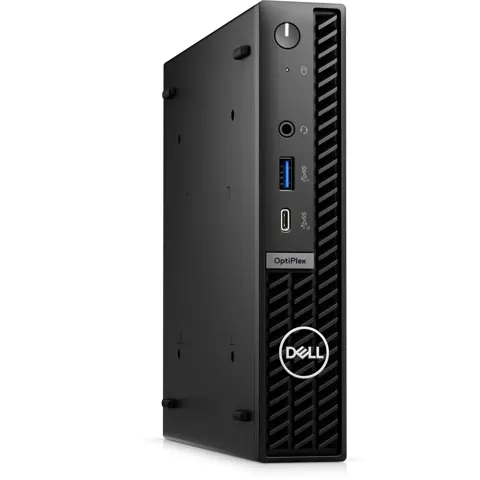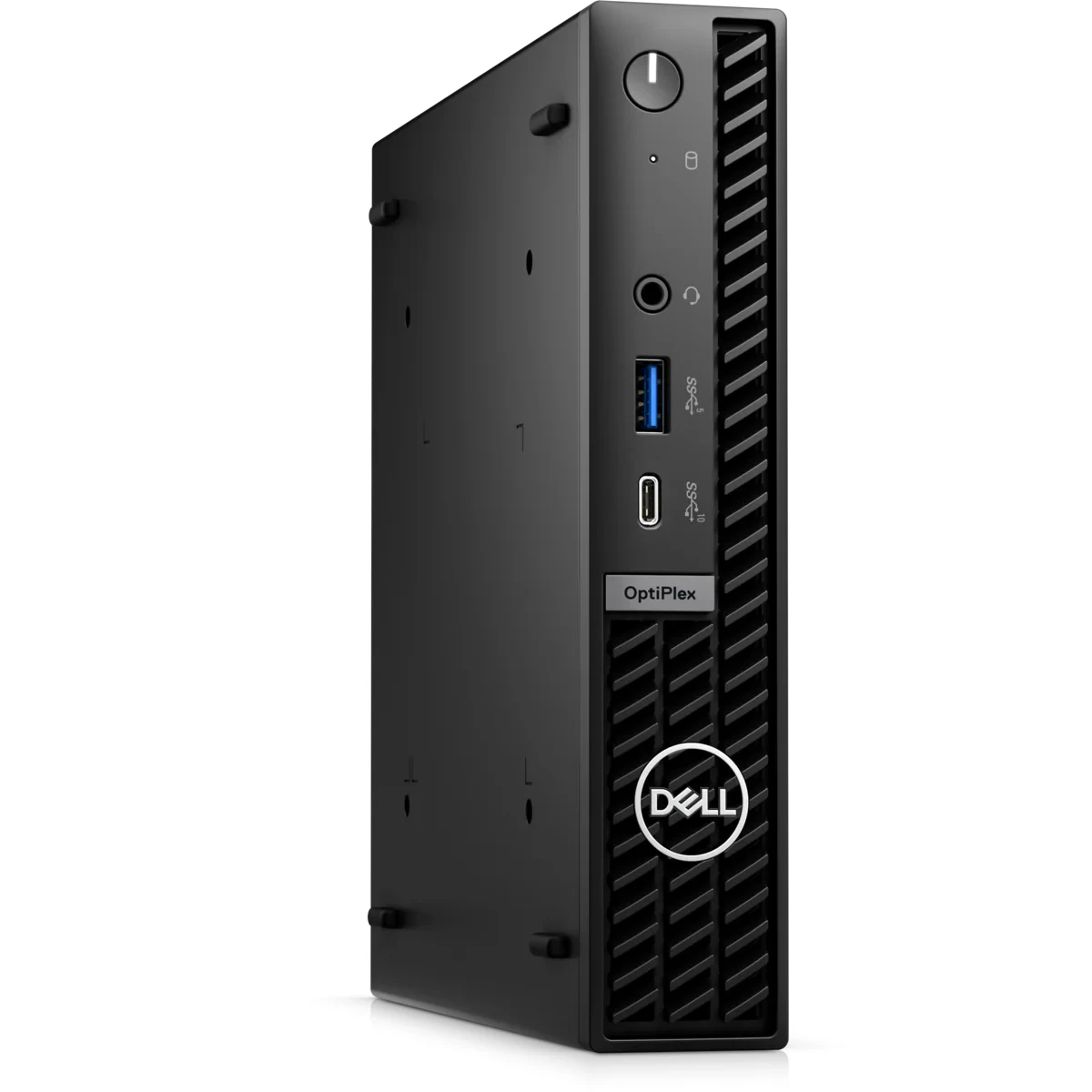
Dell 7020 MFF Mini PC
By Dell · Desktop Computers · Phones & Computers · More from Dell
Compare all Desktop Computers side by side →
- 14th Gen Intel Core i5-14500T processor
- 16GB DDR5 RAM
- 256GB NVMe SSD
- Intel UHD Graphics 770
- Wi-Fi 6E
Check today's price at the stores
- Walmartfree shipping $35+ · store policyView at Walmart
- Dell30-day returns · store policyView at Dell
- AmazonView at Amazon (paid link)
More on eBay (1)
- eBayView at eBay
- eBay (used) eBay: used, open-box, refurbishedView at eBay (used)
Stores with a price are sorted lowest first; commission never changes the order. Prices are snapshots. Check the current price with the store.
Summary
The Dell OptiPlex 7020 MFF is a compact business desktop with a 14th Gen Intel Core i5-14500T, 16GB DDR5 RAM and 256GB NVMe SSD for offices, call centers and retail workspaces. Check whether you need dedicated graphics or more storage before buying, because the standard configuration uses integrated graphics and has no 2.5-inch drive bay.
Size in context

3.6 cm · 1.4 in (W) × 17.8 cm · 7.0 in (D) × 18.2 cm · 7.2 in (H) · Drawn to scale from the maker's stated dimensions, next to everyday objects.
Strengths
- Tiny chassis. The desktop can hide behind a monitor or mount under a desk with a VESA bracket.
- Strong multitasking. Owners report responsive office work with DDR5 memory and several applications open.
- Three 4K displays. Multiple-monitor support is useful for trading, operations and support desks.
- Business security. TPM 2.0, chassis intrusion detection and optional vPro support suit managed deployments.
- Easy maintenance. The tool-less chassis gives access to memory and storage without a full teardown.
- Port selection. DisplayPort, USB Type-C, USB 3.2 and Gigabit Ethernet cover common desk setups.
Weaknesses
- Integrated graphics. Intel UHD Graphics 770 is unsuitable for gaming and demanding GPU-accelerated creative work.
- No 2.5-inch drive bay. Storage expansion is limited to M.2 NVMe drives.
- Sustained-load heat. Owners report thermal throttling, and fan noise becomes noticeable under heavy loads.
- Limited upgrade headroom. Some components are proprietary, and the chassis offers less expansion than a full-size desktop.
Verified specifications
| Model | Dell OptiPlex 7020 MFF (Micro Form Factor) |
|---|---|
| Processor | Intel Core i5-14500T with 14 cores, 20 threads and up to 4.8 GHz |
| Memory | 16GB DDR5 RAM, up to 64GB supported at 5600 MT/s |
| Storage | 256GB NVMe SSD, up to 2TB supported; RAID 0/1 available |
| Graphics | Intel UHD Graphics 770 |
| Displays | up to three 4K displays |
| Wireless | Wi-Fi 6E and Bluetooth 5.3 |
| Networking | Gigabit Ethernet |
| Ports | three DisplayPort 1.4a outputs and multiple USB 3.2 ports, including a high-speed USB Type-C port |
| Security | TPM 2.0, chassis intrusion detection, Kensington lock slot and optional vPro support |
| Power adapters | 90W or 130W with 7.4mm barrel connectors |
| Dimensions | 1.42 × 7.01 × 7.17 in (36 × 178 × 182 mm) |
| Weight | 2.41 lb (1.09 kg) |
| Included | Dell Pro Wireless Keyboard and Mouse KM5221W in standard configurations |
Parts, consumables and accessories
(up to 2TB in supported configurations) — the reviewed unit has 256GB; no store price, part number or replacement interval is reported.
- Compatible For Dell OptiPlex 7010 7020 9010 9020 2.5" to 3.5" HDD SSD Caddy R494D- DN8MYView at AliExpress
- Compatible A+ Set of Hard Drive SSD Screws For DELL Optiplex 3000 5000 7000 7020 SFF newView at AliExpress
Full research notes and sources
Performance
The Core i5-14500T has 14 cores and 20 threads, with boost clocks up to 4.8 GHz. That is enough for office suites, business software, video calls and light multitasking.
It scored 2,858 in the Geekbench 6 single-core test and 17,116 in the multi-core test, ahead of the ASUS NUC 13 and 14 Pro in CPU-intensive work. Its y-cruncher run calculated one billion digits of Pi in 28.739 seconds, while Blender completed 158.658 samples per minute in the Monster scene.
Graphics performance was much weaker. Intel UHD 770 scored 8,317 in the Geekbench 6 GPU test, far below systems with dedicated graphics.
Displays and everyday use
The platform supports up to three 4K displays through three DisplayPort 1.4a outputs. Owners frequently cite multi-monitor capability as a practical advantage for productivity workspaces. A USB Type-C port and several USB 3.2 ports add flexibility for peripherals, while Gigabit Ethernet and Wi-Fi 6E cover wired and wireless networking.
Integrated graphics are adequate for productivity applications, presentations and video conferencing. They are not intended for demanding graphics work, gaming or professional creative workloads. Display support and real-world smoothness can also vary with the processor and graphics configuration.
Size, noise and mounting
The chassis measures 1.42 × 7.01 × 7.17 in and weighs 2.41 lb. Owners praise its compactness and ability to sit completely behind a monitor or under a desk. It also supports VESA mounting behind monitors or on walls.
Most owners report quiet operation during typical business use. Under sustained heavy workloads, some report noticeable fan noise and thermal throttling because the small chassis has limited cooling capacity. Acoustic measurements at different loads have not been published, so judge the noise in your own workspace if the machine will run continuously under pressure.
Memory, storage and maintenance
Dell supports up to 64GB DDR5 memory at 5600 MT/s and storage up to 2TB, with RAID 0/1 available in supported configurations. Some owner reports suggest practical memory limits in particular configurations, so check the exact configuration before ordering extra memory.
There is no traditional 2.5-inch drive bay, and the system does not support a hard drive in that format. Expansion is limited to M.2 NVMe SSDs. DDR5 modules and compatible NVMe drives also cost more than older, less demanding components when you need to upgrade.
The tool-less chassis simplifies access to RAM and storage. Dell provides a standard 36-month warranty, with longer coverage available as an option.
Security and deployment
TPM 2.0 supports hardware-backed data protection, while chassis intrusion detection flags physical access to the case. A Kensington lock slot and an optional cable lock provide physical security options. Managed deployments can use optional vPro support.
These features make the 7020 MFF most relevant to offices that value standard security and fleet management. Long-term reliability beyond the warranty period for this specific configuration has not been established.
Is it worth it?
For an office deployment, the 7020 MFF makes sense when desk space, quiet operation, three-display support and business security matter more than graphics performance. Owners consistently praise its build quality and compact industrial design.
Price varies substantially by configuration. Dell Outlet has offered certified refurbished units at 30–50% discounts, starting around $500–800 with a one-year warranty. Base i5 configurations with 16GB RAM and a 256GB SSD typically run from $800–1,200, while larger i7 or i9 configurations can reach $1,500–2,000. Base configurations generally offer the strongest value in the $700–900 range.
Check the storage size and graphics needs before buying. Moving beyond $1,200 becomes harder to justify unless a specialized workload or specific enterprise feature justifies the extra cost.
Which model this is
The 7020 MFF line also appeared with 13th Gen Intel processors and different memory, storage and power configurations, so check the hardware in the unit you receive.
Sources
Manufacturer:
- No manufacturer URL was included in the research inputs.
Independent reviews:
Owner reports:
- No owner-report URL was included in the research inputs.