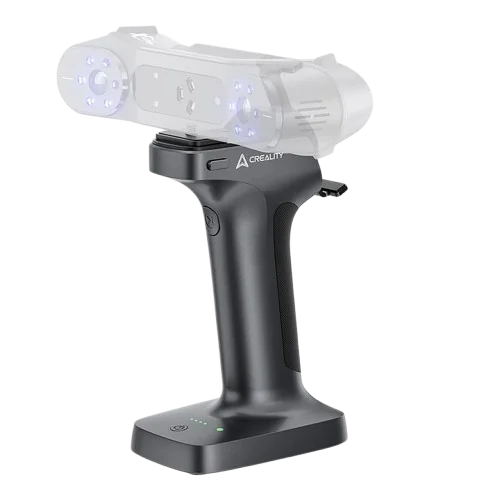
Creality Scan Bridge for Sermoon S1 / Raptor
By Creality · 3D Printing Accessories & Scanners · 3D Printing · More from Creality
- WiFi 6 AX6000, up to 4.7 Gbps
- 36,000 mWh battery
- up to 4 h continuous scanning
- fast charging via USB-C
- real-time screen mirroring
Price not listed
- CrealityView at Creality
- eBayView at eBay
- AmazonView at Amazon (paid link)
- eBay (used) eBay: used, open-box, refurbishedView at eBay (used)
Stores are listed in a fixed order, never by price or commission. Prices are snapshots. Check the current price with the store.
Summary
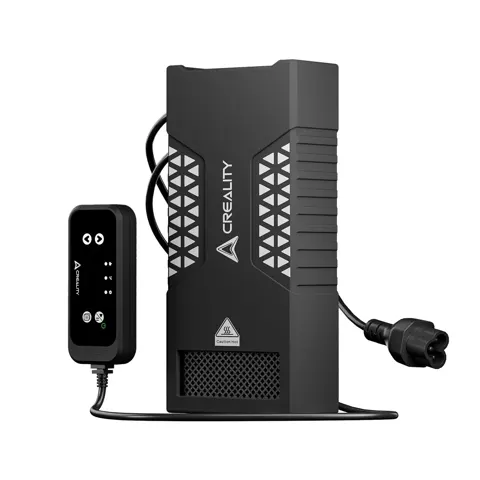
A wireless scanning handle and battery for supported Creality 3D scanners, not a scanner itself: it links the scanner to a computer over 5 GHz Wi-Fi 6.
Strengths
- Tether-free positioning: one owner used it to stream scans to a Windows PC and display the session on a phone, at roughly 5 to 20 m between computer and Bridge in their environment.
- Heavy processing stays on the desktop while the user sees the feed on the mounted phone, useful for large high-detail objects.
- Accessory ecosystem: Creality US separately prices the Raptor bridge cable at $12.90, quick-release plate at $9.99, magnetic phone clamp at $28 and fast charging cable at $9.96.
- Owner workflow: one poster routinely used Raptor plus Bridge in NIR mode to capture a large perforated steel part when maximum metrology accuracy was not required.
- Creality’s storefront carries comments praising freedom from the laptop and easier scanning.
Weaknesses
- Wi-Fi shows connected but CrealityScan does not see the scanner; one user says Creality support sent a different software build and firmware, followed by success, but this is not a universal fix.
- One owner documented a lit blue indicator with no scanner power output, measured with an adapter; not independently inspected.
- Phone-dependent low fps and lost tracking: an Otter owner reported about 5 fps on an older Wi-Fi 5 Pixel 4a, and another complained of repeated tracking loss on Galaxy S22+.
- PC freezing and corrupt projects occurred both via Scan Bridge and direct USB, so that report does not demonstrate a Bridge-specific defect.
- Dark and mixed-surface capture failures with Bridge firmware v1.3.1, plus connection drops and radio interference covered by Creality’s Wi-Fi troubleshooting guide.
- No large validated sample, formal failure frequency or average months before battery capacity loss was found.
Verified specifications
| Exact version | Creality Scan Bridge, “Scan Bridge for Sermoon S1 & Raptor Series”, official catalog 4008050055; Raptor-series reseller identifier RAPTOR SERIES SCANN BRIDGE; B&H UPC 799904646987. |
|---|---|
| Price/variant | Creality US listed $299 with $449 crossed out for the Sermoon S1/Raptor selection on October 25, 2026; the Otter selection is $279. |
| Wireless | 5 GHz, Wi-Fi 6, with claimed backward compatibility. The AX6000-class figure is radio marketing, not scan throughput. |
| Speed limits differ by document | an earlier Creality store specification states up to 45 fps laser / 20 fps NIR; the March 2026 RaptorX manual specifies up to 50 fps parallel-line / 30 fps infrared. These are manufacturer ceilings, not guaranteed real-world rates. |
| Battery | earlier specification 36,000 mWh (36 Wh) and up to 4 hours continuous use; updated manual specifies two 5,000 mAh lithium cells. Fast charging at 30 W USB-C (PD/AFC/FCP); 80% charge in 1.5 h. None is a verified runtime benchmark at maximum scanning workload. |
| Dimensions | updated manual 193.7 × 119.8 × 81.7 mm, 444 g; older Creality store copy 194 × 120 × 82 mm, 474 g. |
| Interfaces and controls | scanner communication USB 3.0; scanner power DC 12 V / USB 5 V by model; mechanical power and scan/pause buttons; battery and Wi-Fi status LEDs; magnetic phone clamp. |
| Environment | -10°C to +40°C, 0 to 90% relative humidity. |
| Mobile host requirements (November 2025) | Snapdragon 8 Gen 3 or better on Android for Raptor/Sermoon; A16 or better for supported iOS Raptor/Pro/Sermoon workflows. This is a host requirement, not proof that every current firmware and scan mode supports full on-phone scanning. |
| Original Raptor-series bundle | scan handle, scanner connection cable, 5 GHz Wi-Fi 6 USB computer adapter, phone magnetic clamp, mounting/quick-release plate, charging cable, guide and small accessories/pouch. This is not a scanner-included bundle. RaptorX already normally includes a Scan Bridge. |
| Scan accuracy | none can be assigned to the Bridge alone; geometric accuracy belongs to the attached scanner, calibration, motion and reconstruction. |
Full research notes and sources
How it connects
The Bridge creates its own 5 GHz hotspot, so the computer usually joins the Bridge SSID rather than ordinary home or office Wi-Fi. A machine with one wireless interface may lose its usual internet connection during a scan; the supplied adapter helps, but driver and network selection still need setup. One early owner wished it could join the existing LAN and found it could not on that tested build. Pairing order matters: start the Bridge, wait for the flashing blue Wi-Fi light, join the uniquely labeled hotspot, open CrealityScan, confirm scanner detection, then activate screen mirroring and attach the phone. “Connected, no internet” on the local SSID is not inherently a defect because the Bridge is not an internet router. Bluetooth is not the specified transport.
Range, speed and battery
The 5 to 20 m range is one user’s field estimate, not a manufacturer-certified maximum. The 45 to 50 fps headline cannot be assumed with every mobile host; weak phones and interference can limit frame rate well below the advertised theoretical wireless capacity. Creality’s November 2025 guide recommends substantial host resources for Raptor, Raptor Pro and Sermoon. The 36 Wh (or two 5,000 mAh cells) and 4-hour marketing claim is not a verified user runtime benchmark at maximum scanning workload. Budget for charging before long jobs.
Software and setup
Crucially, isolate computer, software and scanner causes before replacing the wireless handle, since failures have occurred over both Scan Bridge and direct USB. Back up scan projects before updates. A March 2026 owner liked the hardware but reported struggling with CAD conversion; adding a Scan Bridge alone does not provide native CAD reconstruction. The extra handle, phone and cable assembly increases weight and the number of things to secure during handheld movement.
US snapshot October 25, 2026, before tax and any non-free shipping:
- Creality US, exact Raptor/Sermoon variant: $299, manufacturer crossed-out $449, with add-to-cart available. This is the benchmark for a new correct-version kit; do not confuse with the $279 Otter variant.
- DigiKey, Raptor-series item: $379.42, listing one unit in stock.
- B&H, Raptor-series bridge: $399 and in stock when checked, with listed Wi-Fi adapter, power supply and magnetic phone clip and free standard shipping indicated.
- Good buy: $270 or less new with US warranty and confirmed Raptor version, as a buyer-defined 10%-below-direct target, not an observed standard deal. $270 to $310 is reasonable for a tested local-to-desktop wireless workflow. Above $350, buying at Creality’s verified $299 direct quote, or keeping a wired solution, is usually better while the direct offer remains available.
- The $449 figure is a manufacturer’s strike-through listing reference, not evidence it typically sold for $449. No independently verified US 12-month pricing trend or reliable current used sold-price sample was found.
A wired alternative may beat the Bridge on value: the Creality Raptor 4.5 m USB 3.0 and power cable is $25.99, and the Sermoon S1 2 m USB 3.0 and power cable is $34.00. The RaptorX scanner at $3,299 includes its own bridge, so an owner of a complete RaptorX should not buy a duplicate $299 handle.
Running costs
The Bridge has no required monthly subscription or disposable filter in the manufacturer’s current listing or manual. An existing computer, scanner, phone and available Wi-Fi adapter are still required for the described PC-plus-mirroring workflow. Illustrative electricity: using the earlier manufacturer’s 36 Wh battery-energy claim, 100 full equivalent discharges and recharges a year equals 3.6 kWh of stored battery energy; at an explicitly assumed $0.20 per kWh that is $0.72 per year of battery energy alone. Actual grid input and cost will be higher because charger and battery efficiency are imperfect and peripherals, computer and scanner draw additional power. 250 cycles would store 9 kWh, or $1.80 at that assumed rate, before losses. This is arithmetic, not measured US household electrical use. Occasional repair scenario: replacing one $12.90 scanner cable and one $9.99 plate within a year costs $22.89, excluding shipping, tax and labor; a $28 phone clamp or $9.96 charging cable adds cost only if actually replaced. None of these is a regular yearly consumable. Actual annual battery degradation, repair and loss rates and total user operating costs were not found.
Support and warranty
B&H identifies a limited 1-year manufacturer warranty for its Raptor-version Bridge kit. Creality US product pages advertise up to 12 months, while the general after-sales policy lists 12 months for complete scanners and says separately purchased accessories have their own coverage terms. The seller should confirm that standalone Scan Bridge part 4008050055 is covered for 12 months rather than assuming a scanner’s complete-machine term applies unchanged to every accessory. Creality US generally provides a 14-calendar-day return request window and 30-calendar-day exchanges for qualifying defective accessories, subject to product condition, documentation and seller channel. Customer-preference returns can leave the buyer responsible for return shipping. Official after-sales address is cs@creality.com. Provide exact variant and part number, date and proof of purchase, scanner model, Scan Bridge firmware, CrealityScan version, screenshots, status LEDs and a short video; the manufacturer’s current troubleshooting guide tells owners to collect logs for persistent problems. Real service outcomes vary: 2025 comments include conflicting support answers and at least one owner who says a support-provided firmware and software update ultimately fixed recognition, while a December 2025 buyer spent two weeks unsuccessfully trying to connect the supplied Wi-Fi adapter. No verified nationwide standalone-Bridge repair center price, battery exchange tariff, median claim turnaround or warranty success percentage was found.
Alternatives
- Creality Raptor 4.5 m USB 3.0 and power cable at $25.99, for Raptor series, Sermoon S1 and Sermoon X1. Better for a desk or workshop within cable reach when reliability, cost and consistent wired transfer outweigh full wireless freedom. It does not provide a battery or phone mount.
- Creality Sermoon S1 2 m USB 3.0 and power cable at $34.00. Better for a Sermoon S1 operator using a nearby computer who wants a model-specific spare or basic wired replacement rather than a $299 Bridge. It does not remove the physical tether.
- Creality RaptorX 3D scanner with its factory-included Scan Bridge at $3,299. Important for someone buying a complete new scanner rather than this standalone accessory; buying another $299 handle without confirming box contents risks a duplicate.
Incompatible non-alternative: the $279 Scan Bridge for Otter is a distinct hardware and cable kit and is not a safe drop-in substitute for Raptor/Sermoon just because both are labeled Scan Bridge.
Which model this is
Creality Scan Bridge for Sermoon S1 and Raptor Series, part 4008050055, UPC 799904646987. It is an accessory for supported scanners, not a scanner. Do not confuse it with the Otter kit at $279, which uses a different scanner cable and lacks the Raptor package’s additional Wi-Fi adapter. Confirm the original scanner bundle contents before buying, since RaptorX already includes a bridge.
Sources
Manufacturer:
- Creality US store: Scan Bridge product page
- Creality RaptorX Quick Guide V1.2, March 2026
- Creality VIP Mall: Scan Bridge Raptor-series SKU 4008050055
- Creality: Sermoon S1 scanner compatibility
- Creality: RaptorX 3D scanner
- CrealityScan wiki: setup help
- Creality wiki: Scan Bridge connection troubleshooting
- Creality wiki: September 2026 Scan Bridge firmware v1.3.1 troubleshooting
- Creality wiki: recovery guides
- Creality US: Raptor 4.5 m data cable
- Creality US: Scan Bridge fast charging cable
- Creality US: Scan Bridge cable for Raptor series
- Creality US: Scan Bridge quick release plate
- Creality US: Scan Bridge magnetic phone clamp
- Creality US: scanner accessory collection
- Creality US: scanner collection
- Creality US: after-sales returns and warranty terms
- Creality official blog: scanner compatibility guide
- Creality official store: early Scan Bridge full specs
- Creality Sermoon S1 2 m cable
Independent reviews and sources:
- B&H Photo: Creality Scan Bridge for Raptor
- B&H Photo: Raptor bridge package specifications
- DigiKey: Raptor series scan bridge
- Manuals+: Scan Bridge setup
Owner reports:
- Reddit r/3DScanning: Raptor plus Scan Bridge first impressions
- Reddit r/3DScanning: Raptor Scan Bridge software and firmware issues
- Reddit r/3DScanning: Otter Scan Bridge first impressions
- Reddit r/3DScanning: Galaxy S22+ Otter tracking complaints
- Reddit r/3DScanning: May 2026 Otter low fps
- Reddit r/3DScanning: Raptor Bridge connectivity and flicker
- Reddit r/3DScanning: July 2026 owner workflow on perforated steel
- Reddit r/Creality: Raptor scan failures also over direct USB
- Creality Community Forum: Raptor Bridge power output problem
- Shop: Creality Scan Bridge purchaser remarks
Parts and stores: