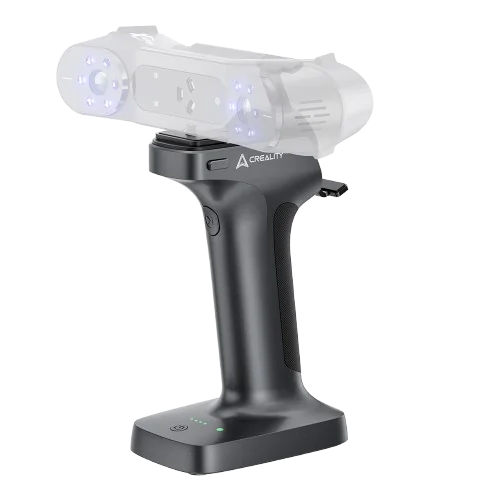
Creality Scan Bridge for Otter
By Creality · 3D Printing Accessories & Scanners · 3D Printing · More from Creality
- WiFi 6 AX6000 wireless data transfer
- 36000 mWh battery
- Up to 4 h continuous scanning
- Fast charge to 80% in 1.5 h (USB-C)
- Magnetic quick setup
Price not listed
- WalmartView at Walmart
- eBayView at eBay
- eBay (used) eBay: used, open-box, refurbishedView at eBay (used)
Stores are listed in a fixed order, never by price or commission. Prices are snapshots. Check the current price with the store.
Summary
A handheld wireless bridge for the Creality Otter scanner that carries its own battery, links over WiFi 6 AX6000 and adds a magnetic phone holder for screen mirroring. Check your computer before you buy: initial setup can require a firmware update, a 2.4 GHz adapter and sometimes a Windows PC.
Strengths
- Wireless use removes the cable tether; owners describe it as much better than wired scanning after setup.
- Wireless screen mirroring to a phone clipped to the bridge reduces looking away from the workpiece and tracking loss.
- Scan quality is reported at least as good as wired, with the lower frame rate not causing practical problems.
- After firmware updates, Mac and Windows users report successful wireless connections.
Weaknesses
- Early firmware (1.0.6) often must be updated to 1.1.3 before Creality Scan detects the bridge.
- Some Mac users needed a Windows PC to complete the WiFi password setup.
- The bridge network may only appear with a 2.4 GHz adapter; 5 GHz-only adapters miss it.
- A VPN must be disabled for the connection to work.
- The magnetic phone holder breaks or is lost, and replacement is quoted at about £80 with no separate listing.
- Firmware updates can hang or fail, with the bridge reporting “device occupied”.
Verified specifications
| Product | Creality Scan Bridge, Otter variant (sold separately from the Raptor & Sermoon variant). |
|---|---|
| Compatible scanner | Creality Otter. |
| Wireless link | WiFi 6 AX6000. |
| Features listed on store pages | large-capacity battery, fast charging, wireless screen mirroring, magnetic quick setup, intelligent power-saving. |
| Software | Creality Scan / Creality Scan 4 for connection and firmware updates. |
| Firmware versions seen in owner reports | 1.0.6, 1.1.3, 1.2.5. |
| Battery capacity, runtime, charge time, dimensions, weight, materials and included accessories are not published in the readable store text. | |
| Warranty | up to 12 months on the US store, up to 24 months on the UK store. Return window: 14 days on both stores. |
Full research notes and sources
Setup and compatibility
Early units shipped with firmware 1.0.6 and had to be updated to 1.1.3 before Creality Scan detected the bridge. Some Mac users needed a Windows PC to complete password setup, and at least one user found the bridge network only with a 2.4 GHz adapter. A VPN must be disabled for the connection to work, and macOS Tahoe 26.2 compatibility problems were reported by at least one user. Owners suggest keeping firmware and Creality Scan updated, disabling VPN, using a 2.4 GHz adapter and completing password setup on a compatible computer.
Wireless performance
The only quantitative comparison found is one owner’s report of roughly 14-15 fps over the bridge versus 29-30 fps wired. Owners report scan quality at least as good as wired and that the lower frame rate does not cause practical problems. No independent instrumented test of the bridge was found.
Costs and parts
US store lists the Otter bridge at $279.00, compare at $399.00 (save $120.00), and the Raptor & Sermoon bridge at $299.00, compare at $449.00 (save $150.00). UK store lists the Otter bridge at £349.00 and the Raptor & Sermoon bridge at £389.00. UK combo discounts run 10% off for 2 units, 15% for 4 and 20% for 6. Accessory cables are £9.90 for Otter and £11.00 for Raptor. A replacement magnetic phone holder was quoted at about £80, with no separate low-cost listing found, and a 2.4 GHz adapter may be needed. Warranty differs by region: up to 12 months in the US and up to 24 months in the UK, with a 14-day return window on both stores.
Is it worth it?
At $279.00 in the US, the bridge is a workflow purchase rather than a quality upgrade: it suits frequent or awkward-position scanning, where untethered use and phone screen mirroring matter. It is weaker value for occasional scanning, for Mac-only users without access to a Windows PC for initial setup, or for users whose computer lacks a 2.4 GHz adapter.
Which model this is
This page covers the Creality Scan Bridge for Otter, a separate variant from the Raptor & Sermoon bridge. No public model number, serial format or regulatory ID was found in the readable store or forum text. The Otter Lite and its Lite Bridge are a different product family and are not covered here. Firmware versions seen in owner reports are 1.0.6, 1.1.3 and 1.2.5.
Sources
Manufacturer:
- Creality Scan Bridge (US store)
- Creality Scan Bridge for Otter, Raptor, Sermoon Series Scanner (UK store)
- Creality Scan Bridge (Creality official)
Independent reviews:
- No independent instrumented test of the bridge was found.
Owner reports:
- Scan Bridge (Creality forum)
- Raptor Pro - No Connection Via Scan Bridge Possible (Creality forum)
- Problem with connecting Scan Bridge Raptor series to WiFi (Creality forum)
- Replacement Magnetic Phone Holder for Scan Bridge (Creality forum)
- Creality scanning bridge (Creality forum)
- Scan Bridge with Otter seems to hang during FW Update (Creality forum)
- SOLVED: Creality Wireless Bridge Set Password pop-up not appearing on macOS (Creality forum)
- Otter lite bridge, phone connected to bridge, in app Device not connected (Creality forum)
- Otter Lite wireless connection guide (Creality forum)
- Import from phone to Creality Scan 4 fails (Creality forum)
- Otter Lite, iOS and Mac WiFi password (Creality forum)
- OTTUR LITE WIFI no longer turning on (Creality forum)
- Creality Lite Bridge? (Creality forum)