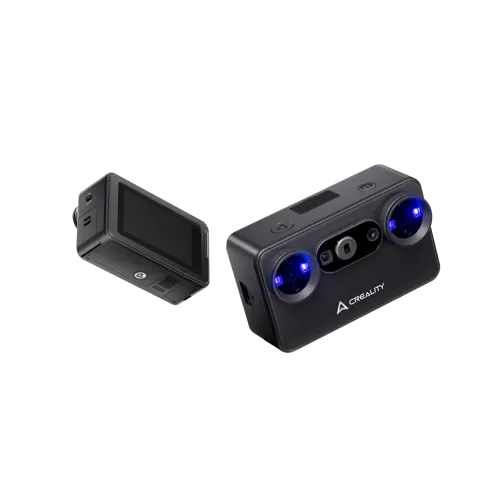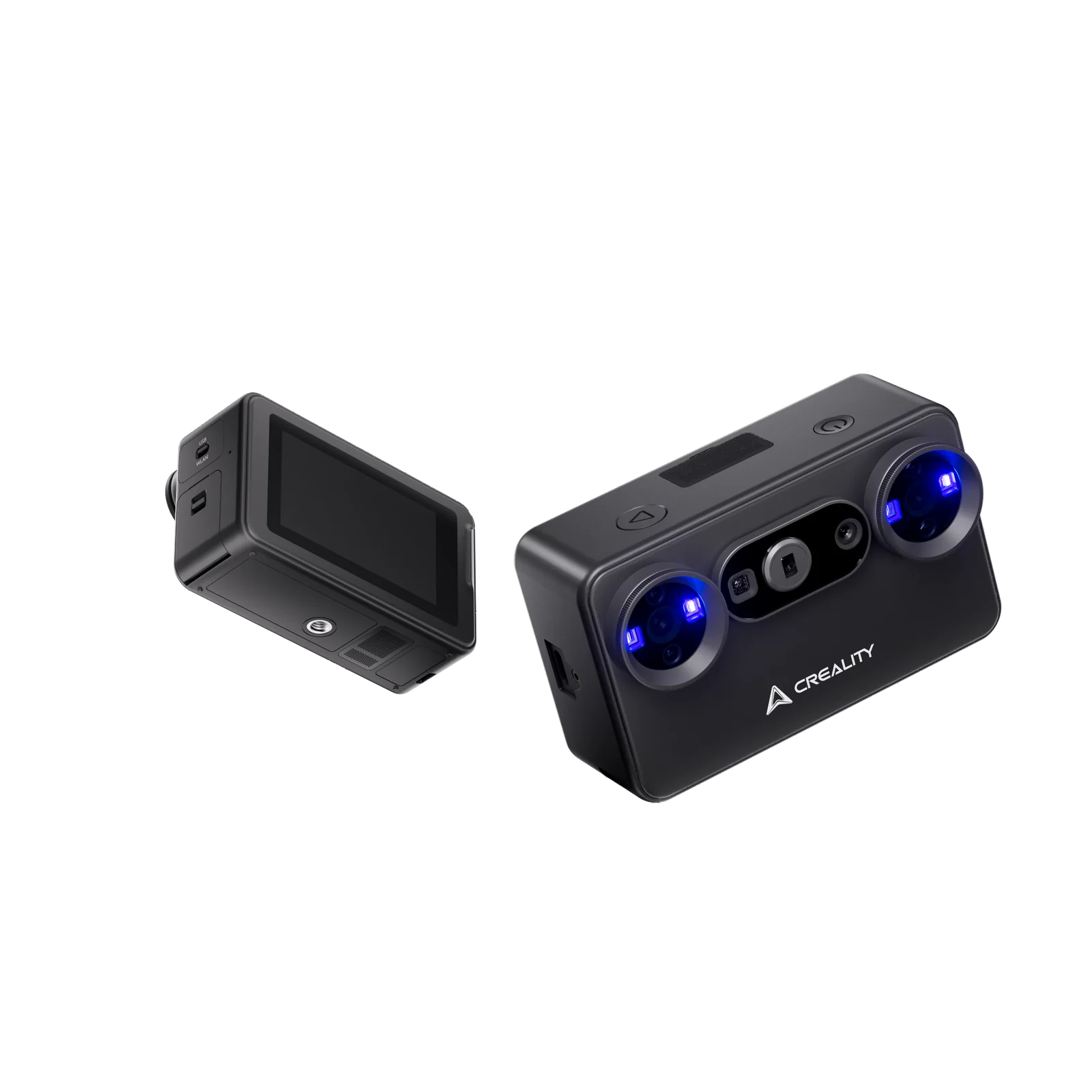
Creality Pika 3D Scanner
By Creality · 3D Printers · 3D Printing · More from Creality
- 260 g weight
- 100 x 60 x 35 mm
- 7 parallel blue laser lines
- up to 110,000 lux (blue laser)
- two 3,350 mAh batteries
Price not listed
- CrealityView at Creality
- WalmartView at Walmart
- eBayView at eBay
- eBay (used) eBay: used, open-box, refurbishedView at eBay (used)
Stores are listed in a fixed order, never by price or commission. Prices are snapshots. Check the current price with the store.
Summary
A 260 g pocket 3D scanner that pairs a 7-line blue laser mode with near-infrared structured light, for makers who scan small parts, collectibles and mechanical pieces. Check your host hardware before buying: good results need a flagship phone or a PC with 16 GB or more of RAM and an Nvidia GPU, and marker-free blue-laser scanning works only over USB to a PC.
Strengths
- Genuinely pocketable at 260 g and 100 × 60 × 35 mm, so it travels to the object.
- Blue-laser mode resolves small features on collectibles, figures and mechanical parts.
- Creality Scan’s cleanup tools turn rough captures into print-ready meshes.
- Dual modes and a built-in screen cut setup friction; Wi-Fi removes the cable for NIR work.
- Free software with no subscription, and the price undercuts Creality’s own Sermoon line.
Weaknesses
- Marker-free blue-laser scanning works only over USB to a PC; over Wi-Fi it needs marker dots.
- NIR mode loses tracking on hair and fluffy surfaces, and dark parts need powder coating.
- Angular accuracy of about 0.2 deg trails Creality’s Raptor and Sermoon lines.
- Resolution sits a tier below Creality’s Mole 3, Sermoon and Raptor on fine back surfaces.
- Host hardware is demanding: budget Android phones fail outright.
- The included turntable has play in its centre bearing, which can roughen surfaces.
Verified specifications
| Scanning systems | 7 parallel blue laser lines plus near-infrared structured light. |
|---|---|
| Blue laser mode | rated accuracy up to 0.03 mm (laboratory); resolution 0.05–2 mm (Tom’s Hardware) or 0.1–2 mm (others); working distance 160–400 mm; single capture 101 × 107 mm at 160 mm and 344 × 268 mm at 400 mm; outdoor tolerance up to 110,000 lux. |
| NIR mode | rated accuracy up to 0.1 mm (manufacturer) or about 0.08 mm in mobile use (3DTechValley); resolution 0.15–2 mm; working distance 200–1,000 mm (manufacturer), 140–1,000 mm (Tom’s Hardware) or 200–1,200 mm (CNX Software spec list); single capture 144 × 134 mm at 200 mm and 764 × 670 mm at 1,000 mm; outdoor tolerance up to 80,000 lux with the NIR filter. |
| Scan speed | blue laser up to 110 fps on PC and 40 fps on phone; NIR up to 30 fps on PC and 20 fps on phone. |
| Object size coverage | about 10 × 10 × 10 mm to 2,000 × 2,000 × 2,000 mm. |
| Alignment | blue laser supports marker, global marker and marker-free; NIR supports marker, global, geometry and texture. |
| Color mapping | supported. |
| Laser safety | Class I (eye safe). |
| Display | 3-inch touchscreen, 854 × 480, 500 nits. |
| Processor | 8-core CPU at 2.0 GHz. |
| Battery | two removable 3,350 mAh batteries, hot-swappable. |
| Connectivity | USB 3.0 Type-C, Wi-Fi 6. |
| Dimensions | 100 × 60 × 35 mm; 260 g with battery. |
| Output formats | STL, OBJ, PLY, ASC. |
| Supported hosts | Windows 10/11 64-bit, macOS 14+, Android 10+, iOS 15+. |
| Recommended host | PC Intel Core i7 13th gen or newer, NVIDIA RTX 3060/4060 or newer with 8 GB VRAM, 32 GB RAM; Mac M3/M4/M5 with 32 GB RAM; Android Snapdragon 8 Gen 2/Gen 4 with 8–12 GB RAM; iPhone A15/A17 with 6–8 GB RAM. |
| Warranty | store badge states “Up to 12-Month Warranty”; no detailed warranty document was captured. |
| In the box | scanner, tripod, glass calibration board, 2 m USB-C cable, turntable, lanyard, two 3,350 mAh batteries, reflective markers (D6 mm × 10, D3 mm × 10), six marker towers, two NIR filters, cleaning cloth, quick start guide, certificate of conformity, warranty card. |
| No USB-C charger is included in the box. | |
Full research notes and sources
Which model this is
This page covers the Creality Pika 3D Scanner, model number CRS15CPK, co-developed with Orbbec and released July 22, 2026. It is a single variant with no documented color or revision differences. Do not confuse it with Creality’s CR-Scan Ferret, Otter, Raptor or Sermoon lines, or with Einstar and Revopoint models.
Blue laser versus NIR
The headline 0.03 mm figure applies to the blue-laser mode, and that mode is the one that needs a wired PC connection for marker-free work. Over Wi-Fi, blue-laser scanning needs marker dots, and in wired USB mode the built-in screen shows only control buttons while the live preview stays on the host. NIR mode is the wireless, people-friendly option but struggles with hair, fluffy surfaces and dark parts unless they are dusted with powder. Outdoors, blue laser tolerates up to 110,000 lux and NIR up to 80,000 lux with its filter.
Host hardware and workflow gotchas
Good results need a flagship-class phone or a capable PC: 16 GB or more of RAM and an Nvidia GPU on Windows, or an M3/M4/M5 Mac with 32 GB of RAM. On a budget Android phone with a Snapdragon 695, laser mode captured no data and NIR ran at about 1 fps. Calibration only works over USB, not Wi-Fi, and the iPhone connects over Wi-Fi only. Wi-Fi scanning can interrupt the host laptop’s internet access. Batteries ship discharged and must be charged before first use, and no USB-C charger is included in the box. There is no Linux support.
Accuracy and resolution in practice
A certified 90-degree angle measured about 89.8 degrees, an error of about 0.2 deg, against under 0.02 deg on Creality’s Raptor and Sermoon lines in the same test. On a certified 100 mm gauge block, length error ran 30–40 microns, within a 50-micron metrology threshold. Resolution sits a tier below Creality’s Mole 3, Sermoon P1, X1, S1 and Raptor on fine back-surface detail, though it runs ahead of Revopoint Metro X and Moose Lite.
Is it worth it?
MSRP is $699 at the Creality store as of late October 2026, with an early-bird price of $629 from July 22 to August 12, 2026; 3DTechValley quotes roughly $599–699. At $629 it is strong value for portable blue-laser scanning. At $699 it is good value for buyers who already own a capable host; portability, dual modes and sub-50-micron accuracy justify the price. Value drops sharply if a host device must be bought. Cross-shopping includes the Creality CR-Scan Ferret Pro at about $359, which lacks the blue-laser mode and built-in screen, and the Creality Sermoon S1 at $2,000 or more, against which the Pika produced similar results on tested objects. Revopoint POP 4, Einstar Rockit and a Bambu Lab S1 teased for November 2026 are also in the mix. Software is free and there is no subscription, but total cost of ownership can include a capable host device, optional scanning spray, a sturdier turntable or tripod and a case.
Repairs and upkeep
Warranty appears to be up to 12 months per the store badge, and no replacement-parts catalogue or extra-battery listing was found for the Pika, so long-term service and parts availability are unknown. Maintenance means calibrating with the supplied glass board (the serial number is entered manually, and the PC needs internet for correction data), keeping the lenses clean, charging the batteries over USB-C and avoiding shorted loose batteries. Whether Creality will add Linux support, and whether marker-free blue-laser scanning will ever work over Wi-Fi, are open questions.
Sources
Manufacturer:
- Creality US Store: Creality Pika 3D Scanner product page
- Creality support: Creality Pika
- Creality Wiki: Pika User Manual
- Creality Wiki: General FAQ for Pika
Independent reviews:
Owner reports:
- 3DWithUs forum: Creality Pika Discussion
- Reddit r/Creality: Creality Pika big limitations
- Reddit r/3DScanning: scan to printed part in 30 minutes with Pika
- Reddit r/CrealityScanning: Pika hardcore test with 12 objects
- Reddit r/CrealityScanning: new Pika user marker issue
- Reddit r/3DScanning: Pop 4 vs Pika side-by-side
- Reddit r/3DScanning: testing Pika on real objects
- Reddit r/CrealityScanning: Pika size comparison
- Reddit: CrealityScanning Pika FAQ