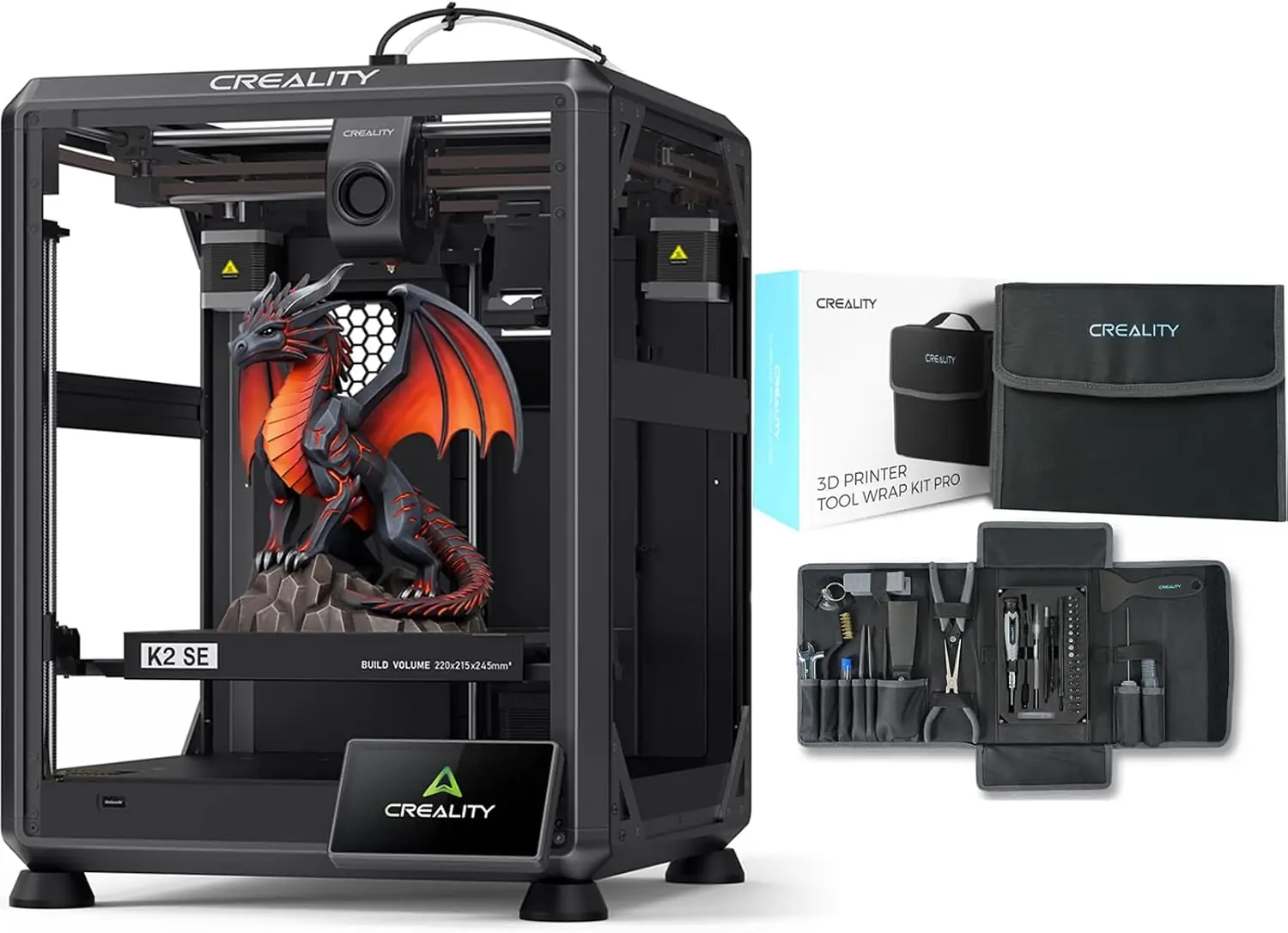
Creality K2 SE 3D Printer Bundle with 74Pcs 3D Printing Tool Wrap Kit
By Creality · Budget 3D Printers · 3D Printing · More from Creality
- Build volume: 220 x 215 x 245 mm
- Max print speed: 500 mm/s
- Max acceleration: 20000 mm/s2
- Max nozzle temperature: 300 C
- Max heatbed temperature: 100 C
Price not listed
- CrealityView at Creality
- eBayView at eBay
- AmazonView at Amazon (paid link)
- eBay (used) eBay: used, open-box, refurbishedView at eBay (used)
Stores are listed in a fixed order, never by price or commission. Prices are snapshots. Check the current price with the store.
Summary
A compact open-frame CoreXY FDM printer with a 220 x 215 x 245 mm build volume, a 500 mm/s headline speed and a 0.4 mm all-metal hotend to 300 °C, sold in the US as a bundle with a 74-piece 3D-printing tool wrap kit. Check the exact-model fault reports before you buy: owners in Creality’s own forum describe the nozzle crashing into the build plate at the start of a print.
Strengths
- CoreXY motion, input shaping, auto-leveling and power loss recovery, all documented in Creality’s wiki.
- Eleven replaceable assemblies with step-by-step tutorials, a parts list and clog-clearing guides.
- Four-colour printing from one nozzle on the 4C, with no filament lock-in and no proprietary spools.
- A 0.4 mm hardened-steel nozzle in an all-metal hotend to 300 °C handles abrasive PLA-CF.
- A 3.97-inch colour touchscreen, 8 GB of storage and 2.4 GHz Wi-Fi.
- Warranty up to 12 months plus a 14-day return.
Weaknesses
- Open frame with no chamber heating, so ABS and ASA warp and tall prints can crack partway up.
- The 500 mm/s figure is a ceiling; Creality itself sets 300 mm/s for best surface quality.
- Plain step motors make it noisier than the FOC step-servo K2 Pro.
- 2.4 GHz-only Wi-Fi may need band separation on a crowded router.
- Owners report the nozzle crashing into the build plate at print start, and Creality has not accepted the software explanation.
- The 4C’s four spools sit open to the air, so hygroscopic filament needs a dryer between sessions.
Verified specifications
| Build volume | 220 x 215 x 245 mm. |
|---|---|
| Printing speed | up to 500 mm/s; Creality rates 300 mm/s for optimal surface quality. |
| Acceleration | up to 20000 mm/s². |
| Nozzle | 0.4 mm hardened steel in an all-metal hotend, to 300 °C. |
| Heatbed | to 100 °C. |
| Build plate | epoxy resin. |
| Extruder | dual-gear direct drive. |
| Motion | CoreXY with step motors on all four axes and full-auto leveling. |
| Display | 3.97-inch color touchscreen. |
| Storage | 8 GB eMMC; file transfer over USB drive or Wi-Fi. |
| Wi-Fi | 2.4 GHz. |
| Filament diameter | 1.75 mm. |
| Compatible filaments | PLA, PETG and PLA-CF. |
| Rated power | 350 W on 100–120 V or 200–240 V. |
| Dimensions | 355 x 355 x 715 mm; net weight 11.64 kg. |
| Firmware | V2.3.6.43, dated March 11, 2026. |
| Warranty | up to 12 months, with a 14-day return. |
Full research notes and sources
Speed and the three bundles
The K2 SE is Creality’s entry into the K2 family. The bare K2 SE is a single-colour speed printer; the K2 SE 4C adds an open two-by-two spool rack bolted to the frame, with four PTFE tubes feeding one nozzle that swaps and purges between four spools; the K2 SE Combo replaces that rack with the sealed CFS box. Four colours are discrete, not blended, and there is no mixing hotend and no documented way past four. One CFS holds four spools and up to three more take the total to sixteen.
Creality’s own footnote puts optimal surface quality at 300 mm/s, so the 500 mm/s headline is a ceiling and 300 mm/s is the number to plan around. Makers101 puts the four-colour step at roughly $150 over the bare printer, and a listing that says “multicolor” without naming 4C or Combo is ambiguous.
Nozzle crashes and other owner faults
The most useful exact-model evidence is in Creality’s own community forum, and two of its three active K2 SE threads are complaint threads. The largest, opened 2026-03-09 with 39 posts, is titled “K2 SE nozzle crashes into build plate when beginning print”. Its opening poster bought a K2 SE in late December, printed successfully after downgrading Creality Print 7 to version 6.3, then had the nozzle crash into the build plate and damage it; changing the Z offset from 0 to 0.08 helped briefly, but the crash returned and destroyed a second plate. A second owner reports the same symptom appearing only after a Creality Print update, while the printer’s own preloaded “Boat” file still printed fine. A third owner reports the crash after about 50 successful plates and after each filament change. One poster says reflashing firmware, replacing the strain gauge and switching to OrcaSlicer did not fix it, and that Creality continued to refuse the software explanation. Nobody has published a failure rate.
A separate thread reports extruder gears that jump or jam for a millisecond and rip prints, a machine that became unusable after roughly three months, and a recurring “Z axis homing issue” that returned after a strain-gauge replacement. Several owners blame the white Creality PLA that ships with the machine for clogs and underextrusion, and report improvement on third-party filament, which is a competing explanation for the same extruder symptoms and cannot be separated from the thread alone.
The camera option advertised on the product pages is not plug-and-play on this model. No camera cable ships with the printer; Creality’s answer was a separate extension cable, part number 3103110566, routed to the mainboard with the bottom panel off, and there is no internal mount once the enclosure is fitted.
Repairs, parts and running costs
Serviceability is better than the price suggests. Creality’s wiki documents eleven replaceable assemblies with step-by-step replacement tutorials and video guides, plus a published parts list, clog-clearing procedures and a troubleshooting entry for error code BM0111.
Filament is sold separately. The enclosure, if you want ABS or ASA or draft shielding, is listed by Creality’s store at $59.99 on sale and $76.10 list, and Makers101 puts it at about $70. A dryer or dry box for the 4C’s exposed spools is another running cost. An adjacent K2 Series bed-leveling thread reports the base plate bowing when heated to 50 °C, with the fix a third-party R3MEN Graphite Bed at about $130 rather than a Creality plate; that thread concerns a K2 Pro or K2 Plus, not the SE.
There is no filament lock-in — the printer is not tied to proprietary spools. The 4C’s four spools sit open to the air, so PETG and other hygroscopic filaments need pulling off between sessions or a nearby dryer, and that running cost is not covered by the purchase.
Is it worth it?
Creality’s US store listed the K2 SE 4C at $359 against a $399 list, the bare K2 SE 3D Printer at $279, and the K2 SE/Combo flash-sale page at $379 against $499 in October 2026. Tom’s Hardware reported the bare K2 SE at $248.99 in July 2026 against a $299 selling figure, and Makers101 checked the bare printer at $249 and the 4C at $399 in August 2026.
Under about $260 for the bare printer the hardware is hard to beat at this tier: CoreXY motion, a 500 mm/s ceiling, 300 mm/s usable, auto-leveling, input shaping and power loss recovery for less than a Bambu Lab P1S without multicolor. At $359 to $399 the 4C is a fair multicolor-on-a-budget choice, and the same money buys an enclosed Bambu Lab P1S at $399 that is single-colour without its $150 AMS, or Creality’s own SparkX i7 Combo at $359 with a larger bed and multicolor included. Past about $400 the 4C is hard to justify against the K2 SE Combo’s sealed CFS at $379 from $499 or the Bambu P1S Combo at $549.
Which model this is
This page covers the Creality K2 SE family sold in the US as a bundle with a 74-piece 3D-printing tool wrap kit. The listing’s ASIN is B0FKMM358C.
Creality sells three K2 SE entries: the bare K2 SE 3D Printer, the K2 SE 4C with an open 4-spool rack, and the K2 SE Combo with a sealed CFS box. The published spec table is headed “K2 SE 4C”, and the 220 x 215 x 245 mm build volume and 500 mm/s speed are line-wide, so they do not identify which bundle a listing ships. Only the rack or the CFS does. Don’t confuse the K2 SE with the K2, K2 Pro or K2 Plus, which are larger and use FOC step-servos.
Sources
Manufacturer:
- K2 SE Open-frame Multicolor 3D Printer | Creality Official
- Search results for K2 SE | Creality Official Store
- K2 SE Support: Firmware, Videos, Specs & Help | Creality
- K2 SE User Guide | Creality Wiki
- K2 SE User Manual | Creality Wiki
- Creality K2 SE 4C | Easy Multicolor 3D Printer | Creality Official Store
- Creality K2 SE Combo 3D Printer – 500 mm/s Multicolor Pro | Creality Official Store
- K2 SE Downloads: Firmware, Software & User Manuals | Creality
Independent reviews:
- Creality K2 SE 3D printer price slashed by 17%, now under $250 — Tom’s Hardware
- Creality K2 SE 4C 3D Printer: What “4C” Means (and Why It’s Not a CFS) | Makers101
- Creality’s New K2 SE Might Be a Smarter Buy Than the K1C | All3DP
- Creality K2 SE 4C: Four-color 3D printer for $399 | 3Druck.com
Owner reports:
- K2 SE Do not buy this devil of a machine (Rant) | Creality Community Forum
- K2 SE nozzle crashes into build plate when beginning print | Creality Community Forum
- K2SE Camera? | Creality Community Forum
- New Firmware Update (2026-02-02) for the K2 Series - Feedback | Creality Community Forum
- K2 Series Flagship Printers - Bed Leveling and Maintenance | Creality Community Forum