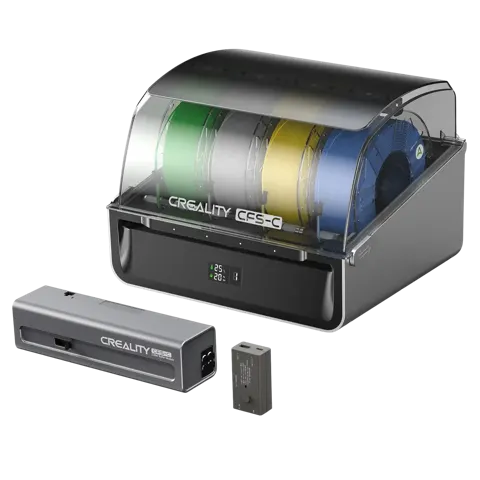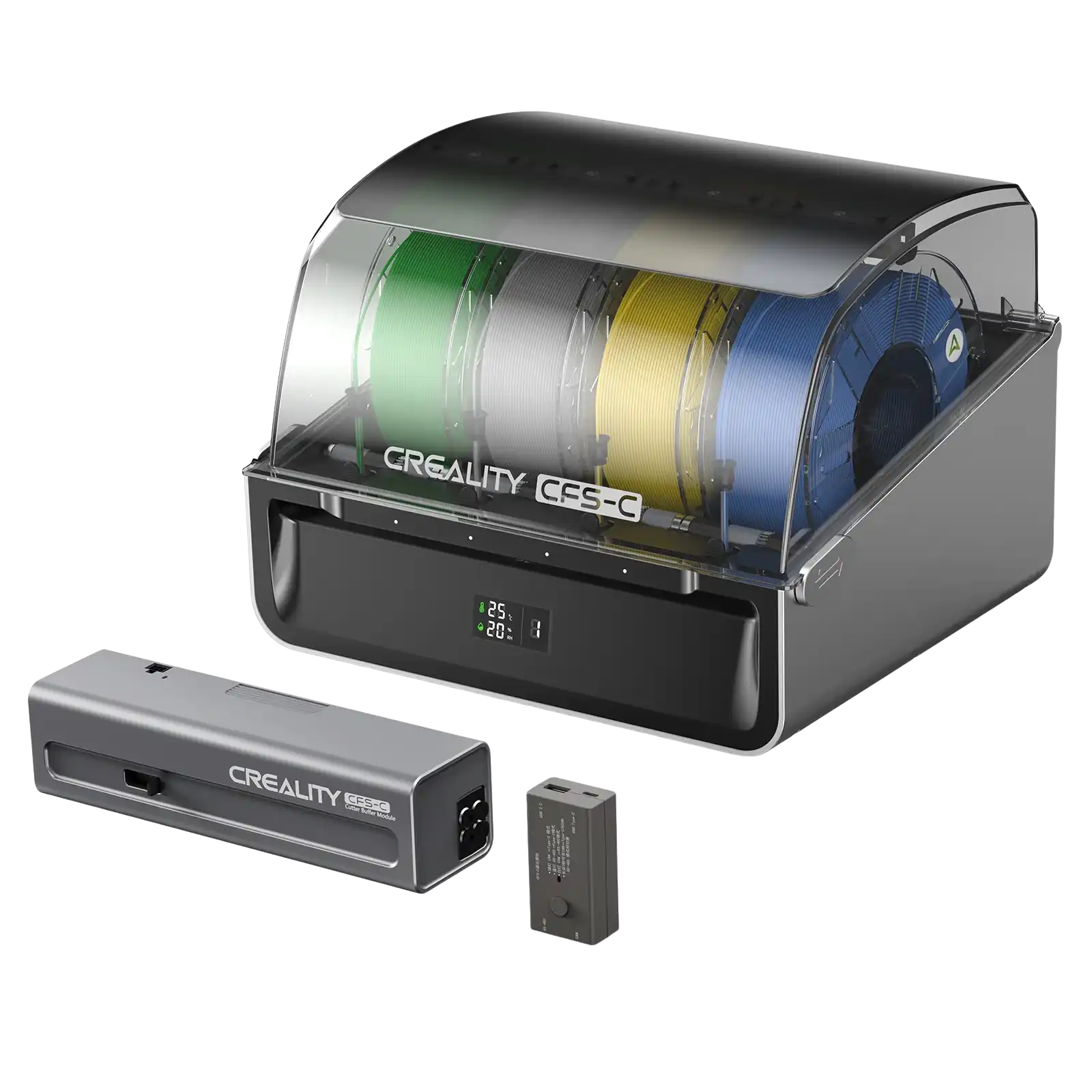
Creality CFS-C Multi-Color Filament System
By Creality · 3D Printing Accessories & Scanners · 3D Printing · More from Creality
- 4 filament slots
- Product dimensions 379 x 314 x 276 mm
- Net weight 4.56 kg
- Power supply DC 24 V, rated power 30 W
- Filament diameter 1.75 +/- 0.05 mm
Price not listed
- CrealityView at Creality
- eBayView at eBay
- AmazonView at Amazon (paid link)
- eBay (used) eBay: used, open-box, refurbishedView at eBay (used)
Stores are listed in a fixed order, never by price or commission. Prices are snapshots. Check the current price with the store.
Summary
A four-slot external filament system that adds up to four-color printing to an existing Creality K1-series printer over a CAN-port connection and a firmware update. Check the printer’s hotend and extruder before buying: older K1 units may need the unicorn hotend and the 2025 extruder to avoid clogs and long startup loops.
Strengths
- Adds automated four-color printing to an existing K1-series printer without replacing the toolhead.
- External cutter and buffer keep waste outside the printer chamber.
- RFID spool identification, auto color mapping and auto relay reduce manual filament handling.
- Desiccant storage with a humidity readout suits spools left loaded between jobs.
- Some K1C owners report good print quality and working multicolor once printing starts.
Weaknesses
- Not plug-and-play: firmware, slicer and hardware compatibility can require tuning.
- Only four colors; multiple CFS-C units cannot be stacked.
- TPU and wet water-soluble supports are not supported.
- Marketing “no purges” still leaves purge towers and flush waste.
- Passive desiccant does not dry a wet spool; no heated dryer.
- No independent instrumented test of the CFS-C exists; evidence is owner-reported.
Verified specifications
| Product | CFS-C (Creality Filament System - C), sold as “CFS-C Multicolor Kit”. |
|---|---|
| Filament slots | 4 per unit; multiple CFS-C units on one printer are not supported, so 4 colors maximum. |
| Filament diameter | 1.75 ± 0.05 mm. |
| Spool compatibility | 1 kg spools, 197–202 mm diameter, 42–68 mm thickness. |
| Compatible filaments | Hyper PLA, CR-PLA and CR-Silk; more through firmware updates. |
| Drying | desiccant (passive, not a heated dryer). |
| Filament path | buffer with 4 inputs and 1 output. |
| Auto features | RFID filament identification, auto color mapping, auto filament relay, run-out and tangle detection, cutter-wear monitoring. |
| Waste | external cutter and buffer collect waste outside the printer; no purging inside the printer. |
| Port | CAN; power: DC 24 V, 30 W rated. |
| Indicators | 4 white/red status lights; segment LCD showing temperature and humidity. |
| Compatible printers | K1 Max 2025, K1C 2025, K1 Max, K1C, K1, K1 SE. |
| Dimensions | 379 × 314 × 276 mm; 4.56 kg (manufacturer; the V1.0 manual lists 5.05 kg). |
| Warranty | 12 months in the US; up to 24 months in the EU. |
| TPU is not supported; use the printer’s own spool holder for flexible filament. | |
Full research notes and sources
Compatibility and setup
Older K1 hardware is the main risk. One K1 owner found the system unusable with the older PTFE-tube hotend and reliable only after upgrading to the unicorn hotend and the 2025 extruder. A detailed K1C report found good print quality and working multicolor once printing started, but a confusing startup sequence of load, retract and reload cycles, a purge tower that was initially massive, and a Creality Print 7 slicer bug (“Print file corrupt”) that required downgrading to Creality Print 6.3. Extruder lock position also appears to affect reliability, though whether that is expected is unclear. A K1 Max owner found the multicolor firmware removed Ethernet detection and the old root-enable interface, while other owners still had SSH and root access, so root accessibility varies by firmware revision. A January 2026 owner reported 20–30 minutes of repeated slot-1 loading and cutting before a six-minute print, and the detailed K1C report saw about 15 minutes of startup on a troubled first installation. A March 2026 K1C print completed a two-color Benchy in about 65 minutes and an eight-change model in about 1 hour 50 minutes after a slicer change, plus a single-color print in 1 hour 26 minutes. Creality maintains separate CFS-C, original-CFS and single-color firmware; factory reset alone may not restore the original stack, so back up configurations before flashing.
Waste, purge towers and startup time
Despite “No Filament Purges” advertising, owner photos show physical purge towers, cut filament tips and slicer-controlled flushing, so the claim is about keeping waste out of the printer, not about zero waste. Owners can tune flush volumes and tower size, but setting them too low risks color bleed or under-priming. The external cutter and buffer do make cleanup easier than scraps collecting inside the chamber. Shortening PTFE routes and shortening tube bends helped some K1C owners feed reliably.
Running costs and parts
There is no mandatory subscription. Consumables are the cutter blade, PTFE tubes, desiccant and filament. The kit ships with a spare cutter blade and a paper waste bin of about 180 × 100 × 80 mm, but no verified US replacement price for the blade, tubes or desiccant was found, so replacement should follow the unit’s wear alerts and physical condition rather than a calendar. Creality RFID filament runs about $21 for a 1 kg spool, so four new spools cost about $84 before tax and delivery; with the kit at $319 that is $403 before a printer or tax. Electricity is modest: at the 30 W rating, 10 hours a week for 52 weeks is 520 hours and 15.6 kWh, about $3.12 a year at an assumed $0.20 per kWh. The 30 W figure is rated power, not a measured draw, and it excludes the printer, hotend, heated bed and any drying. The cutter, buffer PTFE, filament sensor, communication module and mainboard are user-replaceable per the wiki, but no tested 2026 replacement prices were found.
Is it worth it?
US retail lists the kit at $319 (sold out at several retailers at the time of research); the official US store sells it only in combos at $649 for the K1C + CFS-C and $859 for the K1 Max + CFS-C. The EU store lists it at €269. Wholesale pricing sits around $220–$300. A practical target is $275–$290 for a genuine complete kit with US warranty and confirmed stock. At $250 or less the value is strong for an existing K1 owner wanting four-color printing; $250–$320 is fair; above about $320, compare against a new multicolor-capable printer. The original CFS on the K2 Plus offers 16 colors, and a K2 Combo tracked at $521 in October 2026 is an entire printer purchase rather than a retrofit. The main value risk is compatibility: older K1 units may need extra hotend and extruder spending that is not reflected in the kit price.
Which model this is
This page covers the CFS-C (Creality Filament System - C), manufacturer part number 3D-PM-CR-CFS-C, UPC 198549096384, retailer SKU 1002120013. It is an accessory for the K1 series, not a printer, and it is not the original CFS that supports up to 16 colors on the K2 Plus and K2. Do not confuse it with the CFS upgrade accessory kit for older K1 units, which uses different hardware. The Amazon listing for the kit is ASIN B0G487LN9H.
Sources
Manufacturer:
- Creality CFS-C product page
- Creality US store CFS-C listing
- Creality US original CFS (different product)
- Creality K1C + CFS-C combo
- Creality K1 Max + CFS-C combo
- Creality UK store CFS-C
- Creality model support and firmware
- Creality Wiki CFS-C
- Creality Wiki CFS filament compatibility
- Creality K1 retrofit kit (original CFS)
- Creality return policy
- Creality shipping policy
Independent reviews:
- No independent instrumented test of the CFS-C was found from established review outlets.
Owner reports:
- K1 & CFS-C issues (Creality Community Forum)
- CFS vs CFS-C (Creality Community Forum)
- CFS-C user guide (Creality Community Forum)
- CFS-C cutting question (Reddit r/Creality)
- CFS-C issues (Reddit r/Creality)
- CFS-C startup (Reddit r/Creality)
- CFS-C ASA and material switching (Reddit r/Creality)
Parts and stores: