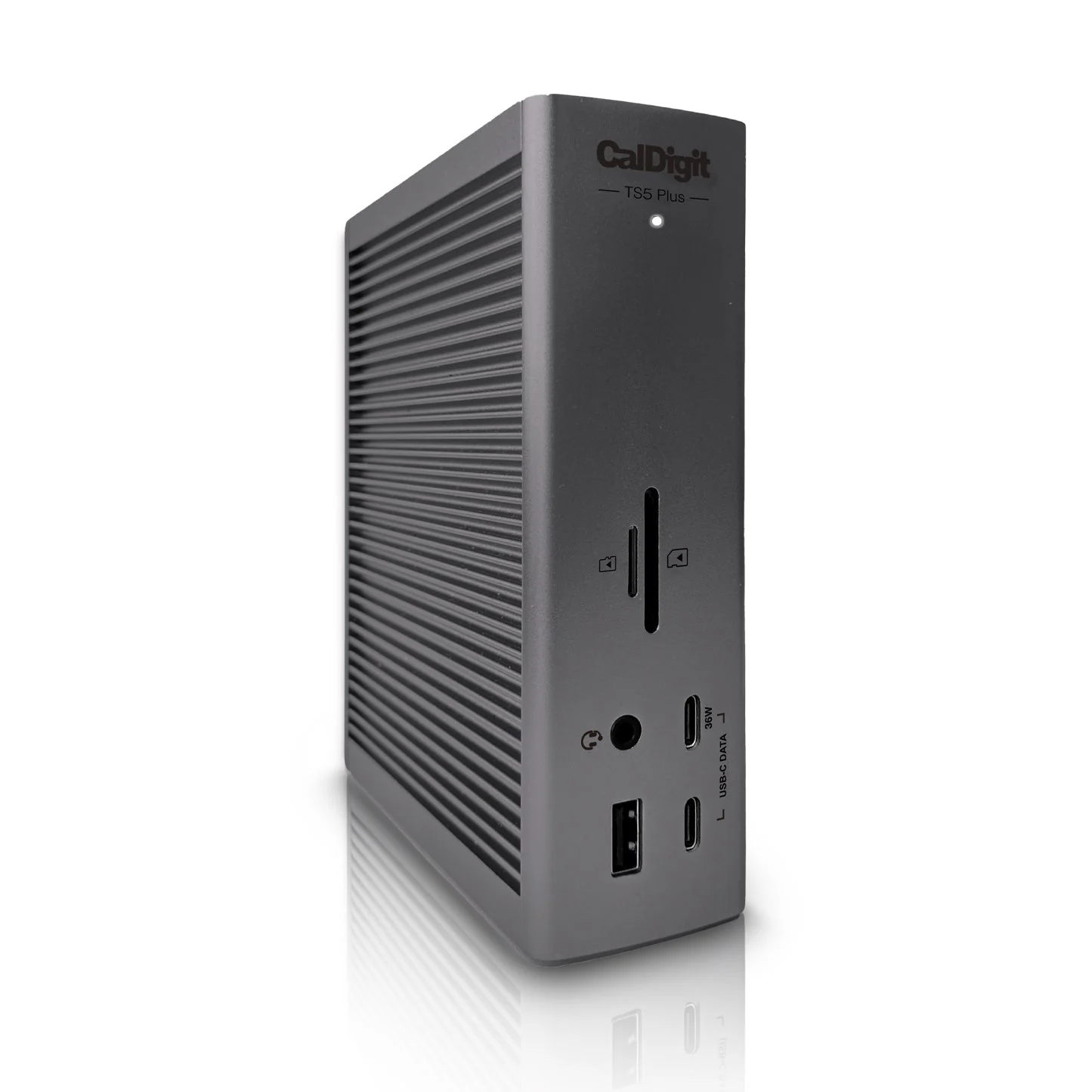
CalDigit TS5 Plus
By CalDigit · Docking Stations · Desk & Streaming Setup
- 20 ports
- 120 Gb/s Thunderbolt 5 bandwidth
- 10 Gigabit Ethernet
- 140W host charging
- DisplayPort 2.1 output
Price not listed
- CalDigitView at CalDigit
- eBayView at eBay
- AmazonView at Amazon (paid link)
- eBay (used) eBay: used, open-box, refurbishedView at eBay (used)
Stores are listed in a fixed order, never by price or commission. Prices are snapshots. Check the current price with the store.
Summary
A 20-port Thunderbolt 5 dock for people who need 10GbE, 140W host charging and as many fast ports as possible over one cable. Check your host before you buy: it wants a Thunderbolt 5 or USB4 v2 port, and a plain USB-C or Thunderbolt 3 laptop will not get the full speed.
Strengths
- The 20 ports cover almost any pro workflow, and every one can be used at once.
- Built-in 10GbE saves the $119–249 a separate Thunderbolt-to-10GbE adapter costs.
- The 330W supply holds a steady 140W to the laptop even with all ports busy.
- Two separate USB 10Gb/s controllers keep fast drives and hubs from fighting for bandwidth.
- The braided 1m Thunderbolt 5 cable is better than the rubber cables most docks ship with.
- The aluminum chassis works standing up or lying flat.
Weaknesses
- Owners report the case running very hot, with external temperatures of 55–70°C (131–158°F) under load.
- Some owners tie USB dropouts, sleep/wake failures and a buzzing noise to that heat.
- Independent testing saw 10GbE fall to 2.5GbE at 52°C and drop out at 56°C.
- No native HDMI and no CFExpress Type-B reader at this price.
- Macs are limited to two external displays because Apple does not support MST.
- The 330W power brick is large and hard to hide behind a desk.
Verified specifications
| Ports | 20 total. |
|---|---|
| Host connection | one Thunderbolt 5 port, up to 120Gb/s with Bandwidth Boost, 80Gb/s bidirectional. |
| Downstream Thunderbolt 5 | two ports at 80Gb/s, 36W each. |
| USB-C | five ports at 10Gb/s, one front-facing at 36W and four at 7.5W. |
| USB-A | five ports at 10Gb/s, 7.5W each. |
| Display | one DisplayPort 2.1 output. |
| Card readers | one SD 4.0 UHS-II and one microSD 4.0 UHS-II. |
| Ethernet | one 10 Gigabit Ethernet port (NBASE-T, AVB). |
| Audio | front combo 3.5mm in/out, plus a rear audio in and out. |
| Host charging | up to 140W. |
| PCIe bandwidth | 64Gb/s (PCIe 4.0). |
| Power supply | 330W external adapter; DC input 24V 13.75A. |
| Displays supported | up to three 4K 144Hz screens on Windows Thunderbolt 5 PCs, dual 4K 240Hz or dual 8K 60Hz on supported Macs. |
| Dimensions | 6.10 × 5.03 × 1.85 in (155.0 × 127.9 × 47.0 mm); 1.98 lbs (0.90 kg). |
| In the box | dock, 1.0m braided Thunderbolt 5 cable, two rubber feet strips, power cord and 330W power supply. |
| Warranty | two years. |
Full research notes and sources
Heat and stability
Heat is the dock’s recurring problem. Owners on r/CalDigit describe a case that gets really hot to the touch, with external temperatures of 55–70°C (131–158°F), and one measured 70°C with the room at 23°C. An independent troubleshooting guide, after 80 hours across six hosts, measured 56–59°C on the chassis under a sustained dual 4K 120Hz plus SSD, Ethernet and charging load, and 34°C at idle. AppleInsider added an overheating update in August 2025 citing a credible report of 131°F (55°C). CalDigit says the reports are isolated and that the dock is designed to run continuously up to 60°C chassis temperature.
The instability reports cluster around that heat: USB errors, random disconnects, sleep/wake failures and a buzzing noise on disconnect. The same guide reproduced an SSD dropping during a sustained transfer, and measured 10GbE throttling to 2.5GbE at 52°C and disconnecting at 56°C over long transfers. One owner on an M5 Max reported display blackouts, audio-interface disconnects and kernel panics, and CalDigit opened an RMA. Nobody has published a failure rate, so treat this as a known risk rather than a proven defect. Owners who place fans under the dock say it helps.
Firmware has moved since launch. Early v1.0.0 had significant sleep/wake failures on Intel Thunderbolt hosts; v1.0.3 fixed the sleep/wake timing; v1.0.5 (March 2026) improved thermal management and USB controller arbitration, and Thunderbolt firmware v71.1 arrived in September 2026.
Compatibility and setup
The port count hides a strict host requirement. The TS5 Plus needs an 80Gb/s Thunderbolt 5 or USB4 v2 connection for full performance, and it is not compatible with Thunderbolt 3 Windows PCs or with plain 5Gb/s or 10Gb/s USB-C hosts. When Bandwidth Boost is active for high-resolution monitors, the remaining ports share 40Gb/s. Mac users get two external displays because Apple does not support MST; three displays work only on supported Windows Thunderbolt 5 PCs. There is no power button, and two rear USB-A ports do not work when no host is connected.
For buyers who need 10GbE and the maximum port count in one box it is the only option that combines them; the smaller TS5 is about $370 and rival docks about $400 (Windows Central, 2025) for similar core function. A third-party Newegg listing at $978.98 (Windows Central, 2025) is not a reasonable buy. There are no subscriptions or accessory lock-in, so electricity is the only running cost. The dock has sold out repeatedly at list price.
Which model this is
This page covers the CalDigit Thunderbolt Station 5 Plus, sold in Space Black. It is not the smaller TS5, which has 15 ports, 2.5GbE and no DisplayPort 2.1, nor the older TS4 with its 19 ports, 98W charging and 40Gb/s. The US variant is ASIN B0F2GQZXVL.
Sources
Manufacturer:
- CalDigit TS5 Plus product page
- CalDigit TS5 Plus datasheet (PDF)
- CalDigit TS5 and TS5 Plus announcement
- CalDigit US shop
- CalDigit downloads
Independent reviews:
- Tom’s Hardware Thunderbolt 5 dock roundup
- TechRepublic USB-C docking station roundup
- ByrdPilot problems and fixes guide
Owner reports: