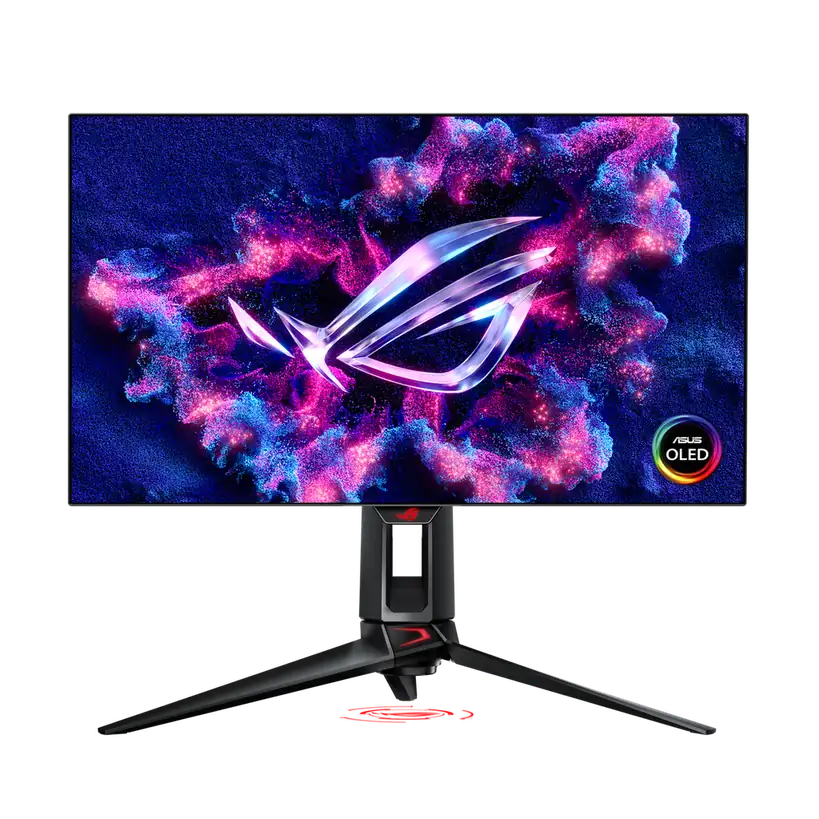

ASUS ROG Swift OLED PG27AQDP
By ASUS ROG · Gaming Monitors · Audio & Electronics
- 26.5-inch WOLED (MLA+) panel
- 2560x1440 (QHD) at 480Hz
- 0.03ms GtG response time
- VESA DisplayHDR 400 True Black, 99% DCI-P3
Lowest price seen
$798.34
from $798.34 at Provantage · Checked Oct 4, 2026
- Provantage $798.34View at Provantage
- Central Computers $799.99View at Central Computers
- ASUS ROGView at ASUS ROG
- WalmartView at Walmart
- CDWView at CDW
- NeweggView at Newegg
- Best BuyView at Best Buy
- AdoramaView at Adorama
- eBayView at eBay
- eBay (used) eBay: used, open-box, refurbishedView at eBay (used)
- AmazonView at Amazon
Prices are snapshots. Check the current price with the store.
Summary
A 26.5-inch 1440p WOLED gaming monitor that runs 480 Hz at full resolution, built for competitive players who need the refresh rate rather than desk features or HDR brightness. Check the HDR peak before you buy: the 1300-nit figure is a small-window marketing peak, and lab measurements landed between 453 and 1208 nits depending on the mode.
Strengths
- 480 Hz is the native mode at the full 2560x1440, not a resolution drop.
- 0.44 ms measured average G2G, consistent across 480, 240, 120 and 60 Hz and under VRR.
- 0.20 ms measured total display lag; Tom’s Hardware measured 15 ms of end-to-end input lag.
- Colour lands near reference after calibration: 0.53 dE greyscale and 0.93 dE colour.
- Screen-uniformity deviation of 2.4%, among the lowest the reviewer recorded.
- Three-year warranty that covers panel burn-in.
Weaknesses
- HDR peaks fall well short of the 1300-nit spec: 453 nits in True Black, 709 nits at a 25% window in Console HDR.
- With Uniform Brightness on, SDR tops out near 259 nits, below most LCD desktop panels, and both labs still recommend it for desktop use.
- No USB-C, no KVM, no PiP/PbP and no speakers, so it is a poor all-round desk panel.
- Outer dimming control darkens the screen edges by roughly 37 nits and reads as an obvious vignette.
- The matte coating looks grainier and less sharp than semi-glossy QD-OLED panels.
- ELMB only works at 120 and 240 Hz, and the tilt was stiff on TFTCentral’s sample.
Verified specifications
| Model | ROG Swift OLED PG27AQDP. |
|---|---|
| Panel | 26.5-inch flat WOLED (27-inch class), matte anti-glare coating, LG.Display’s newest WOLED generation with an updated sub-pixel layout. |
| Native mode | 2560x1440 at 480 Hz, no overclock and no resolution switching; DisplayPort 1.4 with DSC carries it. |
| Refresh range | 40–480 Hz vertical over both DisplayPort and HDMI, 30–890 kHz horizontal. |
| Pixel density | 110 PPI (Tom’s Hardware lists 109). |
| Viewing area | 586.75 × 330.05 mm. |
| Response time | 0.03 ms G2G is the manufacturer figure; TFTCentral measured 0.44 ms average and 0.29 ms best. |
| Colour depth and gamut | 10-bit, DCI-P3 native. ASUS publishes no gamut percentage. |
| Measured colour coverage | 97.2% absolute / 99.5% relative DCI-P3, 95.1% sRGB with the sRGB colour space selected, 95.7% Adobe RGB. |
| Measured colour accuracy | 1.81 dE average against DCI-P3 in the default Racing mode, 0.93 dE after calibration; greyscale 4.35 dE out of the box and 0.53 dE calibrated. |
| VRR | FreeSync Premium and G-SYNC Compatible certified (no native G-Sync module), VESA AdaptiveSync 480 tier, HDMI-VRR, range 48–480 Hz. |
| Blur reduction | Extreme Low Motion Blur / black frame insertion, at 120 and 240 Hz only. |
| HDR | VESA DisplayHDR 400 True Black certified. |
| Measured SDR brightness | up to 425 nits with Uniform Brightness off, 259 nits with it on, minimum 29 nits at 10% APL. |
| Measured HDR brightness | 1208 nits in TFTCentral’s Gaming HDR mode and 464 nits in True Black 400; Tom’s Hardware measured 709 nits at a 25% window in Console HDR and 453 nits in True Black. |
| Connectivity | 1× DisplayPort 1.4 with DSC, 2× HDMI 2.1 with FRL, a 2-port USB 3.2 Gen 1 hub, 3.5 mm headphone jack. |
| No USB-C, no KVM, no PiP/PbP, no speakers, no microphone input, no ambient light sensor, no tripod socket. | |
| Dimensions with stand | 23.82 × 21.57 × 10.79 in (60.50 × 54.80 × 27.40 cm); without stand 23.82 × 13.82 × 1.97 in (60.50 × 35.10 × 5.00 cm). |
| Weight | 13.67 lb (6.2 kg) with stand, 7.72 lb (3.5 kg) without. |
| Power | under 27 W per ASUS, external power brick, fan-less custom heatsink. Tom’s Hardware’s spec table lists 51 W at 200 nits brightness. |
| Mounting and adjustment | VESA 100×100 mm, Kensington lock, Aura Sync, tilt +20° to −5°, plus height, swivel and pivot. |
| Controls | rear joystick plus two buttons; firmware is user-updatable. |
| Warranty | 3 years, including panel burn-in. |
| In the box | DisplayPort cable, power adapter, power cord, colour pre-calibration report, ROG pouch, ROG sticker, warranty card, quick start guide. No HDMI cable is listed. |
Full research notes and sources
What 480 Hz buys you
480 Hz is the panel’s native mode at the full 2560x1440. Nothing drops resolution to get there, and DisplayPort 1.4 with DSC carries the bandwidth, so you keep every pixel at the top refresh rate.
The measurements back the spec. TFTCentral recorded 0.44 ms average G2G with a 0.29 ms best case, holding across refresh rates and under variable refresh with no visible overshoot. Persistence at 480 Hz is 2.08 ms, half that of a 240 Hz OLED. Tom’s Hardware independently measured 15 ms of total input lag and 2.4% screen-uniformity deviation.
The 0.03 ms number in the marketing is a manufacturer figure. The measured average is more than ten times higher and still far faster than any LCD.
Check your GPU before you buy. Tom’s Hardware could not reach a full 480 fps in Doom Eternal on a GeForce RTX 4090 and averaged around 340 fps instead. If your hardware sits well below the top end, you will run this at 240 Hz and leave the headline number unused.
Brightness and the 1300-nit claim
ASUS publishes no SDR peak figure. Tom’s Hardware lists 250 nits SDR and 1300 nits HDR as manufacturer numbers, and that 1300-nit peak is the figure that circulates in retail copy. Neither lab reproduced it.
TFTCentral measured 1208 nits in its Gaming HDR mode and 464 nits in DisplayHDR True Black 400 mode. Tom’s Hardware measured 709 nits at a 25% window in Console HDR and 453 nits in True Black. Read 1300 nits as a small-window peak in a favourable mode, not as a number to design a bright HDR room around.
SDR is a separate story. With Uniform Brightness off, TFTCentral measured up to 425 nits, falling to 255 nits on a full-white screen and bottoming at 29 nits at 10% APL. Turn Uniform Brightness on for desk work and the ceiling drops to 259 nits. Both labs recommend turning it on anyway because it removes the brightness swing as the cursor moves, but it leaves this panel below what most LCD desktop panels manage, and that is the real cost of buying it for work.
Black level is 0.00 nits with contrast effectively infinite. Shadow detail rated very good, with the first visible greyscale step at box 3 in the default Racing mode.
Colour, text and desk features
Colour is the strongest part of the picture. TFTCentral measured 97.2% absolute and 99.5% relative DCI-P3 coverage with a 1.2 dE average error out of the box, plus 95.1% sRGB coverage when the sRGB colour space is selected with every OSD setting still adjustable. Tom’s Hardware measured 1.81 dE average against DCI-P3 in the default Racing mode, improving to 0.93 dE after calibration, and 2.04 dE in the locked sRGB Cal preset. There is no quantum-dot layer here.
Out of the box the greyscale runs warm. TFTCentral measured a 2.0 dE average error at a 6674 K average colour temperature; Tom’s Hardware measured 4.35 dE, with red error visible from 40 to 100% brightness and 2.87 dE in sRGB Cal mode. Calibration took greyscale to 0.53 dE. Both labs recommend it, and TFTCentral publishes an ICC profile in its database.
Adobe RGB is the gap: 95.7% coverage and no emulation preset, so print work needs a calibration device.
Text rendering improved with this panel generation. The sub-pixel layout is a new RGWB arrangement with the RGB emitters back in normal order, which TFTCentral found clearly clearer than the RWBG layout in earlier 27-inch WOLEDs such as the PG27AQDM, though still not perfect. ASUS’s Clear Pixel Edge feature is meant to trim the remaining fringing. The matte coating is a matter of taste: TFTCentral found it grainier and less sharp than semi-glossy QD-OLED panels, and states that as preference rather than defect.
The desk features are thin. There is no USB-C, no KVM switch, no PiP/PbP, no speakers, no microphone input, no ambient light sensor and no tripod socket. You do get VESA 100×100 mm mounting, a Kensington lock, an external power brick, fan-less heatsink cooling and full height, swivel, pivot and tilt adjustment. TFTCentral found the tilt stiff on its sample and effectively no wobble.
Two OLED-care settings matter before you point a static desktop at it. Outer dimming control engages the panel’s edge dimming and darkens the screen edges by roughly 37 nits, which reads as an obvious vignette. Auto logo brightness costs about 6 nits of luminance. The rest of the care toolkit is standard: pixel shift, screen saver, a periodic image-cleaning cycle you can also run by hand, and taskbar detection. Note that the menu’s local dimming control is called global dimming control on ASUS’s product page, and a Target mode listed there was missing from the menu during testing.
Is it worth it?
This is a premium panel with one reason behind it: 480 Hz. ASUS’s own store listed it at $799.00 when this was checked in October 2026, and the retailer listings on Tom’s Hardware’s pages ran from $899 at Best Buy to $998 at Walmart.
Below roughly $800 the specification is hard to argue with: native 480 Hz 1440p WOLED, 0.44 ms measured average G2G, 0.20 ms measured display lag and a three-year burn-in cover. Between roughly $800 and $900 the question is whether your hardware can feed it, since a reviewer could not even reach 480 fps on an RTX 4090. Above $900 the case rests on needing the refresh rate more than HDR brightness or desk features, and neither lab reproduced the 1300-nit headline.
If you play competitive shooters on top-end hardware, the refresh rate and near-instant response earn their keep. If you want HDR brightness, USB-C, a KVM or speakers for a desk setup, look elsewhere. Check the store panel above for current prices.
Ownership cost is close to electricity alone. ASUS rates draw under 27 W, there are no consumables beyond the power adapter, and no parts catalogue for this model was located.
Which model this is
This page covers the ROG Swift OLED PG27AQDP, the 26.5-inch flat WOLED that TFTCentral lists as the world’s first native 480 Hz OLED monitor and the first shipping product on LG.Display’s newest WOLED panel generation. The Amazon listing is ASIN B0D7NXSQ44.
Do not merge it with the PG27AQDM or PG27UCDM (240 Hz QD-OLED), the PG32UCDP or PG32UCDM (32-inch 4K WOLED), the PG27QDP (Fast IPS, not OLED) or the PG27UCWM. Those are different panels with different refresh rates and different features.
Sources
Manufacturer:
Independent reviews:
- Asus ROG Swift PG27AQDP review (TFTCentral, Simon Baker, 2024-09-02)
- Tom’s Hardware review — features and specifications
- Tom’s Hardware review — response, input lag, viewing angles and uniformity
- Tom’s Hardware review — brightness and contrast
- Tom’s Hardware review — grayscale, gamma and colour
- Tom’s Hardware review — HDR performance
- Tom’s Hardware review — conclusion
Owner reports:
- No Reddit or forum threads for this model were read during the research, so no owner experience is claimed here. The two reviews read agree on image quality, motion clarity, low input lag, out-of-box colour in the Racing and sRGB modes, stand stability and build quality, and both recommend enabling Uniform Brightness for desktop use. Treat that as reviewer opinion.