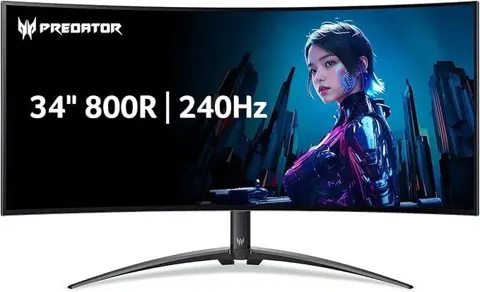
Acer Predator X34 Sbmiiphzx
By Acer · Computer Monitors · Desk & Streaming Setup · More from Acer
- 34-inch 3440 x 1440 UWQHD
- IPS panel, 178° viewing
- Up to 180Hz refresh
- 1ms GTG response
- 400 nits brightness (550 nits peak)
Price not listed
- AcerView at Acer
- eBayView at eBay
- AmazonView at Amazon (paid link)
- eBay (used) eBay: used, open-box, refurbishedView at eBay (used)
Stores are listed in a fixed order, never by price or commission. Prices are snapshots. Check the current price with the store.
Summary
A discontinued 34-inch curved IPS ultrawide (3440 × 1440, 144 Hz, overclockable to 180 Hz) with NVIDIA G-SYNC and Reflex Latency Analyzer, now available only used. Check the exact part number UM.CX0AA.S03 and test 144 Hz and 180 Hz over DisplayPort before paying, because the 180 Hz mode is not guaranteed stable on every signal path.
Strengths
- High-refresh curved IPS for mixed gaming and work: 3440 × 1440 is less GPU-demanding than 4K while wider than 16:9.
- Color and SDR brightness: 400 nits, 98% DCI-P3, wide viewing angles and 1.07 billion colors claimed.
- Useful premium features: adjustable stand, 100 × 100 VESA, two 7 W speakers, multiple inputs, USB hub, and advertised NVIDIA sync and latency diagnostics.
- One October 2021 owner reported clear images, crisp text, faint corner bleed and no dead pixels, though only at 60 Hz on an integrated GPU.
Weaknesses
- Discontinued: Acer lists it at $1,099.99 but OUT OF STOCK; B&H marks the exact part No Longer Available.
- IPS contrast is only 1,000:1, so dark-room performance trails VA and OLED rivals.
- No true HDR: 400-nit IPS with 550-nit HDR peak and no local dimming; B&H’s spec grid even says “HDR Support: No.”
- No USB-C video or power delivery, no HDMI 2.1 and no KVM; the USB-A-to-B cable serves the hub only.
- The 135 W external power brick is a single point of failure on the used market; a missing brick can erase savings.
- Backlight bleed and uniformity are sample-dependent; inspect before paying.
Verified specifications
| Screen | 34-inch, 21:9, 3440 × 1440 (UWQHD) curved LCD, 1900R curve, IPS, 178° viewing angles, matte anti-glare coating; about 109–110 pixels per inch. |
|---|---|
| Refresh | 144 Hz native, overclockable to 180 Hz over DisplayPort; Acer warns the overclock can be unstable. |
| Response | 1 ms gray-to-gray (Acer store listing); as low as 0.5 ms with overdrive, which is not the native gray-to-gray time. |
| VRR | Acer calls it G-SYNC; B&H labels the retail unit G-SYNC Compatible. Confirm the exact module from the NVIDIA control panel. |
| Reflex Latency Analyzer | measures PC-to-display input responsiveness with a supported NVIDIA GPU, a compatible game and a compatible mouse on the designated monitor USB port. |
| Brightness and contrast | 400 nits typical, 550 nits peak in HDR mode, 1,000:1 static contrast; 98% DCI-P3 and Delta E under 2 claimed. |
| Color | 1.07 billion colors claimed; a third-party database specifies 8-bit + FRC rather than native ten-bit. |
| Inputs | DisplayPort 1.4, HDMI 2.0, USB 3.x upstream Type-B and up to four USB-A downstream ports, plus 3.5 mm audio out. HDMI socket count is unresolved (two or three). |
| Audio | two built-in 7 W speakers (14 W total). |
| Ergonomics | 130 mm (5.1 in) height adjustment, -5° to +35° tilt, ±30° swivel, VESA 100 × 100 mm mounting. |
| Dimensions | 32.1 in wide × 18.7–23.8 in high × 12.2 in deep with stand; about 19.1 lb assembled, package about 30 lb. |
| In the box | monitor, height-adjustable stand, external adapter and AC cord, DisplayPort cable, HDMI cable, USB upstream cable. |
| Warranty when new | three-year limited manufacturer warranty in the US. |
| Dead-pixel policy | fewer than two bright, fewer than five dark, fewer than five total subpixels allowable at 3440 × 1440. |
Full research notes and sources
Refresh, VRR and the 180 Hz question
The native refresh is 144 Hz; 180 Hz is an overclock you enable and test. Acer states the overclock may be unstable and to lower the setting if it is. No verified exact HDMI 2.0 maximum-rate timing table was obtained, so treat 144 Hz as the safe baseline over HDMI. The quoted 1 ms gray-to-gray is a best case; 0.5 ms needs overdrive and can add inverse ghosting. No controlled response-time or overshoot chart for this part number exists.
Acer’s exact page calls the technology G-SYNC, a 2021 buyer distinguishes this SB’s NVIDIA module, and B&H’s automated feature chip says G-SYNC Compatible. The wider X34 series supports both implementations by variant, so the label alone does not settle the module. Before buying for an AMD-only PC, confirm the actual unit’s VRR handshake, usable minimum refresh and firmware support. Do not apply X34 GS flicker reports to this SB.
Brightness, color and HDR
The panel is rated 400 nits typical, 550 nits peak in HDR mode, with 1,000:1 static contrast. The 98% DCI-P3 and Delta E under 2 figures are marketing claims with no laboratory-verified calibration for this exact configuration. The 1.07 billion color claim corresponds to 8-bit + FRC per a third-party database, not native ten-bit. Treat this as an HDR400-class capability rather than an HDR mastering monitor; dark-room performance is limited by IPS contrast.
Power, ports and day-to-day use
Inputs are DisplayPort 1.4, HDMI 2.0, USB 3.x upstream Type-B, up to four USB-A downstream ports and 3.5 mm audio out. The HDMI socket count is unresolved (two or three). No USB-C video or power delivery and no Thunderbolt were verified for this part. Ergonomics cover 130 mm of height, -5° to +35° tilt, ±30° swivel and VESA 100 × 100 mm mounting. The two 7 W speakers total 14 W.
Electricity example: 8 hours × 250 workdays = 2,000 h per year. At 58 W that is 116 kWh, or $23.20 at $0.20 per kWh. At the listed 108 W that is 216 kWh, or $43.20 at the same rate. Standby at 0.5 W for 16 h × 365 days = 2.92 kWh, or $0.58. These are scenario figures, not measured annual usage.
Day to day, 21:9 game support varies by title, 3440 × 1440 at high refresh needs a capable GPU, and there is no 4K120 over HDMI 2.0. Reflex needs a supported NVIDIA card, a compatible game and a compatible mouse on the designated USB port. The 1900R curve and 32.1 in width need desk space; assembled weight is about 19.1 lb and the package about 30 lb.
Is it worth it?
Asking prices in October 2026: Acer US $1,099.99 but OUT OF STOCK (stale reference); B&H marks the exact part No Longer Available with a used $499.95 offer; a Puyallup, Washington classified asks $350; NeweggBusiness refurbished is OUT OF STOCK; an August 2024 shopper quote was $750. Competing new options include the LG 34GP63A-B at $249.99, the ViewSonic VX3418-2K at $279.99, the LG 34G63DA-B at $449.99 and the Dell Alienware AW3425DWM at $349.99 but OUT OF STOCK.
Buying thresholds: $200–250 local for a fully tested unit with original stand and adapter is a strong used deal. $250–325 delivered can be reasonable if IPS color and viewing angles, the 180 Hz option and NVIDIA features matter more than VA dark-scene strength. $325–400 delivered is hard to justify against $249.99–279.99 new VA rivals. $450–500 used is weak against a new $449.99 240 Hz LG, though VA motion and contrast behavior differ from IPS. $700 or more, or $1,099.99, is not worth it unless an unusual condition or service package is involved. No reports found for an actual completed-sale median.
Which model this is
This page covers the Acer Predator X34 with part number UM.CX0AA.S03, sometimes typed X34 Sbmiiphzx or X34 Sbmiiiphzx. Do not merge it with the older 2015 100 Hz X34, X34 P, X34 GS (different connectivity and G-SYNC arrangement), X34 S (slightly different specifications) or the newer OLED X34 X. Retailer feature labels disagree on whether this SB uses a hardware G-SYNC module or G-SYNC Compatible mode; verify on the actual unit. A manual mirror exists that is internally captioned “X34 GS User Guide,” so do not copy model-specific OSD or input limits from it without confirmation.
Sources
Manufacturer:
- Acer US official X34 SBMIIIPHZX UM.CX0AA.S03 listing and detailed manufacturer specs
- Acer Predator X34 series official 1900R, 180 Hz OC, Reflex and response-time qualifications
- Acer US support: search by exact part number or monitor serial, download documentation
- Acer US support, online repairs, service and warranty check
- Acer US limited warranty table: monitor standard 3-year term
- Acer US official LCD stuck and dead pixel allowance table for 3440 × 1440
Independent reviews and references:
- DisplayDB exact X34 Sbmiiiphzx technical specification collection
- WePC 2026 ultrawide roundup referencing Acer Predator X34 Sbmiiphzx
- TFTCentral 2020 X34 S early news and up-to-200 Hz claims (different planned variant)
Owner reports:
- Acer Community: comparison of X34 S and X34 Sbmiiphzx, relevant variant confusion
- Acer Community: power adapter advice for X34 P variant (not verified SB compatible)
- Reddit r/ultrawidemasterrace: October 2021 owner response and discussion of X34 Sbmiiphzx vs GS
- Reddit r/ultrawidemasterrace: X34 GS Adaptive Sync flicker reports (different model, not proof against SB)
- Reddit August 2024 shopper comparing X34 Sbmiiphzx at $750 to other monitors
Retailers and parts:
- OfferUp Puyallup WA listings showing exact “X34 SBMIIIPHZX” at $350 (local asking price)
- LG US 2026 display listings: 34GP63A-B 160 Hz curved ultrawide $249.99
- B&H ViewSonic VX3418-2K new 34-inch 165 Hz VA $279.99 live listing
- LG US 34G63DA-B: new 240 Hz 34-inch 21:9 gaming monitor specifications
- NeweggBusiness exact UM.CX0AA.S03 refurbished product, out of stock
- Dell US Alienware AW3425DWM 34-inch 180 Hz VA alternative, $349.99 but unavailable
- ManualsDir mirror labeled X34 Sbmiiphzx but document body says X34 GS (identity warning)