How to Choose a USB Microphone for Your Desk: Buying Guide
Published October 19, 2026
In this article
Pick a USB microphone by the room you record in and the way you speak, not by the biggest number on the box. A cardioid condenser close to your mouth will beat a “studio-grade” omnidirectional mic in a noisy bedroom every time. Compact mini mics suit laptops, travel and clean desks; full-size dynamics suit untreated rooms, loud voices, and anyone who plans to grow into an XLR setup later.
What actually matters
Polar pattern: cardioid first
A cardioid pattern picks up what is in front of the capsule and rejects sound from the sides and rear. A supercardioid tightens that front pickup even more but catches a little from directly behind. An omnidirectional mic hears the whole room equally — it only works in a treated, quiet space. If your desk faces a keyboard, a street or a humming PC, cardioid or supercardioid should be your default.
Capsule: condenser or dynamic
A condenser capsule is sensitive and detailed: great for a treated room, voiceovers and quiet voices. It also faithfully records your keyboard, chair and fan. A dynamic capsule is less sensitive and much more forgiving — it wants you close to the grille and naturally down-weights room noise. If your space is untreated, you talk at normal or loud volume, or you stream with loud games, dynamic is the easier ride. All four microphones in our current lineup use either a condenser capsule (the two minis) or a dynamic capsule (the two full-size Shures).
Connection and future growth
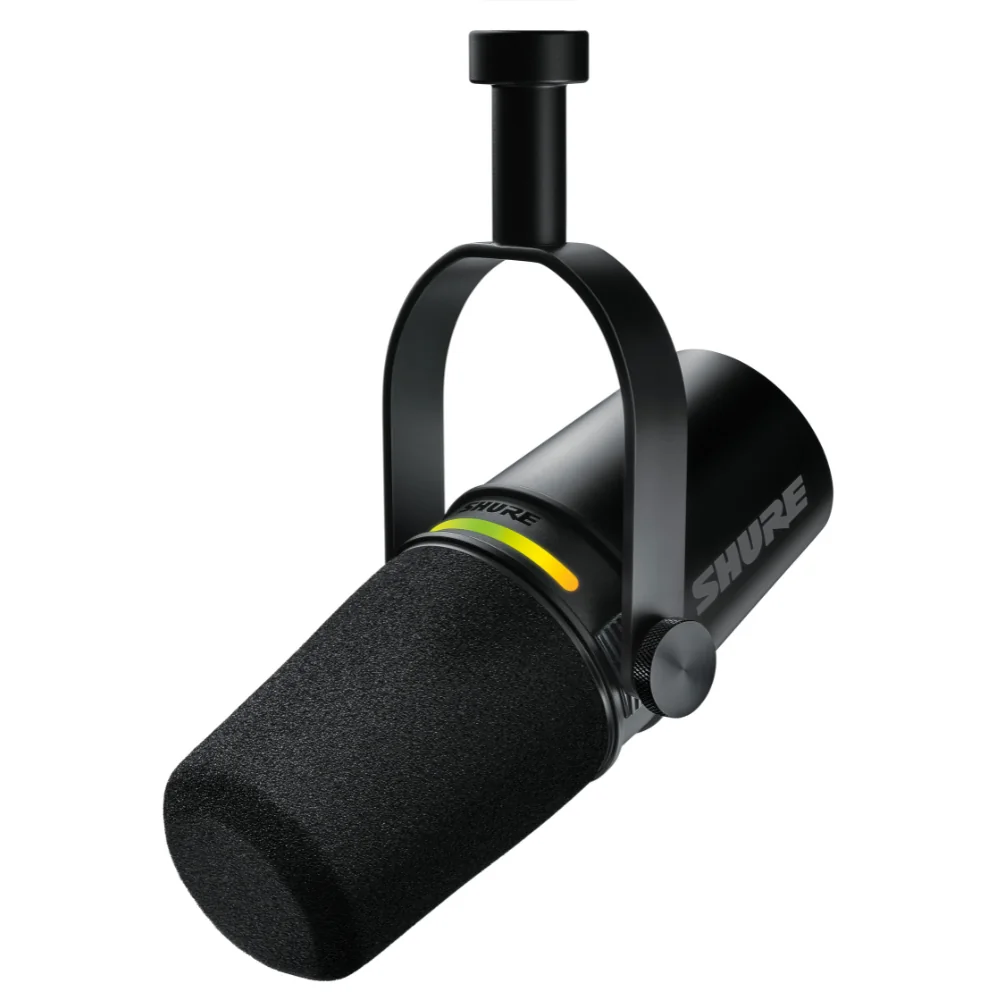
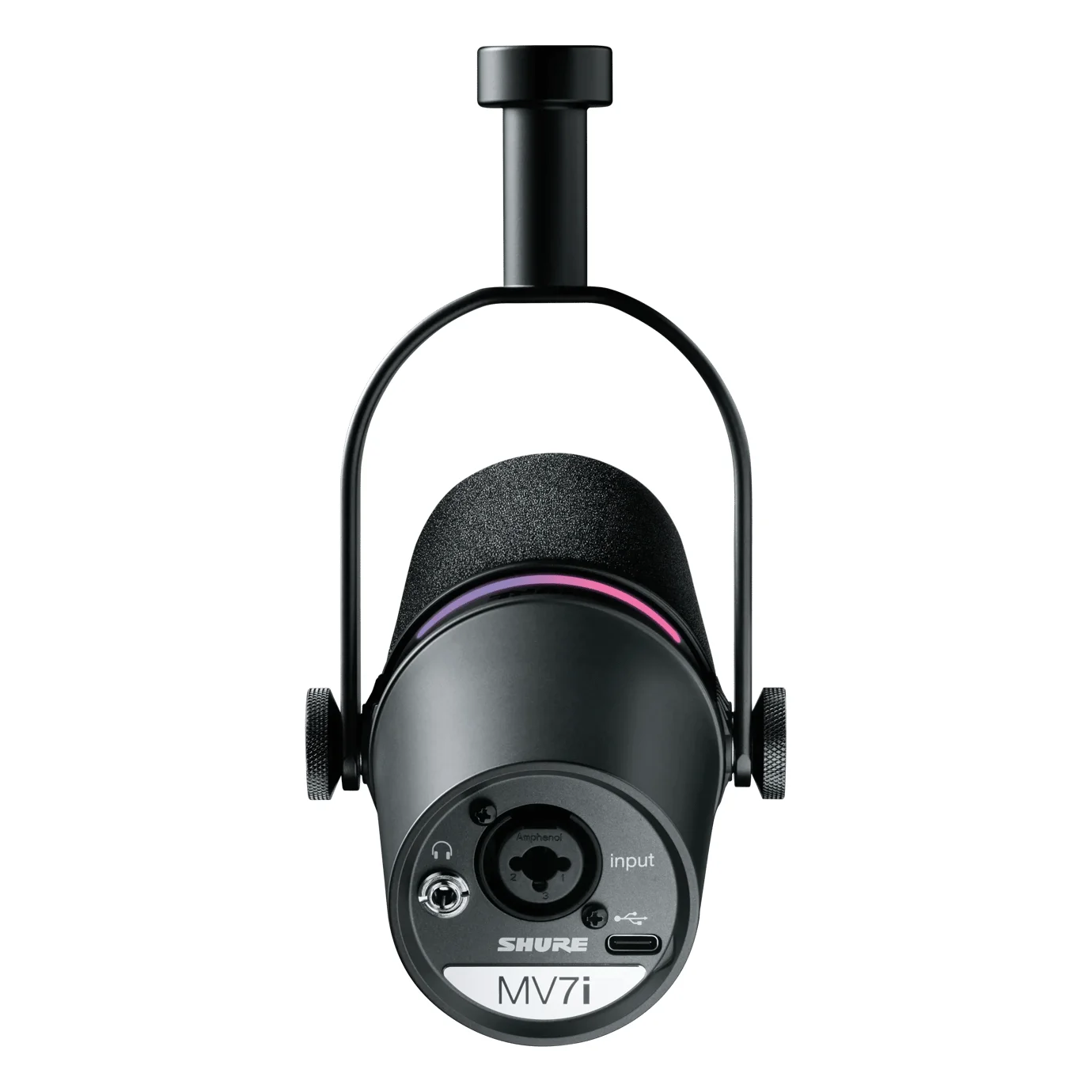
Almost every modern USB mic uses USB-C. What matters more is whether the mic can grow with you. The Shure MV7+ offers both USB-C and XLR outputs in one body: record to the computer today, plug into an audio interface tomorrow without buying a new mic. The Shure MV7i goes further and puts a two-channel interface inside the microphone itself, with a combo XLR and 1/4-inch input for a second microphone or an instrument. If you can see yourself adding a second voice or a guitar later, that dual-output design saves you a separate interface purchase.
Rule of thumb: pattern and capsule first, sample rate last. A cardioid in a quiet room out-records a fancy omnidirectional in a noisy one, every time.
Size and stand
A compact mini sits beside a laptop, fits in a backpack and keeps the desk clear — the Razer Seiren V3 Mini and the RØDE NT-USB Mini are built around small footprints and fixed stands. Full-size microphones like the MV7+ and MV7i are heavier, want a boom arm or a sturdy desk mount, and put more metal (and better internal layout) behind the capsule. Decide where the mic will live: a travel kit, a shared family desk, or a permanent streaming corner.
Types compared
| Format | Best when | Main drawback |
|---|---|---|
| Compact cardioid mini | Calls, travel, small desks, beginners | Limited reach; you must sit close |
| Compact supercardioid mini | You want tighter rejection of keyboard and room | Slight pickup from directly behind |
| Full-size dynamic with dual outputs | Podcasting, streaming, noisy rooms, XLR upgrade path | Needs a boom arm and desk space |
| Dynamic with built-in interface | Two people or mic plus instrument in one desk setup | Largest footprint; priciest tier |
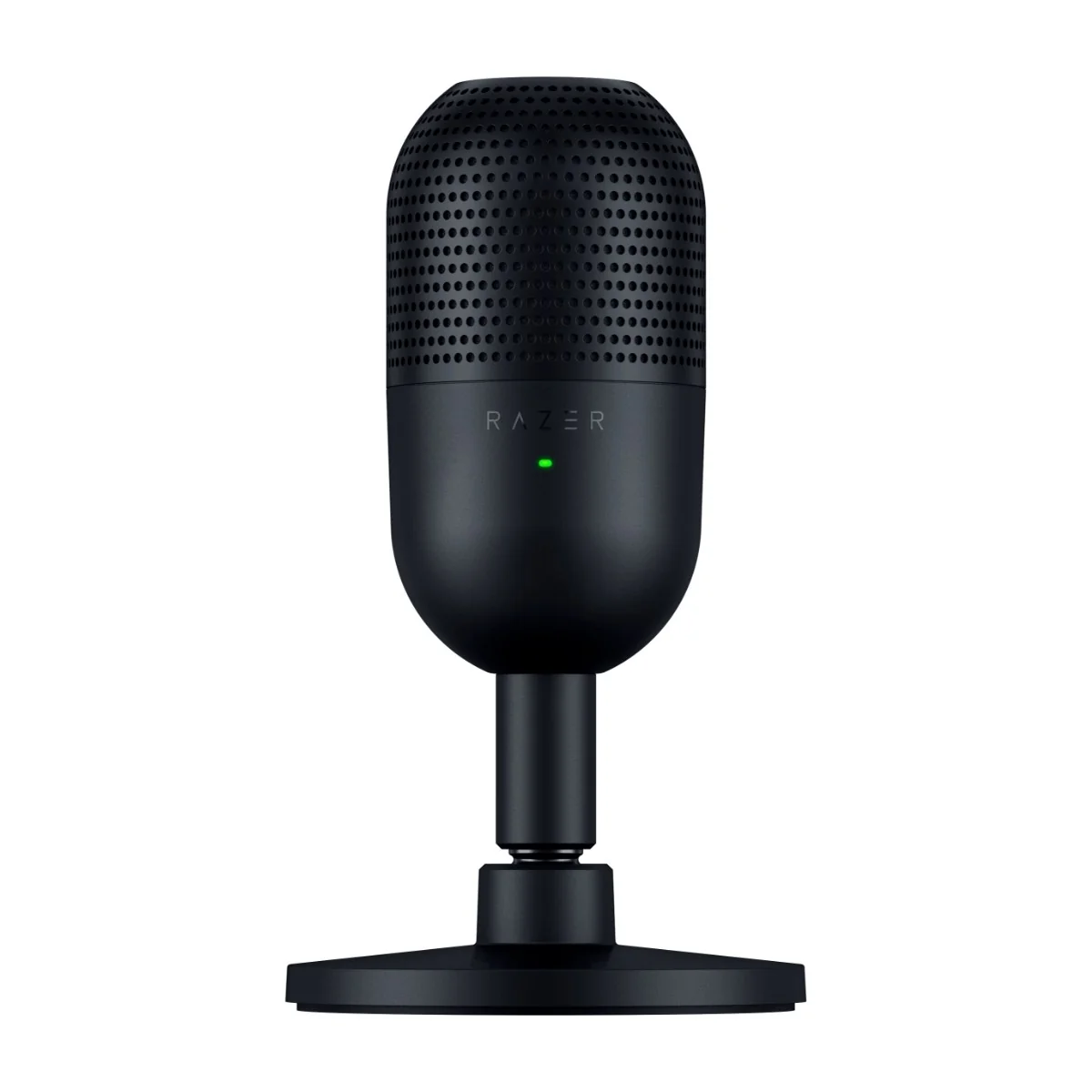
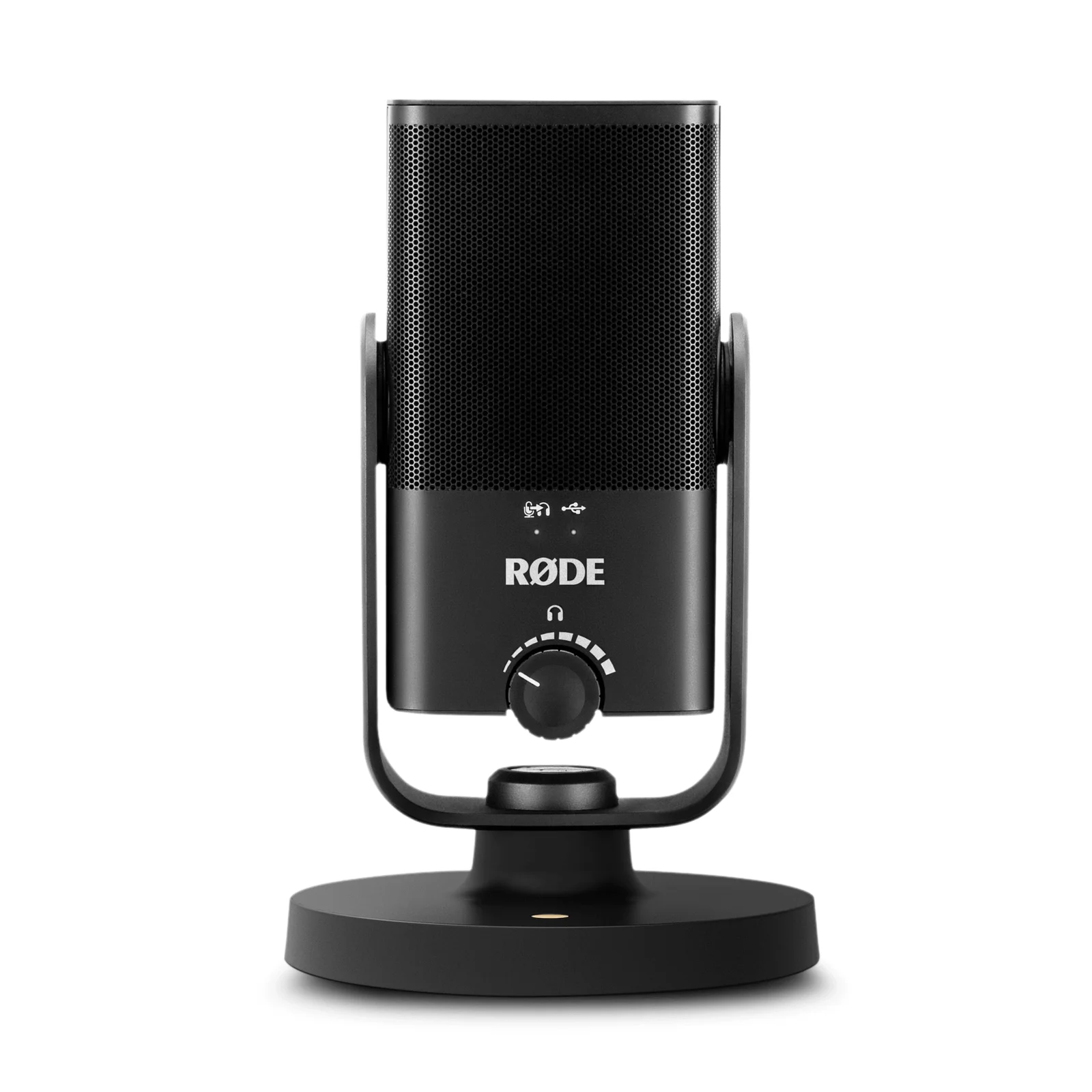
The compact class wins on simplicity: plug in, talk, done. The RØDE NT-USB Mini adds a 3.5 mm headphone output for zero-latency monitoring, and the Razer Seiren V3 Mini adds a tap-to-mute sensor and a built-in shock absorber in the stand to keep desk thumps out of the recording. The full-size class wins on flexibility. The MV7+ covers a solo creator who wants a later XLR upgrade, while the MV7i is the one to pick if two sources will share its desk.
Features worth paying for
Spend on features that fix a problem you actually have:
- Zero-latency monitoring. A headphone output with a direct monitor mix lets yourself hear yourself with no delay. The NT-USB Mini’s volume knob also toggles the monitor mix, which is exactly the kind of small control that matters daily.
- Tap-to-mute with an LED. The Seiren V3 Mini’s sensor lets you kill the mic between sentences and see the state at a glance. On a full-size mic, the Shure MV7+ and Shure MV7i put a color-customizable LED touch panel to the same use.
- Desk-thump isolation. A shock absorber inside the stand, like the one in the Seiren V3 Mini, keeps keyboard slams and desk bumps out of the audio.
- Voice processing you will use. Real-time denoiser and auto level mode on the MV7+ keep a loud or inconsistent voice steady; its digital popper stopper and adjustable reverb add polish without software.
Rule of thumb: pay for features that remove a real annoyance — plosives, desk thumps, background hiss, muting by hand. Everything else is decoration.
Marketing noise
- Sampling numbers. 24-bit 96 kHz sampling (as in the Seiren V3 Mini) is a spec sheet delight. For voice, 16-bit 48 kHz is already transparent, and higher numbers mostly make files bigger. Do not buy on bitrate.
- “Studio-grade” labels. The phrase tells you nothing about how the mic handles your room. Compare capsule type and pattern instead.
- Light shows. RGB rings and glow are fun on a stream overlay and worthless in a recording. Ignore them entirely unless your audience sees the mic on camera and you like the look.
- Bundled software promises. Effects like reverb and voice changers exist in every free recording app. A mic’s adjustable reverb is a convenience, not a reason to choose it.
Common mistakes
Buying omnidirectional for a normal room. It will capture your keyboard, PC fan and the neighbour’s dog. Unless you record in a treated space with several people around one mic, choose cardioid or supercardioid.
Sitting too far away. A common setup is a mic across the desk at arm’s length, gain cranked to compensate. That is how recordings get hissy. Get close — 10 to 15 cm from the grille — and let the dynamic capsule or auto level do its job.
Ignoring the stand. A hard-mounted mini picks up every keypress. The shock absorber in the Seiren V3 Mini’s stand exists for exactly this reason; a boom arm on a full-size mic does the same with more control.
Chasing the XLR upgrade path you will never use. XLR output is worth money only if you plan to buy an interface. If you will always record solo at one computer, a single-output mini is the smarter buy.
Letting plosives through. If your recordings are full of popping on “p” sounds, you need a pop filter or better angle — not a better capsule. The NT-USB Mini’s built-in pop filter is the cheap fix.
Treating every feature as essential. If you never mute from the mic, a touch panel is not a reason to spend more. If you record alone, a two-channel interface inside the mic does nothing for you.
Rule of thumb: most bad recordings come from gain, distance and the room — not from the capsule. Fix placement and pattern first; only then consider upgrading the mic.
Who should buy what
Students and casual users. A compact cardioid mini like the RØDE NT-USB Mini covers calls, lectures and the occasional voice note with zero setup. Built-in pop filter and headphone monitoring included.
Solo podcasters and streamers in imperfect rooms. A dynamic capsule handles background noise and loud voices without drama. The Shure MV7+ adds real-time denoiser, auto level mode and an XLR output for a later interface.
Two-person desks or singer-instrumentalists. The Shure MV7i’s combo XLR and 1/4-inch input records a second voice or an instrument through the same cable — one desk, one device, no separate interface.
Tight desks and travelers. The supercardioid Razer Seiren V3 Mini rejects more of the room behind you, mutes with a tap, and travels in a laptop bag.
A 60-second buying checklist
- Check your room: quiet and treated, or noisy and live?
- Pick a pattern: cardioid or supercardioid for normal rooms; omnidirectional only for quiet group recording.
- Pick a capsule: condenser for detail and quiet rooms; dynamic for forgiveness and loud rooms.
- Match the size to the desk: mini for laptops and travel, full-size for a permanent setup.
- Ask which features solve your real problems: monitoring, plosives, desk thumps, muting.
- Ignore sampling numbers and light shows.
- Only pay for XLR or a built-in interface if you will genuinely use them.
The right USB microphone is the one that makes recording start with one cable and sound like you, in your room, without fighting the settings. Pattern, capsule, size and one or two features you will actually touch — everything else is noise.
- RØDE NT-USB Mini – suits solo beginners and small desks: cardioid condenser, USB-C, zero-latency headphone monitoring with a monitor-mix knob, and a built-in pop filter.
- Razer Seiren V3 Mini – fits users who want tighter room rejection: supercardioid capsule, tap-to-mute sensor with LED, built-in shock absorber in the stand, and high-resolution sampling on paper.
- Shure MV7+ – matches solo creators who plan to grow: dynamic capsule with USB-C and XLR outputs, LED touch panel for mute control, real-time denoiser, auto level mode, digital popper stopper and adjustable reverb.
- Shure MV7i – ideal for two-mic or voice-plus-instrument desks: dynamic USB-C microphone with a built-in two-channel interface and a combo XLR and 1/4-inch input, plus a color-customizable LED touch panel.